Personalization syntax
How to put profile data, offer values and helpers into message copy, with the fields each place offers.
Personalization lets one message read differently for every recipient. You write a tag such as {{.Profile.Attributes.first_name}} inside a message field, and Optima replaces it with that profile's value when the message is built. Everything between double curly braces is a tag; everything outside is ordinary text.
This page covers the syntax and the data a tag can read. The helper functions (default, date, shortlink, coupon and the others) are on Template helpers.
Where you can use it
You can use tags in the text fields of a message template, on every channel that sends a message:
| Channel | Fields that accept tags |
|---|---|
| Subject, HTML body, plain-text body, From name, To name, Reply-To address, Reply-To name | |
| SMS | Body |
| RCS | Body, media URL, card title, card description |
| Body, template name, template language, template parameters, media URL | |
| Viber | Body, image URL, button text, button URL |
| Push | Title, body, image URL, deep link, data, buttons, category, sound, badge, TTL hours, priority, collapse key, thread id |
| Webhook | Body |
Journey Webhook nodes also accept tags in their body and headers.
The on-site channels (web banner, web personalization and mobile in-app) use a related but separate language that is filled in when the visitor loads the page. It is described at the end of this page.
Open the personalization popup
Wherever a field accepts tags, a Personalization button (the curly-braces icon) sits next to it. It opens the Personalize field dialog.
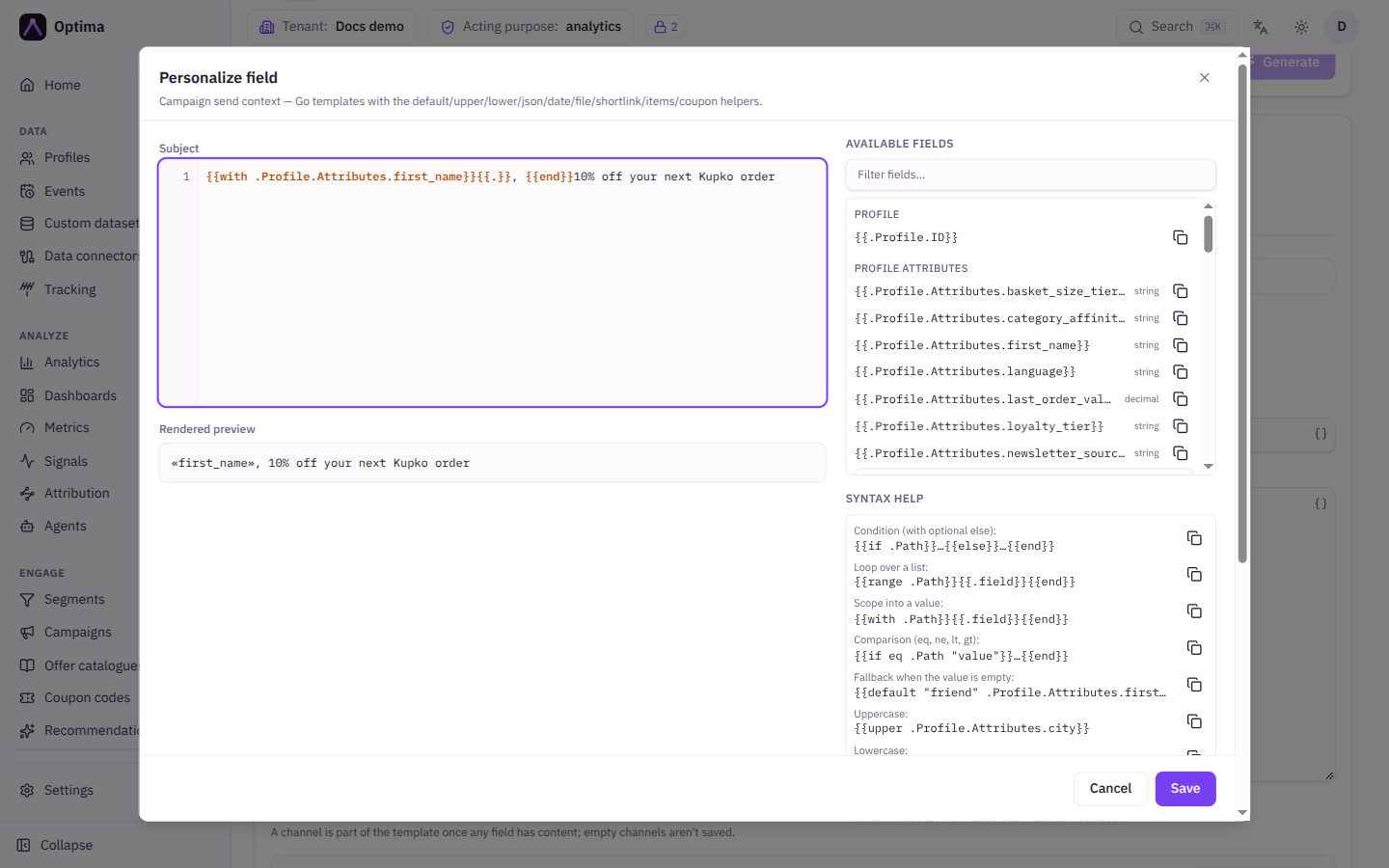
The dialog has these parts:
| Part | What it does |
|---|---|
| Template | A larger editor for the field's text. |
| Rendered preview | The text as it would be sent, rendered against the Example payload. A mistake shows as Template error with the line number. |
| Available fields | Every value this field can read, grouped (Profile attributes, Signals, Offer, and so on). Use Filter fields… to search. Select the copy icon next to a field to copy its tag, then paste it into the editor. The dialog only copies; it never inserts into the editor for you. |
| Syntax help | Ready-made snippets for conditions, loops and the helpers, each with a copy icon. |
| Example payload | The sample data the preview uses. It is built from your own schema. |
Select Save to write the text back into the field, or Cancel to discard your changes. If the preview shows Not in the example payload: followed by tag names, those tags point at data the sample does not contain. That is not an error; the preview simply shows them empty.
The basics
A tag that names a value prints it:
Hello {{.Profile.Attributes.first_name}}, your tier is {{.Profile.Attributes.tier}}.A tag that reads data starts with a dot. The dot means "the data for this message", and each following name steps one level deeper. A profile with first_name set to Anna and tier set to gold produces:
Hello Anna, your tier is gold.Missing values
If a value does not exist for a profile, the tag prints nothing. It is not an error, and the message is still sent. Use the default helper to print a fallback instead:
Hello {{default "friend" .Profile.Attributes.first_name}},Conditions
{{if eq .Profile.Attributes.tier "gold"}}Thanks for being a gold member.{{else}}Join our loyalty programme.{{end}}Each {{if …}} needs a matching {{end}}. {{else}} and {{else if …}} are optional. A condition is true when the value exists and is not empty, zero or false, so {{if .Profile.Attributes.first_name}}…{{end}} shows its text only when a first name is stored.
Loops
range repeats its content once for each entry in a list. Inside the loop the dot is the current entry:
{{range .Run.State.cart}}- {{.name}}: {{.price}}
{{end}}
Add {{else}} before the closing {{end}} to print something when the list is empty.
Scoping with with
with runs its content only when the value exists, and makes it the dot:
{{with .Profile.Attributes.first_name}}Hi {{.}},{{end}}Comparing values
Use the comparison helpers inside a condition: eq (equal), ne (not equal), lt, le, gt and ge. Combine them with and, or and not, using brackets to group:
{{if and (eq .Profile.Attributes.tier "gold") (gt .Profile.Attributes.orders 2.5)}}…{{end}}Numbers in a profile are decimal numbers. When you compare one with a literal number, write the literal with a decimal point (2.0, not 2). Comparing a decimal with a whole number, or a text value with a number, is an error and the message for that profile fails to build.
Pipes
A value can be passed through helpers left to right with a vertical bar. The last result is printed:
{{.Profile.Attributes.nick | default "friend" | upper}}This prints FRIEND for a profile with no nick. It is the same as {{upper (default "friend" .Profile.Attributes.nick)}}.
Whitespace and comments
A hyphen inside the braces removes the neighbouring whitespace: {{- "text" -}}. A comment, {{/* note to self */}}, prints nothing.
What a tag can read
All names are case-sensitive.
| Tag | Meaning |
|---|---|
.Profile.ID | The profile's id. |
.Profile.Attributes.NAME | An attribute of the profile, including computed attributes. Shown in the dialog under Profile attributes. |
.Profile.Signals.NAME | The profile's current value of a signal. Shown under Signals. |
.Offer.ID, .Offer.Name | The offer chosen for this send. Available where the message is sent for an offer. |
.Offer.Payload.NAME | A value from the offer's payload. Shown under Offer. |
.Run.State.NAME | A value carried by the journey run, or supplied with a direct send. Shown under Journey state. Only available in journeys. |
.Run.State.trigger.attributes.NAME | An attribute of the event that started the journey. Shown under Trigger event attributes. |
.Unsubscribe.URL, .Unsubscribe.OneClickURL | The recipient's preference-page link and one-click unsubscribe link. Email only. Empty if the preference centre is not set up for your workspace. |
.Document.URL | The link to the document generated for this send, on channels that cannot carry attachments (such as SMS). Empty on email, where the document is attached. |
.Contact | The address or phone number the message is sent to. Offered only in custom provider request templates. |
The dialog lists only what the field you opened can actually read, so it is the quickest way to find the exact tag. Attribute names use the attribute's name from your schema, for example .Profile.Attributes.first_name. See Attributes and computed attributes.
Withheld attributes
A profile attribute can be withheld from campaigns by your data-protection settings. A withheld attribute prints as empty. Use {{if redacted "email"}}…{{end}} to test for it; see Template helpers.
What gets escaped
In an email's HTML body, every value is made safe for HTML. A first name of <b>Anna</b> is printed as text, not as bold markup. In every other field (subject, plain text, SMS, push and so on) values are printed as they are.
A value that itself contains curly braces is never evaluated as a tag. It is printed literally.
A rendered email subject must be a single line. If a value in the subject contains a line break, the dialog warns The rendered subject contains a line break — delivery will refuse it (header injection). Remove the line break from the value that causes it.
Mistakes and limits
A template is checked when you save it. A tag that cannot be understood stops the save and names the channel, the field and the problem, for example:
channel "sms" field "body": template: body:1: unclosed action
channel "sms" field "body": template: body:1: function "nosuch" not defined
The same check rejects constructs that could run forever:
- A
rangeover a fixed value, such as{{range 5}}. rangeloops nested more than three levels deep.- A template that calls itself.
While a message is being built, each field is limited to roughly 256 KB of output and a two second build time by default, and a loop may run up to one million times. A field that goes over a limit fails the send for that profile. Time spent waiting for shortlink, file, items or coupon is not counted against the build time.
If a value fails to build (for example date given text that is not a date), the message for that profile is not sent. The previews show the same error as the live send.
Examples
A promotion that uses an offer:
Hi {{default "there" .Profile.Attributes.first_name}},

{{.Offer.Name}} is waiting for you: {{.Offer.Payload.discount}}% off until {{date "2 January" .Offer.Payload.valid_until}}.
An order confirmation in a journey that starts on an order event:
Thanks, {{default "there" .Profile.Attributes.first_name}}. Order {{.Run.State.trigger.attributes.order_id}} totals {{printf "%.2f" .Run.State.trigger.attributes.total}}.A short message with a safe fallback and a tracked link:
{{default "Hi" .Profile.Attributes.first_name}}, your order has shipped: {{shortlink "https://example.com/orders"}}On-site and in-app content
Banners, on-site personalization and in-app messages are drawn when a visitor opens the page or app, so they are filled in from the visitor's profile at that moment. They use the same curly-brace syntax but a different set of data and no helpers: default, upper, date and the rest are not available. The comparison and logic words (eq, and, if, range, with) work as above.
| Tag | Meaning |
|---|---|
.Attributes.NAME | An attribute of the visitor's profile. |
.Identifiers.KIND | An identifier of the visitor's profile, such as .Identifiers.email or .Identifiers.phone. Empty when the profile has no identifier of that kind. |
.Consents.PURPOSE | true when the profile has granted that purpose. Use it in a condition: {{if .Consents.marketing}}…{{end}}. |
.Parents.ENTITY.NAME | An attribute of the linked parent profile of that entity type. |
.Children.ENTITY | The linked child profiles of that entity type, for a loop: {{range .Children.order}}{{.total}} {{end}}. |
.Datasets.DATASET | The linked records of a custom dataset, for a loop: {{range .Datasets.loyalty}}{{.points}} {{end}}. Every record also has _key. |
.Data.NAME | A value fixed when the campaign sent the content, such as a coupon. Only for content delivered by a campaign. |
.Found | true when the visitor matched an existing profile. Wrap personal text in {{if .Found}}…{{end}} so an unknown visitor sees a neutral version. |
The dialog for these fields shows the same groups under Available fields.
Notification templates (the emails and alerts Optima sends to your own team) use plain names from the notification's data, such as {{.first_name}}, and have no helpers. The dialog lists the exact names for each template.
Related
- Template helpers for
default,date,json,file,shortlink,itemsandcoupon. - Channels and delivery for what each channel sends.
- Attributes and computed attributes for the values you can read.