Custom datasets
Browse and maintain the records in your custom datasets, such as products, stores or campaigns, and link them to profiles.
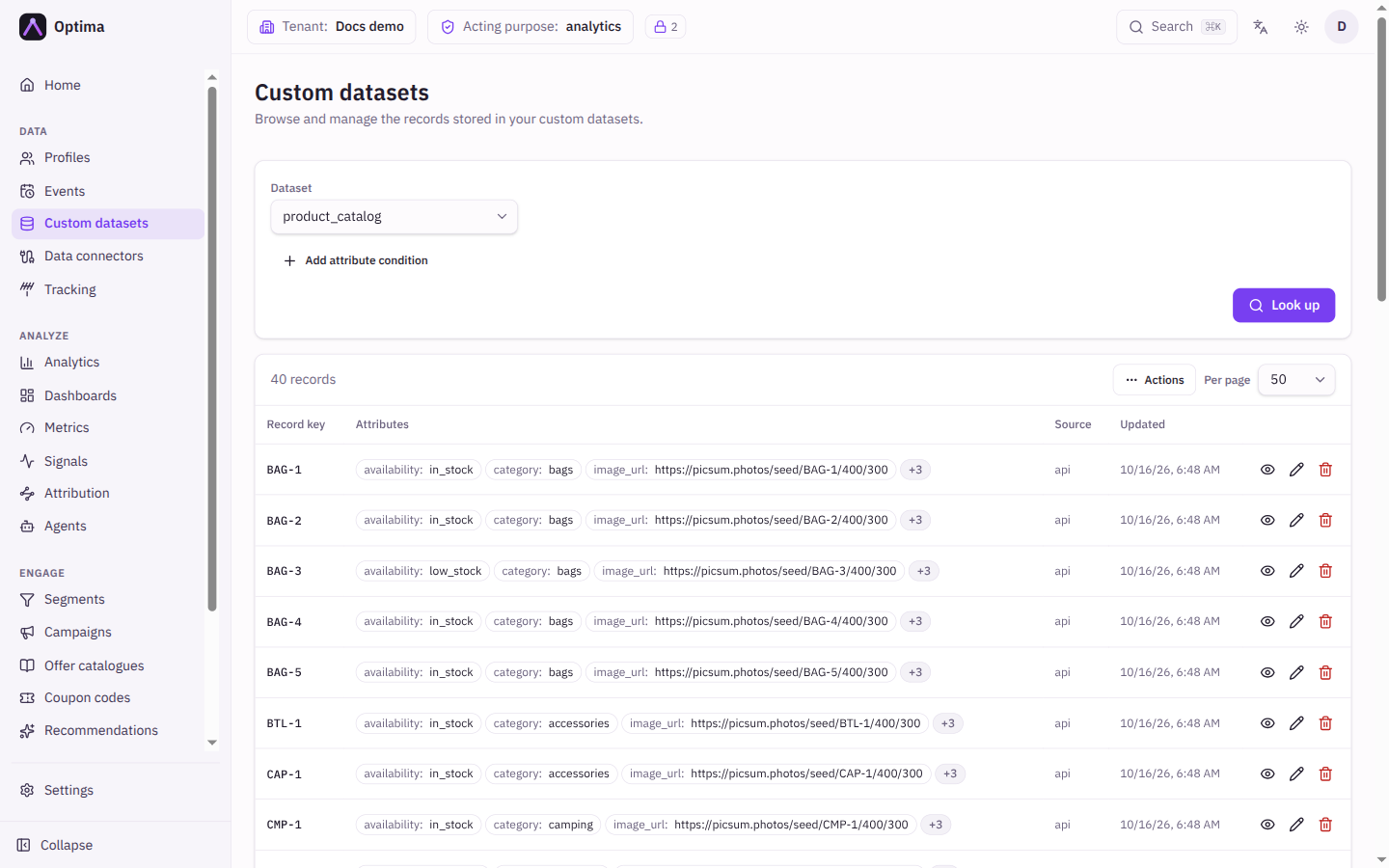
A custom dataset is a table of reference records that are not people: a product catalogue, a store list, a set of campaigns. Each record has a unique Record key and attributes, and can be linked to profiles, for example a customer's favourite store. This screen is for browsing and maintaining the records. The datasets themselves, with their attributes and types, are defined in the schema under Settings → Workspace → Schema, on the Custom datasets tab.
Who uses it
Integration specialists, and anyone who maintains reference data by hand. Reading needs data_viewer, or another role your administrator has given access to this area — see Licences and roles; adding, editing, deleting and linking need data_editor. If no custom datasets exist yet, the screen says "No custom datasets defined yet."
Fields
| Field | Meaning | Valid values | Default |
|---|---|---|---|
| Dataset | Which dataset to browse. | Any custom dataset | The first dataset |
| Attribute conditions | Narrow the records by attribute values, the same way as on Events. Shown when the dataset has attributes. | Attribute, operator, value | None |
Look up applies the conditions. The header shows the number of records.
Results table:
| Column | Shows |
|---|---|
| Record key | The unique key. Select it to edit the record. |
| Attributes | The first three attributes as name: value, and "+N" for the rest. |
| Source | Where the record came from, for example manual. |
| Updated | When it last changed. |
Each row has three icon buttons: View (read-only view), Edit and Delete. Below the table: Previous, Next and Per page (10, 25, 50 or 100; default 50).
Record dialog
| Field | Meaning | Valid values | Default |
|---|---|---|---|
| Record key | Natural unique key, for example a SKU or campaign ID. Cannot be changed later. | Text | Empty |
| Source | Where the record came from. | Text | manual |
| Attributes | The dataset's attributes. Set a value to add or update it; clear a field to remove that attribute. | As defined by the dataset | Empty |
The View dialog shows the same values read-only, plus Linked profiles: the profiles linked to the record, each with its Link type. Link profile adds a link (enter the Profile ID and an optional Link type), the pencil changes a link type, and the bin icon removes a link (Unlink profile).
Actions
The Actions menu above the table offers:
- Add record: opens the record dialog for a new record.
- Download CSV: exports records matching the current conditions. The record key, source, created-at and updated-at are always included; pick the attribute columns.
- Delete filtered…: deletes all records matching the applied attribute conditions, including their attributes and profile links. It needs at least one condition ("Apply a filter first"). You must type the number of records to confirm. The deletion runs in a few minutes and can be cancelled until then, under Privacy, Deletions tab.
Deleting a single record asks you to confirm and cannot be undone. A profile's own page also lists the dataset records it links to, under Dataset links on the Overview tab.
Examples
Add a product by hand. Choose the dataset products, Actions → Add record, enter Record key SKU-1001, fill the attributes such as name and price, then Save.
Link a customer to a store. Open the store record with View, select Link profile, paste the customer's profile ID, enter Link type home_store, and save with the check mark.
Clean up an obsolete range. Add the condition status = discontinued, select Look up, then Actions → Delete filtered… and type the number shown.
Common problems
- "No custom datasets defined yet." Datasets are created in the schema first. Ask someone with schema access.
- "No records in this dataset." The dataset is empty, or the conditions match nothing. Clear them and look up again.
- I cannot change the Record key. It is fixed once created. Create a new record and delete the old one.
- Saving shows warnings or a rejection. The dataset may be strict: attributes it does not define are refused, and values must match their type.
- Delete filtered… is disabled. Add an attribute condition and look up first.