Profile detail
Everything Optima knows about one profile, with the actions to correct, link, merge or erase it.
The profile page shows one customer, household, device or other subject in full: who they are (identifiers and attributes), what they have done (events), what Optima has worked out about them (computed attributes, signals, cohorts), how they are connected to other profiles, what they have consented to, and how the record has changed over time. It is also where you correct a profile, record a consent, merge a duplicate or start an erasure.
Who uses it
Integration specialists use it to check that data arrived and was stitched correctly. Privacy officers use it to see consents and to start erasure. Opening it needs data_viewer, or another role your administrator has given access to this area — see Licences and roles. Changing anything (editing attributes, adding events, managing consents, merging, linking, erasing, deleting) needs data_editor; with only the viewer role those controls are disabled and say your role can view but not change. Which attribute values you see also depends on the purpose you are acting under and your PII level; see consent and purposes.
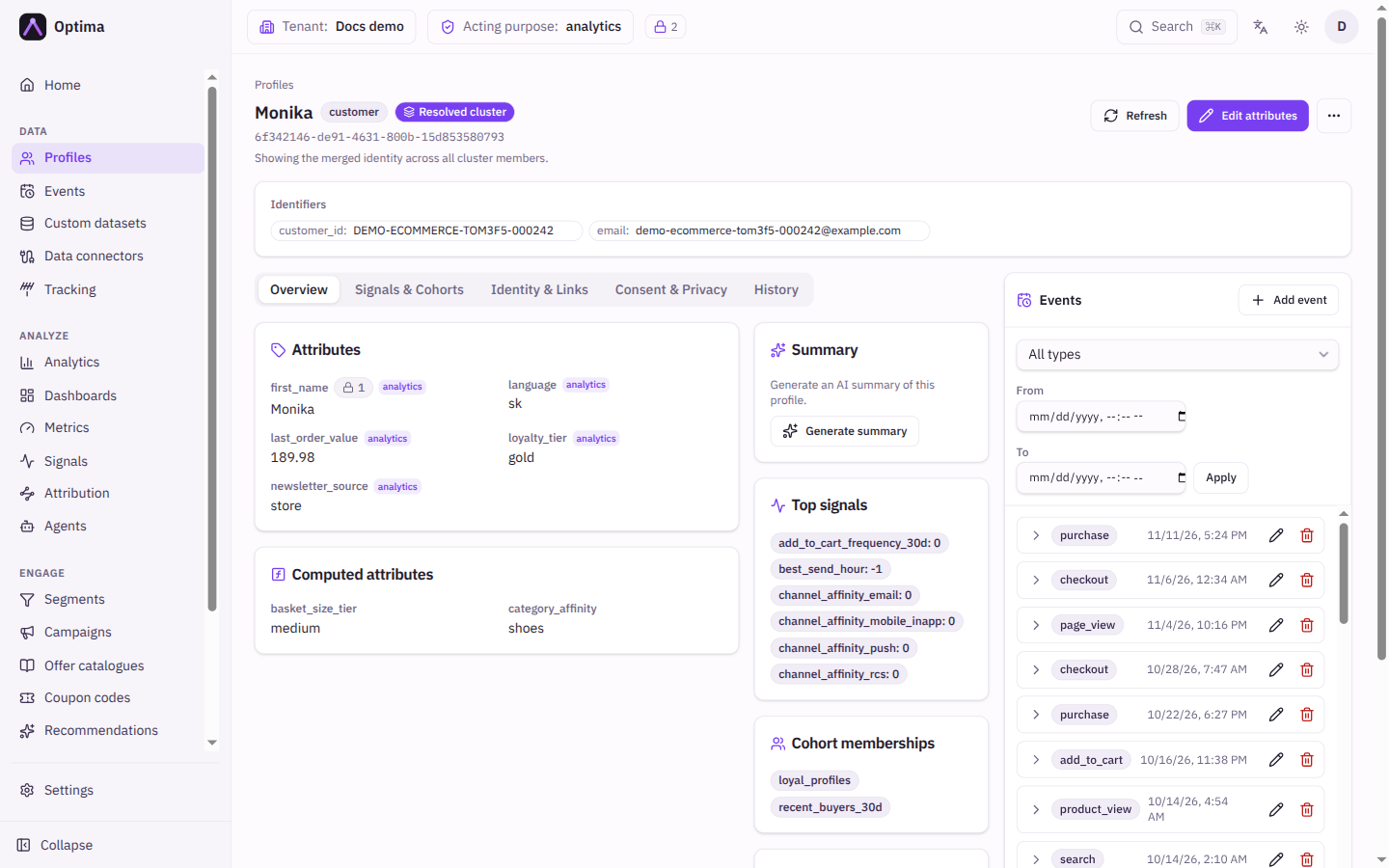
Fields
Header
| Element | Meaning |
|---|---|
| Title | A readable name for the profile when it has one, otherwise the start of its ID with a copy button. If the name attribute is hidden from you, Name withheld appears. |
| Profile ID | The full permanent ID, with a copy button. |
| Entity type badge | What kind of subject this is. |
| Resolved cluster / Single profile | Resolved cluster means you see the merged identity across all profiles that identity resolution has joined together. Single profile means one raw profile, before any merging. |
| Identifiers | Every identifier on the profile as key: value, each with a copy button. |
Tabs
The page has five tabs.
Overview
| Card | Shows |
|---|---|
| Attributes | The profile's attribute values. A checkbox Show empty (visible when you hover the heading) also lists attributes with no value. A pencil beside a value, when you can edit, opens Edit purposes to change the consent purposes the value was collected under. |
| Computed attributes | Values calculated by Optima from the profile's history, marked computed. Shown only when the profile has some. |
| Summary | Generate summary writes a short plain-language summary of the profile, with a line saying how many attributes, events and signals it used. Regenerate refreshes it. Shows "Summarization is not available." when the feature is not available to you. |
| Top signals | The profile's signals and their values. |
| Cohort memberships | The cohorts the profile belongs to, or "Not a member of any cohort." |
| Related profiles | Linked profiles, each tagged Parent or Child with its relation. Select one to open it. |
| Dataset links | Records in custom datasets linked to this profile. Link record adds one (choose the dataset, the Record key and a Link type); the bin icon removes a link. |
If some attributes are hidden, a notice above Attributes says how many and why: no acting purpose is selected, or the purpose, your PII level or the profile's consent does not allow it. Choose a purpose or Change purpose in that notice opens the purpose selector.
Signals & Cohorts. One card per signal with its value, whether it is Fresh or Stale, when it was Computed and Valid until. Numeric signals show a small trend line. History shows earlier values. Recompute recalculates the profile's signals now. A signal can show withheld (purposes) or withheld (stale) when you may not read it.
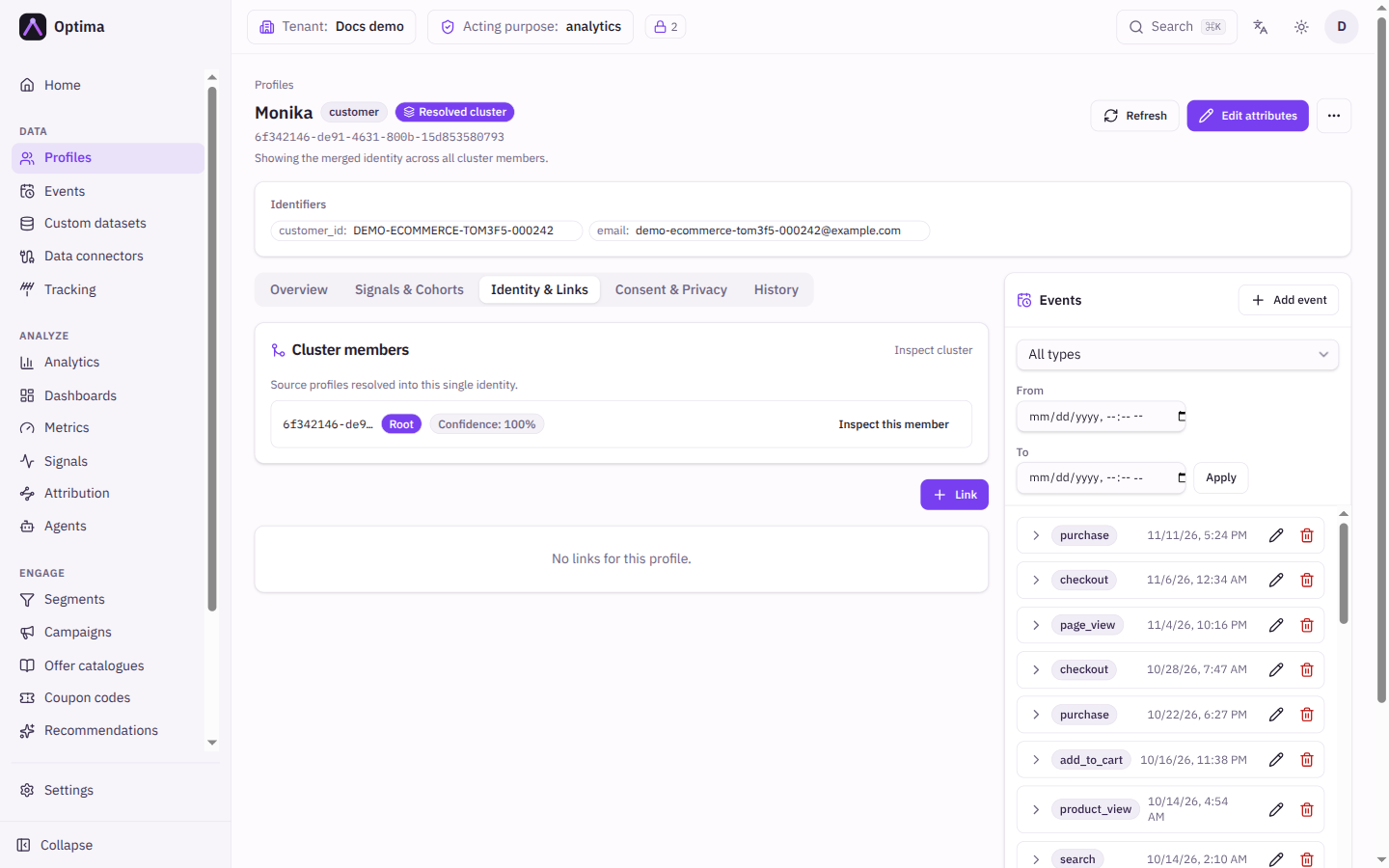
Identity & Links
| Section | Shows |
|---|---|
| Cluster members | The source profiles resolved into this one identity. The Root badge marks the anchor, Confidence shows how sure the match was. Inspect this member switches to that single profile. |
| Links | Profile-to-profile relationships with columns Direction (Parent or Child), Linked profile, Relation, Confidence, Creator and Created. Link adds one; each row can be edited or removed. |
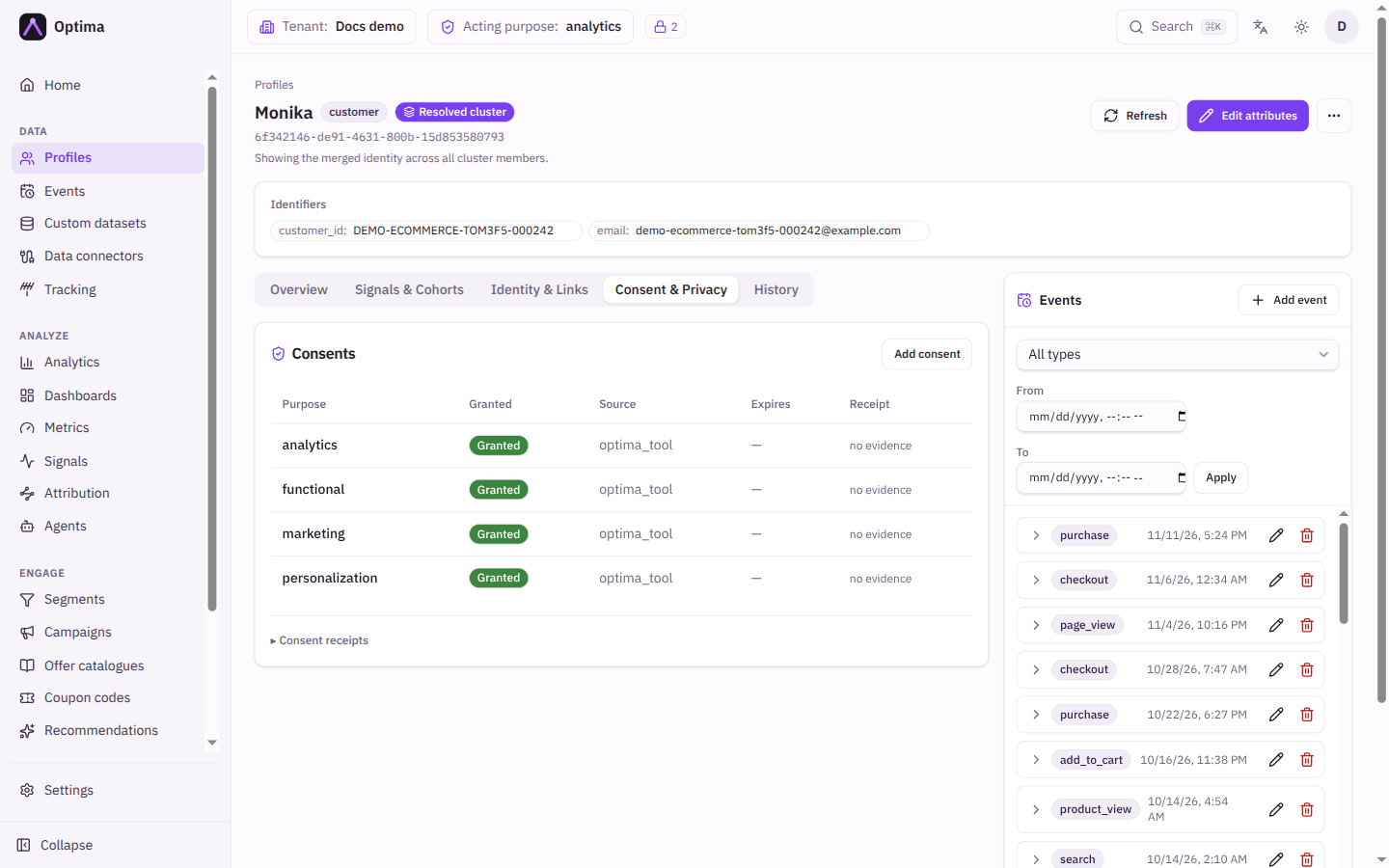
Consent & Privacy. A Consents table with the columns Purpose, Granted (shown as Granted or Withdrawn), Source, Expires and Receipt ("no evidence" when no receipt was recorded). Add consent opens the consent dialog. Below it, Consent receipts (expand to open) lists the recorded evidence: When, Purposes, Granted, Policy and Channel.
History. The profile's change log. Filter by Scope (Profile, Attributes, Identifiers, Links, Consents), Action (Added, Changed, Removed), Key, From and To, then Apply. Columns are When, Scope, Action, Key, Old value and New value.
Events panel
On wide screens the right-hand side lists the profile's events. Filter by Filter by type and a From / To time range. Select an event to show its attributes. The pencil edits it, the bin deletes it (Delete this event? This cannot be undone.), and Add event adds one.
Actions
| Action | Where | What it does |
|---|---|---|
| Refresh | Header | Reloads the profile. After any change a banner reminds you that writes are processed in the background and may take a moment; refresh to see them. |
| Edit attributes | Header | Edits attribute values. Set a value to add or update it, clear a field to remove it. |
| Show unresolved profiles / Back to resolved | More actions | Switches between the merged identity and a single raw profile. The first opens the Identity & Links tab to pick a member. |
| Add event | More actions | Records an event for this profile. Choose the Event type, optionally set the Timestamp (empty means now) and fill the event's attributes. |
| Manage consents | More actions | Sets each purpose to granted or withdrawn, with an optional Expires date (empty means no expiry). You can attach a receipt: choose a Policy, then give Channel, Collection point and an Evidence note. If a purpose is configured to erase on withdrawal, withdrawing a granted consent starts a purpose-scoped erasure automatically. |
| Merge | More actions | Merges another profile into this one. Enter the Source profile ID; this profile is the target and keeps the result. |
| Link | More actions | Links this profile to another. Choose the Direction (the other profile is this one's Child or Parent), the other profile's ID and a Relation, such as household_member. |
| View as of… | More actions | Shows the profile's attributes as they were at a past date and time, read-only, marked Snapshot as of that time. Reconstructed from the change history. |
| Request erasure | More actions | Needs privacy_officer (the server checks it) and profile write access such as data_editor (the menu item is disabled without it); ask your administrator to give the person filing both. Starts an audited erasure. Choose a Scope: full, PII only, purpose (then pick the Purpose) or attribute list (then list the Attributes by key, for example email). Progress is tracked under Privacy, Erasure tab. |
| Delete profile | More actions | A hard technical delete: the profile, its identifiers and attributes are removed immediately. For a right-to-be-forgotten request use Request erasure; it is audited and covers derived data. |
Treat merging as permanent. Removing a link asks for confirmation and cannot be undone.
Examples
Answer "what do you hold about me?". Search for the person on Profiles, open them, and read Overview (attributes), Consent & Privacy (consents and receipts) and the events panel. Choose the right purpose first if a notice says attributes are hidden.
Fix a wrong email. Edit attributes, change the email, Save. Open History to confirm the change was recorded with its old and new value.
Withdraw marketing consent. More actions → Manage consents, set the marketing purpose to withdrawn, choose a receipt policy and enter Channel phone and an Evidence note, then Save.
Record two people as one household. On the first person's profile choose Link, set Direction to Child, enter the second person's profile ID and the relation household_member.
Common problems
- "Profile not found." The ID is wrong, the profile was deleted, or it belongs to another environment. Check the tenant switcher.
- My change has not appeared. Writes are processed in the background. Select Refresh after a moment.
- Attributes show as hidden. Choose an acting purpose with Choose a purpose. If the notice still lists hidden attributes, your PII level or the profile's consent does not allow them.
- I see one profile but expected a merged customer. You are on Single profile. Select Back to resolved.
- Controls are disabled. Your role can view but not change this area. Ask an administrator for the
data_editorrole. - Erasure scope "purpose" asks for a purpose but none is listed. No consent purposes are defined yet. Define them under Privacy first.