Agent definitions
Write what an agent does - prompt, triggers, tools, actions and parameters - and keep every version.
A definition says what an agent does. It is the recipe; an instance is one agent cooking from it. Open Agents and choose the Definitions tab for the list, then a name to open the editor or New definition to start one.
Who uses it
Campaign managers and tenant administrators. Building definitions needs the agents_editor role or an administrator role. Without write access the editor is read-only. Auditors with agents_auditor can read definitions.
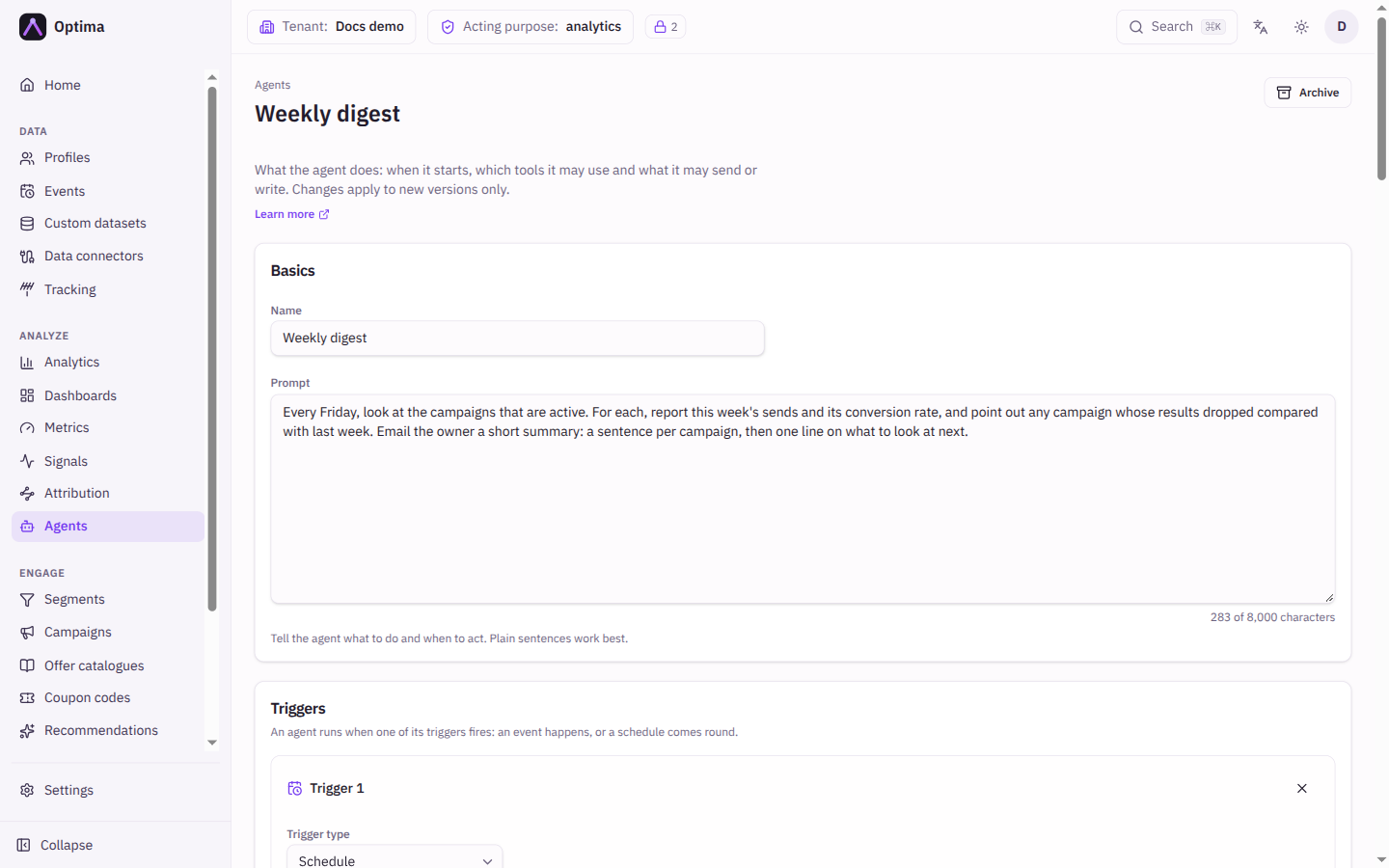
Fields
The list shows each definition's Name, Type (Custom or Built in), Current version and Updated. Archived definitions stay in the list, muted, with an Archived badge.
Basics
| Field | Meaning | Valid values | Default |
|---|---|---|---|
| Name | What people see when creating an instance. | Text, up to 200 characters | Empty |
| Prompt | Tells the agent what to do and when to act. Plain sentences work best. | Text, up to 8,000 characters | Empty |
Triggers
An agent runs when one of its triggers fires. Add at least one with Add event trigger, Add schedule trigger or Add continuous trigger. A continuous trigger cannot be combined with other triggers.
| Field | Meaning | Valid values | Default |
|---|---|---|---|
| Trigger type | Event, Schedule or Continuous. | As listed | The type you added |
| Schedule | For a schedule trigger: when it fires, in the instance's time zone. | A repeating schedule chosen in the picker, shown as a cron expression such as 0 15 * * 5; see Schedules | A daily schedule |
| Event type | For an event trigger: the event that starts a run. | Choose from the list or type one | Empty |
| Only when | Narrows an event trigger to events whose properties match. | Rules with operators such as equals, contains, exists; or JSON | No filter |
| Delay | Wait before the agent acts on an event. No delay, Fixed delay (hours or days) or From a parameter (a parameter of type duration). | At most 30 days | No delay |
| Stage label | An optional name shown in the run log for runs this trigger starts. | Text | Empty |
Continuous trigger
A continuous trigger makes the agent work through a segment or an event type in sweeps; see continuous agents. It needs a purpose and an attribute or event action, and Send emails must match Email a summary when a pass completes.
| Field | Meaning | Valid values | Default |
|---|---|---|---|
| Works through | Profiles in a segment or Events of a type. | As listed | Profiles in a segment |
| Segment | The segment whose profiles are processed. | A segment from your list | Empty |
| Event type | For an events source: the type of event processed. | Choose or type an event type | Empty |
| Sweep schedule | When each sweep starts, in the instance's time zone. | A repeating schedule | A daily schedule |
| Attributes the agent reads | What the agent sees per profile. | Up to 40 attributes | None |
| Recent events of these types | Events added to what the agent sees. | Choose or type event types | None |
| Last N events per type | How many recent events of each type. | 1 to 20 | The console fills in 10 |
| Within days | How far back those events may reach. | 1 to 365 | The console fills in 90 |
| Refresh results older than (days) | Process a profile again when its last result is older than this. Profiles only. | 1 to 3,650 | Empty: each profile once |
| Items per model call | How many items go into one call to the model. | 1 to 50 | 20 |
| Email a summary when a pass completes | Email the owner a summary once a pass has finished. | On or off | Off |
What the agent sees per item is limited in size; an item that is too large is cut short.
Trigger filters can match the event's own properties, not profile data: a filter on attributes or identifiers values is refused.
Tools
The read tools the agent may call while it works, shown as a checklist with a description of each. A tool you cannot use is listed but switched off, with the reason: Not in your licence or Your roles do not allow it. A tool already in the definition that Optima no longer offers is marked No longer offered; untick it to remove it.
Actions
What the agent may do with its result. It can do nothing that is not declared here, and a definition must allow at least one action.
| Field | Meaning | Valid values | Default |
|---|---|---|---|
| Send emails | Lets the agent email the owner and the people in a users parameter, in plain text. | On or off | Off |
| Events to write | Event types the agent may create, each with its Property name and Property type (Text, Number, Yes or no). | Choose or type an event type | None |
| Attributes to set | Attributes the agent may update, each with optional Allowed values. | Choose or type an attribute; allowed values empty means any | None |
| Purpose | Shown on every definition. The agent's reads of customer data run under this purpose and its writes are recorded under it. Required only when the definition writes events or sets attributes. A definition that takes its purpose from a parameter has the field fixed (disabled) by that parameter. | A purpose from your catalogue | None |
Event and attribute actions run with the owner's roles. The editor reminds you that the owner needs data_editor, engineer or an administrator role, or every run fails.
Parameters
Values whoever creates an instance fills in, such as a segment to look at or how long to wait.
| Field | Meaning | Valid values | Default |
|---|---|---|---|
| Parameter name | The name the prompt and delays refer to; unique within the definition. | Text | Empty |
| Parameter type | Text, Number, Duration, Users, Segment or Campaign. | As listed | Text |
| Required | Whether the instance form insists on a value. | On or off | Off |
Versions
Every save creates a new version. Instances keep the version they were created from, so saving never changes an agent that is already running. Pick an older version in the Versions card to read it; it is read-only, with a link back to the current version.
Actions
- Save definition creates the next version (version 1 for a new definition).
- Archive retires a definition: it can no longer be used for new instances, and instances already created keep running on their version. An archived definition opens read-only.
- Built-in definitions come with Optima, are read-only and cannot be archived or edited. Optima publishes changes as new versions; instances you created keep theirs. Create an instance from one to use it, see built-in agents.
Examples
A weekly digest. Prompt: "Every Friday, list the campaigns that sent this week and email me a summary of their results." One schedule trigger, the campaign tools ticked, Send emails on. The weekly digest guide builds this step by step.
Follow up after a stop. An event trigger on campaign.stopped with a delay taken from a duration parameter, so each instance can choose its own wait (a fixed delay of 7 days works too, but not both together).
Common problems
- Save is refused with a message under a field. The messages say what to fix: add a trigger, fix the schedule, write a prompt, allow at least one action, choose a purpose, or remove a duplicate parameter name. On a continuous trigger they also say when a segment is missing, a value is out of range, or the name
profile_idis used for an attribute or event property, which is reserved. - Save is refused because the item view is too large. What the agent reads per item is limited to about 8 KB; an estimate above that is refused. Read fewer attributes or fewer event types.
- A filter on a profile attribute is refused. Filters see only the event's properties. Read the profile in the prompt through a tool instead.
- The tools list is empty or greyed out. Your licence or roles do not allow them; see the reason on each tool.
- The picker lists show nothing to choose from. Your role cannot read the list; type the value instead.