Agent instance detail
Start, stop or switch one agent between dry run and live, and watch its budget.
Open an instance from the Instances tab to control it and see its settings and budget. The tabs are Overview, Runs and Run log.
Who uses it
Campaign managers and tenant administrators. The buttons need agents_editor or an administrator role; anyone with read access only does not see them. Runs and Run log need agents_auditor, an administrator role or auditor. A user with only agents_editor sees the Overview alone.
Fields
The Overview shows:
| Card | What it shows |
|---|---|
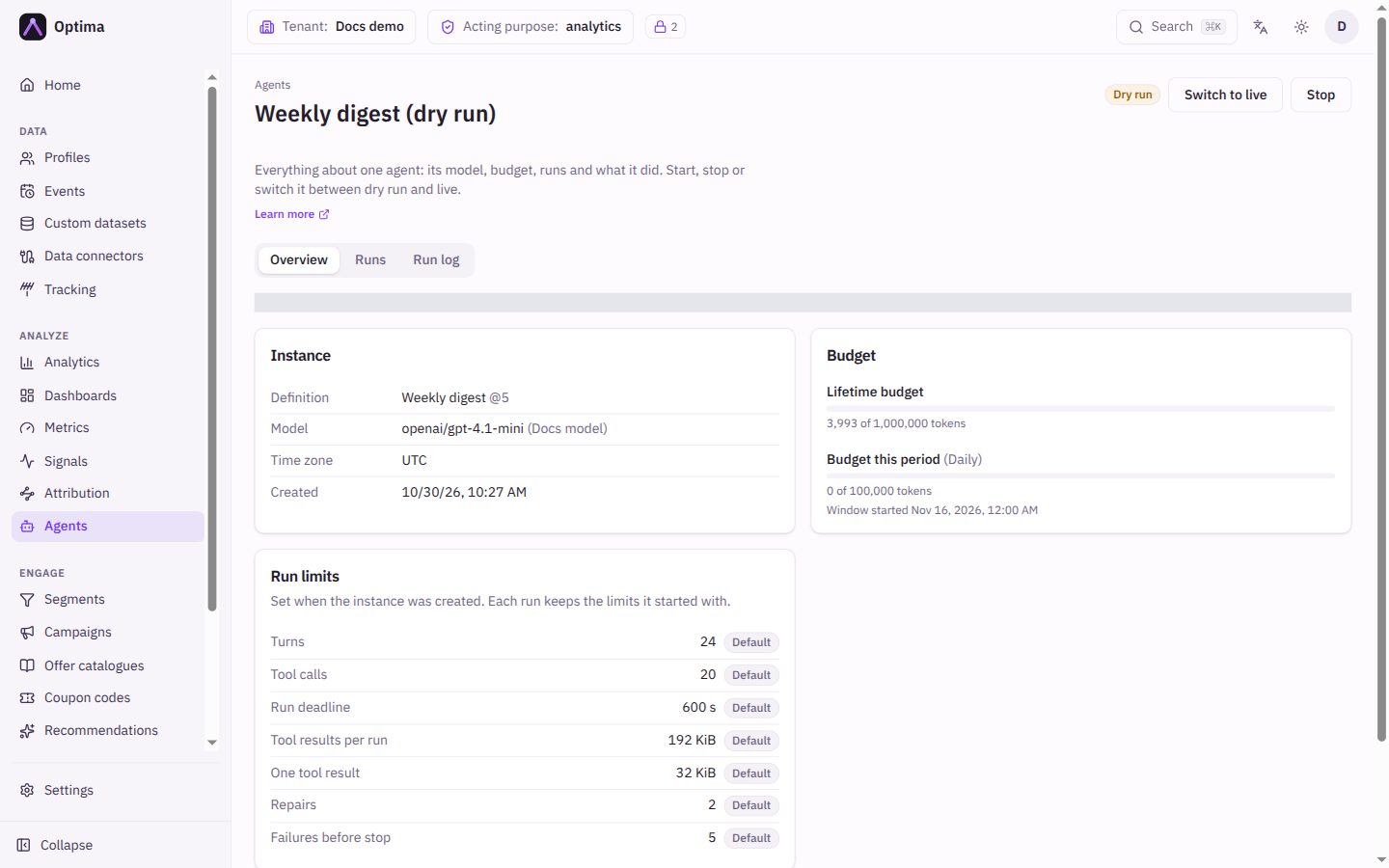
| Instance | The definition and version, the Model (or Model removed), the Time zone and when it was Created. |
| Budget | The Lifetime budget and Budget this period as bars of tokens used, an estimated cost when the model has prices ("Up to … so far"), and when the current window started. |
| Run limits | The seven limits that bound each run, in seconds or KiB where that applies. Each value is marked Custom when it was set at creation and Default otherwise. On a continuous agent the Run deadline row reads Not used by continuous agents and has no badge. The card is read only: limits are fixed for the life of the instance. See Run limits. |
| Parameters | The values the instance was created with. |
For a continuous agent there is also a Continuous sweep card:
- Progress. A badge says First pass or Keeping up to date. In the first pass a bar shows items processed against the scope; afterwards the card counts items processed since the pass started. For a segment the scope is the number of members who consented to the definition's purpose, when last measured; for an events agent it is the events of the type in the last 30 days, an estimate.
- Paused. A notice says the sweep is paused until the budget window resets. Progress is kept.
- Cost preview. Run preview samples 20 items from across the scope and shows the tokens per item and the estimated tokens for a full pass, with a cost when the model has prices. It saves nothing to profiles, but it uses budget (real model tokens on the sampled items) and leaves Would have entries, and entries for failures, in the run log. While it runs the card says so; if it fails the card says why. After a failed preview the card keeps the last successful estimate and labels its date.
A line under the title says whose access it runs with. Starting, stopping or switching mode does not change the owner.
A yellow banner appears when something needs attention: Cancelled for good, the reason the system stopped the instance (for example the licence no longer includes agents, the owner was removed, or the model provider was removed or became unavailable), or how many failed runs in a row it has had. The instance's failure threshold (5 by default, see Run limits) stops it.
Actions
Which buttons appear depends on the state:
| State | Buttons |
|---|---|
| Draft or Stopped | Start dry run, Start live |
| Dry run | Switch to live, Stop |
| Live | Switch to dry run, Stop |
| Cancelled | None |
Start can be disabled on a continuous agent. The card says why: either no preview exists yet, or the scope grew by more than 25 % since the last preview. Run a preview and the buttons come back when it finishes. Switching between dry run and live is never blocked by this. On a continuous agent, going live processes again what only a dry run saw (see below), and the card then says that at the next sweep the agent processes again, live, what the dry run covered.
Going live, from a draft or by switching, asks you to confirm: "In live mode this agent sends its emails and writes its events and attributes. Dry run only logs what it would do." For a continuous agent whose latest sweep was a dry run, the confirmation adds that going live processes again, live, what the dry run covered, which costs those tokens a second time, and it shows the preview's full-pass estimate (an upper bound) when there is one. Switching from live back to dry run never restarts anything, and a continuous agent that has only swept live shows no such warning. Starting in dry run, switching back and stopping happen at once. The budget is never reset by any of them.
Examples
Start the new instance in dry run, wait for a scheduled run or two, read the run log, then choose Switch to live.
Common problems
- No buttons. You have read access only, or the instance is cancelled.
- The Runs and Run log tabs are missing. Your role does not read them; ask for
agents_auditor. - The instance stopped by itself. Read the banner. The instance stops after its failure threshold of failed runs in a row (5 by default); the usual cause is an owner without a role that can write customer data. Fix the cause, then start it again.
- Start is disabled on a continuous agent. Run a cost preview; see the card for the reason.
- A sweep says the owner has no access to something. The owner's roles do not cover what the agent reads or writes. Give the owner the role, then start again.
- Cancelled. The owner lost access. Create a new instance.
- I want other run limits. The Run limits card cannot be edited. Create a new instance with the limits you want.