Agent instances
List running agents and create an instance of a definition with a model, a budget and parameters.
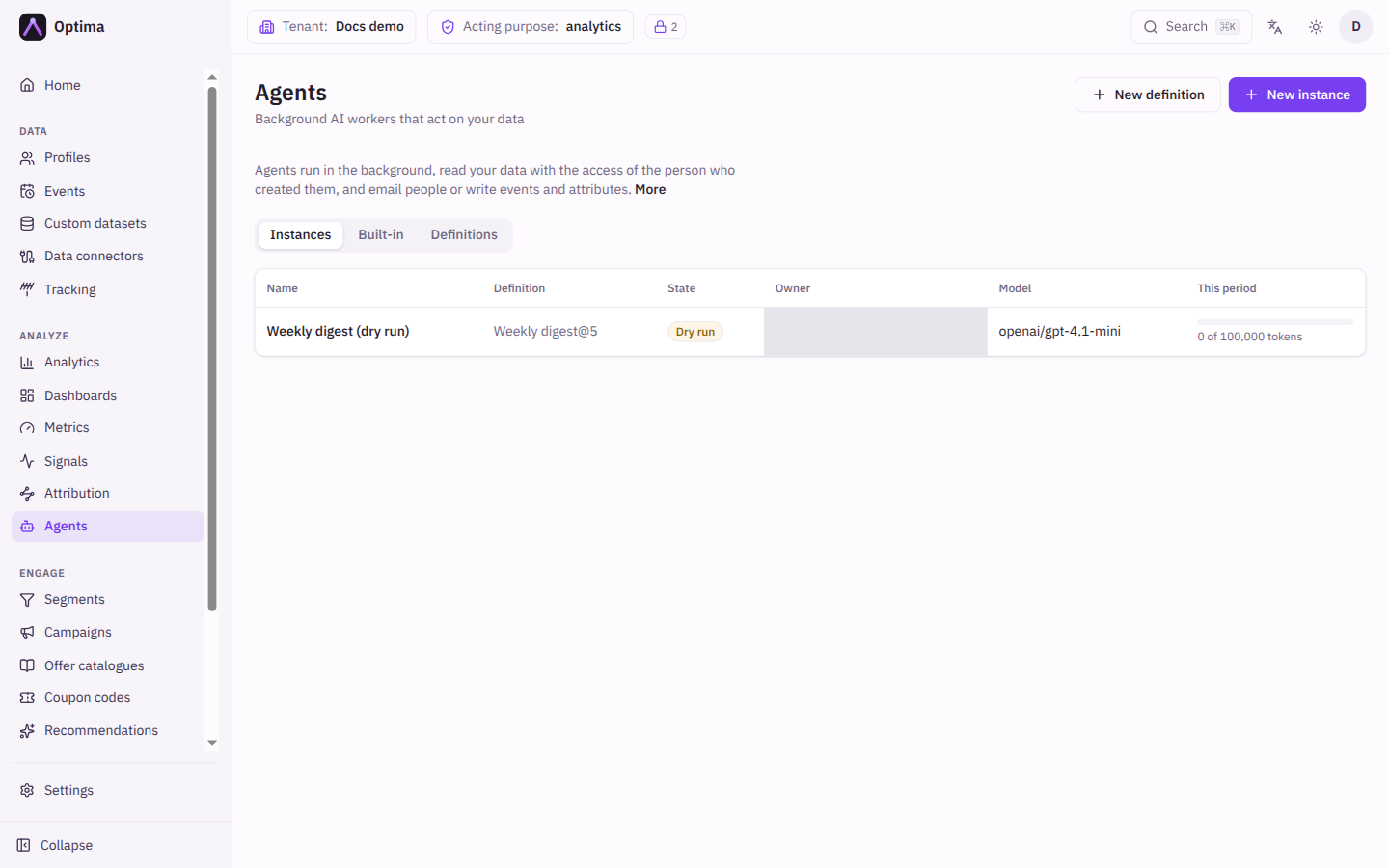
An instance runs one version of a definition with a model, a budget and an owner. The Instances tab of the Agents screen lists them all and is where you create new ones.
Who uses it
Campaign managers and tenant administrators. Reading the list needs agents_editor, agents_auditor or an administrator role. New instance appears only for console users with agents_editor or an administrator role, and the person who creates an instance becomes its owner, which it keeps for life. See Optima Agents.
Fields
The list shows:
| Column | Meaning |
|---|---|
| Name | Opens the instance detail. |
| Definition | The definition and its version, for example Weekly digest@2. |
| State | Draft, Dry run, Live, Stopped or Cancelled. |
| Owner | The person whose access the instance uses. |
| Model | The model it thinks with, or Model removed if the provider was deleted. |
| This period | A bar of the tokens used out of this period's budget. |
New instance opens a dialog:
| Field | Meaning | Valid values | Default |
|---|---|---|---|
| Name | A name for this instance. | Text, up to 200 characters | Empty |
| Definition | Which definition to run. Archived ones are not offered. | A definition | None |
| Definition version | Which version to run. The instance keeps it. | A version number | The current version |
| Model | The text model provider. Shows its prices when it has them. | One of your active text models | Your default text model |
| Parameters | One input for each parameter the definition declares: text, number, duration, users, a segment, a campaign, and for built-in agents also switches, schedules, lists of campaigns, metrics or forms, and lists of values. See built-in agents. | Per parameter | Empty |
| Lifetime budget | The most the instance may use in its whole life. In Tokens, or in Money when the model has prices (with the token equivalent shown). | Above zero | 1,000,000 tokens |
| Budget period | The window for the periodic budget. | Hourly, Daily, Weekly, Monthly | Daily |
| Budget per period | The most it may use per window; not above the lifetime budget. | Above zero | 100,000 tokens |
| Time zone | Where schedule triggers and period windows are counted. | A time zone | Your own |
| Run limits | Optional bounds for each run, in a collapsed section. See Run limits. | Per limit | The defaults |
The model, the parameters, the budget and the run limits cannot be changed after creation. To change any of them, create a new instance.
Run limits
Every run of an instance is bounded by seven limits. Open the collapsed Run limits section of the New instance dialog to change any of them. Each field shows its default as a placeholder; leave a field empty to use the default. A value equal to the default is not stored, so the instance keeps following the default if Optima changes it later.
| Limit | What it bounds | Default | Allowed range |
|---|---|---|---|
| Turns | How many times the agent calls the model in one run. | 24 | 1 to 64 |
| Tool calls | How many tools it may call in one run. A run that finishes needs one turn for its final answer, so it makes at most one tool call fewer than the turn limit. Keep this below the turn limit. | 20 | 1 to 60 |
| Run deadline | How long an event or schedule run may take, in seconds. A run past it fails as a deadline overrun. | 600 s | 60 to 1,800 s |
| Tool results per run | The total size of the tool results the agent may collect in one run, in KiB. Once it is reached, further tool calls are refused and the agent has to finish with what it has. | 192 KiB | 16 to 512 KiB |
| One tool result | The largest single tool result shown to the model, in KiB. Longer results are cut. A single record larger than this comes back empty, so very small values starve the agent. It cannot be larger than the tool results per run. | 32 KiB | 4 to 128 KiB |
| Repairs | How many times the agent may be asked to correct an answer that fails the checks. | 2 | 0 to 5 |
| Failures before stop | How many failed runs in a row stop the instance. | 5 | 1 to 20 |
Things to weigh before changing a limit:
- Cost. Every turn resends the whole conversation, so more turns and larger tool results raise the worst-case cost of a run. The budget still applies, and a period budget may refuse runs earlier.
- Context window. Above about 384 KiB of tool results per run, a model with a 200,000-token context window can fail the run. Raise this limit only for models with a large context window.
- Continuous agents. The run deadline does not apply to continuous agents; a sweep runs for up to 55 minutes. The tool-result budget applies to every chunk of the sweep, and each chunk resends the first chunk's results, so a larger value raises the cost of every model call in the sweep.
- Short deadlines. A 60-second deadline with a slow model ends runs as failures, and failures count toward the stop. A long deadline occupies one of the shared agent workers for that long.
- Stopping on the first failure. With 1, a single temporary error, such as a model timeout, stops the instance.
- Built-in agents. They are tuned for the default limits. Lowering turns, tool calls, the deadline or the tool results per run can make their runs fail. The dialog says so when you choose a built-in definition.
Limits are set when the instance is created and cannot be changed later. To use other limits, create a new instance. The instance detail shows the limits in force, and the run log shows the limits each run ran with.
Actions
- New instance creates a draft. Open it and start it in dry run.
- Choose a row's name to open it.
Examples
A weekly digest for the marketing team: definition Weekly digest, the Users parameter set to the three managers, a lifetime budget of 2,000,000 tokens and a weekly period of 100,000.
Common problems
- No New instance button. You lack the
agents_editorrole, or are signed in with an API key. - Add an AI model first. Agents need a text model; add one in AI models.
- Create a definition. There is nothing to run yet; see definitions.
- The create dialog says the period budget cannot exceed the lifetime budget. Lower the period budget.
- A run limit is flagged in red. Enter a whole number inside the allowed range. One tool result cannot be larger than the tool results per run.
- I need to change a run limit. Limits cannot be edited. Create a new instance with the limits you want.
- Model removed. The provider was deleted. The instance stops; create a new one with another model.