AI models
Point your workspace's AI features at your own text and image model providers.
Optima's AI features (translating a segment from plain language, drafting copy, drafting journeys, predictions, profile summaries and script help) send prompts to a language model, and AI image generation uses an image model. Without configuration they use the platform's own model. On this screen you register your own providers, so prompts go where your policies require. Open it under Settings → Integrations → AI models.
Who uses it
Tenant administrators and IT architects. Reading needs the integration_viewer role. Changing providers needs the admin role, or another role your administrator has given access to this area — see Licences and roles; the integration roles can read providers but not change them. Raising a PII ceiling above the platform value needs an instance administrator. The screen is part of the AI assistants licence package.
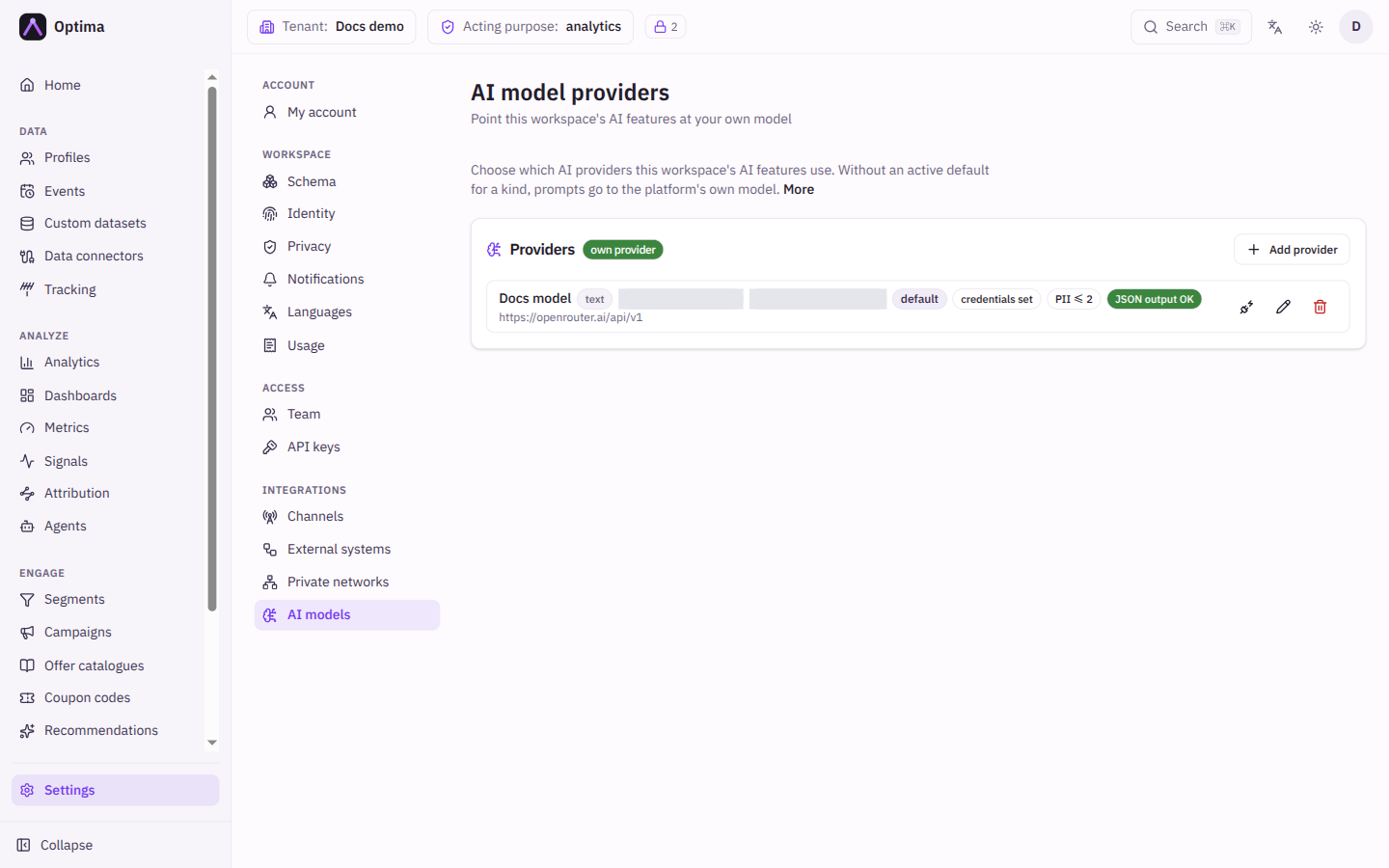
Fields
The Providers card lists your providers, with a badge saying own provider or platform default. Once an image provider exists the list splits into Text models and Image models. Each row shows badges: the kind (text or images), the provider type, the model, default, Inactive, credentials set or keyless, PII ≤ and the level, and for text models JSON output OK or no JSON mode. Add provider opens the dialog.
| Field | Meaning | Valid values | Default |
|---|---|---|---|
| Name | A name for the provider. | Text | Empty |
| Used for | The kind of prompts it answers. Cannot be changed later; add a second provider for the other kind. | Text — copy, segments, journeys, predictions, Images — AI image generation in the Content Manager | Text |
| Provider type | The service dialect. Text: OpenAI-compatible (vLLM, Ollama, LiteLLM, OpenRouter, OpenAI), Azure OpenAI, Anthropic. Images: OpenRouter (chat call with image output), OpenAI Images API. | As listed | OpenAI-compatible |
| API host | The base address, including the version path where the service expects one. | An https address. Loopback (localhost) addresses are always refused, and private and cloud-metadata addresses are refused unless your platform operator allows them. | Empty |
| Model (or Deployment name for Azure OpenAI) | Which model to call. | Text | Empty |
| API key | The credential. Stored encrypted and never shown again. A self-hosted endpoint inside your own network needs no key: leave it empty. | Text | Empty (keyless) |
| PII ceiling | The highest attribute sensitivity allowed into prompts. Empty inherits the platform value; raising it above the platform value needs your platform operator. | A whole number | inherit |
| Timeout (seconds) | How long to wait for an answer. | A number | inherit |
| api-version | Azure OpenAI only. | Text, for example 2024-10-21 | Empty |
| max_tokens | Anthropic only: the answer length limit. | A number | Empty, with 4096 suggested |
| Input price per 1M tokens | What the provider charges for tokens sent to the model, so usage can be costed. Agents use it to show costs and to let you enter budgets as money. | A number, 0 or more | Empty |
| Output price per 1M tokens | What the provider charges for tokens the model returns. | A number, 0 or more | Empty |
| Currency | The currency of both prices. | A three-letter code such as EUR | EUR |
| Active | Whether the provider is used. | On or off | On |
Set both prices and the currency, or none of them. A provider with prices shows a price badge in the list, for example "€2.00 / €8.00 per 1M". The console refuses a save with only one price ("Set both prices, or empty both") and prices below 0 or a currency that is not three letters. Empty both prices on a provider that had them to remove the prices.
Optima Agents think with a text provider, so add an active text model here before you create an agent instance. The default text model is offered first in the instance form.
When editing, an existing key shows "unchanged — leave empty to keep the stored key", and Remove the stored key (switch to keyless) clears it. If you move a provider to a new host, you must enter its key again.
Actions
- Make default sets which provider answers by default for its kind. Each kind has its own default, because a text model cannot answer an image request.
- Test (structured output) calls a text provider and reports whether it answered with valid JSON and how fast. A provider with no JSON mode still works, but drafting features lean on validate-and-repair. Test (generates one image) does a real generation for an image provider.
- Edit and Delete. Deleting a default promotes the newest remaining active provider of the same kind. A workspace left with no providers falls back to the platform model.
With no active default for a kind, prompts go to the platform's own model. If your prompts must never reach that vendor, ask your platform operator to switch the workspace's fallback to deny; the AI features then stop instead of falling back.
Examples
A self-hosted model. Add a provider of type OpenAI-compatible, API host https://llm.internal.example/v1, Model llama-3-70b, no key, PII ceiling 0. Run Test (structured output), then Make default. Private addresses must be allowed by your platform operator.
Your own images. Add an Images provider of type OpenAI Images API with host https://api.openai.com/v1 and your key, then Test (generates one image).
Common problems
- The screen is View only. Integration roles can read providers but not change them. Ask an administrator.
- The test says the reply was not valid JSON. The model ignores structured output. Features still work but rely on repair; choose a stronger model for drafting.
- The probe fails to connect. Check the host and the key, and that private hosts are allowed by your operator.
- Prompts still reach the platform model. The provider is inactive, is not the default for its kind, or no image provider exists for image requests.
- Sensitive attributes are missing from prompts. The PII ceiling filters them out.