Identity
Define the rulesets that recognise several profiles as one person, and test them on real profiles.
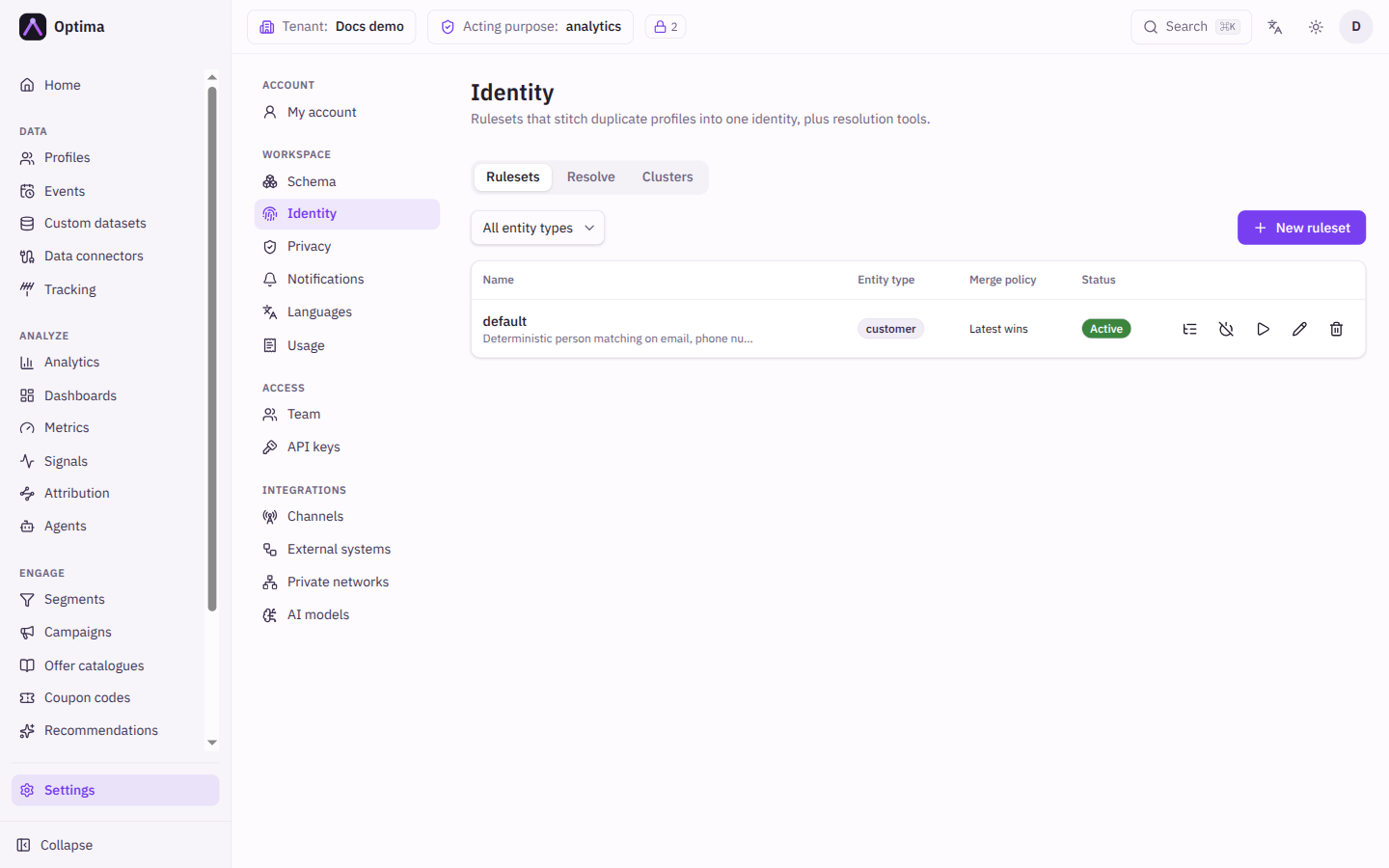
The Identity screen is where you tell Optima how to recognise that several profiles belong to the same person, for example one created from a web form and one imported from your shop. You write rulesets made of rules, switch one on, and Optima groups matching profiles into an identity cluster without changing the original profiles. Open it under Settings → Workspace → Identity. The tabs are Rulesets, Resolve and Clusters. For the ideas behind it, see Identity.
Who uses it
Integration specialists. Changing rulesets needs the schema_editor role, or another role your administrator has given access to this area — see Licences and roles. Looking up a cluster needs only read access to profiles.
Fields
Rulesets tab
The list shows each ruleset with its entity type, merge policy and status. A filter above it narrows the list to one entity type. New ruleset opens the dialog.
| Field | Meaning | Valid values | Default |
|---|---|---|---|
| Name | A name for the ruleset. | Text | Empty |
| Entity type | The kind of profile it applies to. Fixed once created. | An existing entity | None |
| Description | A note for colleagues. | Text | Empty |
| Merge policy | Which values the combined view shows when members disagree. | Latest wins, Source priority, Root wins, Additive | Latest wins |
After you save a new ruleset you land on its page, where its rules are added: a ruleset without rules matches nothing.
Ruleset page
The page shows the entity type, merge policy and status, and the list of Rules with Priority, Name, Match type, Matchers, Confidence and status. New rule opens the rule dialog, which has a Builder and a JSON (advanced) view.
| Field | Meaning | Valid values | Default |
|---|---|---|---|
| Name | A name for the rule. | Text | Empty |
| Priority | Rules run in priority order, lowest first. | A number | |
| Match type | How certain the match is. | Deterministic, Probabilistic | Deterministic |
| Logic | Shown for probabilistic rules: how the matchers combine. | All matchers must pass, Weighted threshold | All matchers must pass |
| Min score | Shown with a weighted threshold: the summed weight of the matchers that fire must reach this. | 0 to 1 | |
| Confidence | Stamped on the links this rule creates. | 0 to 1 | |
| Min match count | At least this many matchers must fire. | 1 or more | |
| Active | Whether the rule is used. | On or off | On |
| Matchers | One or more comparisons, added with Add matcher (at least one is required). | See below |
Each matcher has a Field type (Identifier or Attribute), a Field, a Compare mode (Exact, Normalized, Domain only, Fuzzy), a Weight, Required, and for fuzzy matching a Fuzzy threshold between 0 and 1. A matcher marked Required must fire, or the rule does not. The Matcher reference panel in the dialog summarises the compare modes and when a rule fires.
Resolve tab
Runs the active ruleset for one profile, so you can see what it would do.
| Field | Meaning | Valid values | Default |
|---|---|---|---|
| Entity type | The kind of profile. | An existing entity | None |
| Profile ID | The profile to resolve. | A profile id | Empty |
| …or ad-hoc identifiers | Identifier values to resolve without an existing profile. | Key and value pairs | None |
| Dry run (do not persist) | Show the cluster the rules would form without storing anything. | On or off |
Clusters tab
Cluster inspector looks up a cluster by its Cluster ID and lists the members with their Confidence; the root member is marked Root.
Actions
- Activate or Deactivate a ruleset. Only an active ruleset is used.
- Run re-resolution queues every profile of the entity type to be matched again. A confirmation warns that "This may create new merges", and afterwards the screen reports how many profiles were queued.
- Edit rules opens the ruleset page; Edit changes its name, description and merge policy.
- Resolve on the Resolve tab shows the Resulting cluster with its members and the Edges (the rule behind each link and its confidence).
- To find and merge profiles that share an identifier value, use Dedup identifiers.
Examples
Match on email. Create a ruleset customer identity for customer. Add a rule same email, Deterministic, Priority 10, with one matcher: Identifier email, Compare Normalized. Activate the ruleset, then use Resolve with a dry run on a known profile to check the cluster.
Looser match on name and city. Add a second rule, Probabilistic, Priority 50, Logic Weighted threshold with Min score 0.8, and matchers on last_name (weight 0.5, Fuzzy) and city (weight 0.5, Exact).
Common problems
- Nothing matches. The ruleset is inactive, has no rules, or its matchers need an attribute that is missing on one of the profiles.
- Too many profiles merged. A fuzzy or weighted rule is too loose. Raise the threshold or Min score, or mark the strong matcher Required.
- "At least one matcher is required." Add a matcher before saving the rule.
- Re-resolution seems to do nothing. It runs in the background; check the Clusters tab after a short while.