Privacy
Manage consent purposes and policies, retention rules, erasure requests, contact attributes, scheduled deletions, the audit log and PII access levels.
The Privacy centre is where you set the rules for personal data and keep the evidence that you follow them. It defines the purposes you ask consent for, stores the exact consent wording your customers saw, expires old data automatically, tracks erasure requests, and records every read of personal data in an audit log. Open it under Settings → Workspace → Privacy. The tabs are Consent purposes, Consent policies, Retention, Erasure, Contact attributes, Deletions, Audit log and Access levels. For the ideas behind it, see Consent and purposes.
Who uses it
Privacy officers change everything here with the privacy_officer role. The privacy_viewer and auditor roles can read every tab but change nothing. The Deletions tab appears for roles that may file or review deletion requests, such as data_editor, besides privacy_officer. You can also use another role your administrator has given access to this area — see Licences and roles. Privacy is part of the core licence.
Fields
Consent purposes
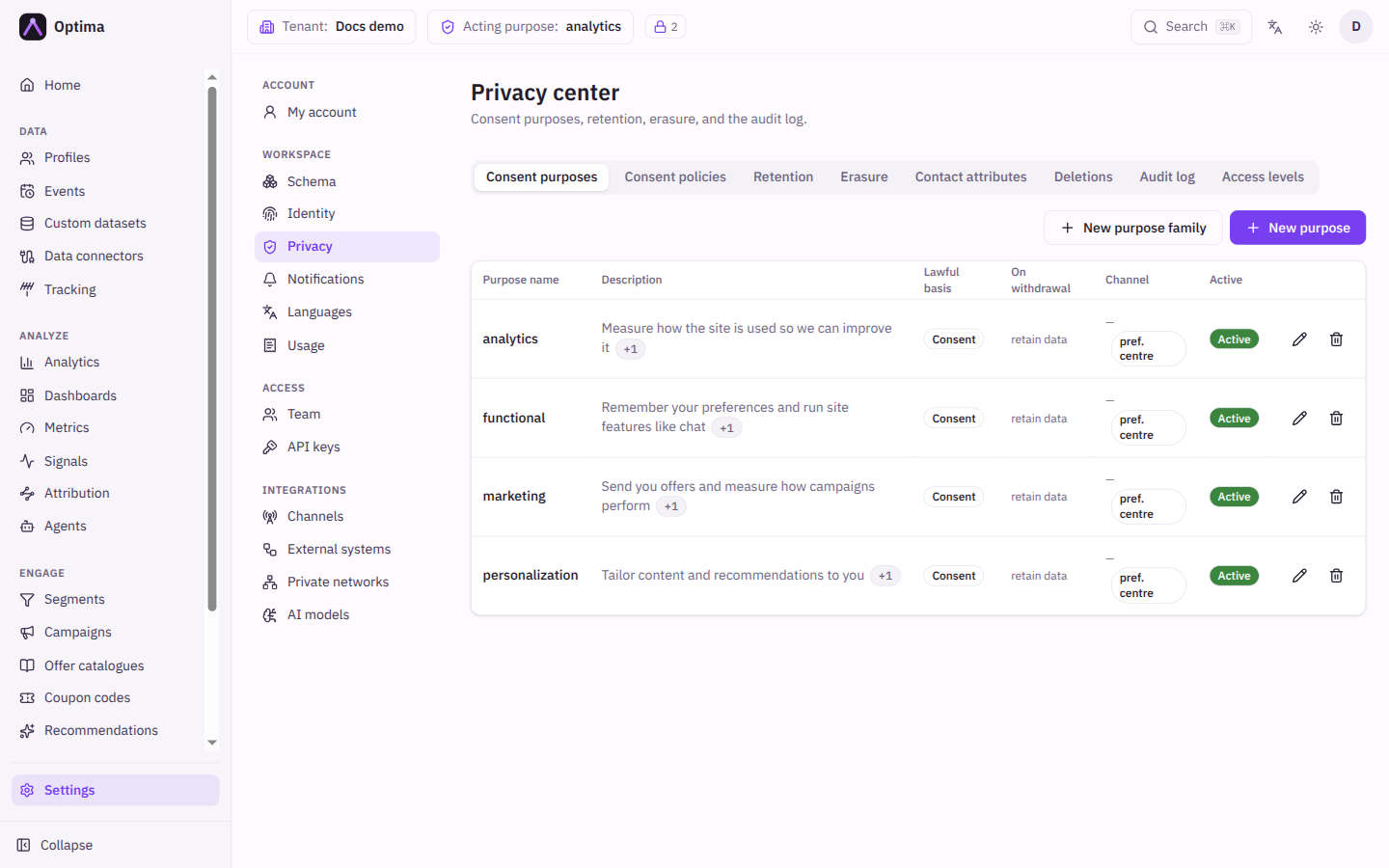
A purpose is a reason for processing personal data, such as marketing_email. The list shows Purpose name, Description, Lawful basis, On withdrawal, Channel and whether the purpose is active. New purpose opens the dialog.
| Field | Meaning | Valid values | Default |
|---|---|---|---|
| Purpose name | The identifier used everywhere the purpose is referenced. It must not contain a dot (.); purposes created earlier with a dot keep working. | Text | Empty |
| Description | What the purpose is for. You can add a translation per language; visitors whose language has no translation read the default text. | Text | Empty |
| Lawful basis | Decides how a missing consent record is read: Consent is opt-in (blocks), Legitimate interest is opt-out (an objection blocks), the others skip the check. | Consent, Legitimate interest, Contract, Legal obligation, Vital interests, Public task | Consent |
| On withdrawal | Whether a withdrawal also erases the person's data collected under this purpose. "Erase" turns an explicit withdrawal into a purpose-scoped erasure request. | retain data, erase data | retain data |
| Channel | Scopes the purpose to one channel, so unsubscribing and suppression work per channel. | A channel, or None | None |
| Topic (optional) | Groups purposes on the preference page. It has no effect on enforcement. | Text | Empty |
| Visible in preference centre | Shows the purpose as a toggle on your hosted preference page, which opens in the browser from the preference link in your emails (labels in English, Slovak, Czech and German; other languages show English). The person changes the toggles and selects Save; only the purposes they changed are recorded. One-click unsubscribe in an email also withdraws the purpose that email was sent under. Keep operational purposes hidden. | On or off | Off |
| Active | Whether the purpose can be used. | On or off | On |
Editing a purpose changes only the fields you change; the rest keep their saved values.
"Erase data on withdrawal" cannot be combined with a channel-scoped or preference-centre-visible purpose, because the withdrawal itself is the record that must be kept. Widening a purpose's lawful basis asks you to Acknowledge & apply: it "instantly unblocks every profile that never opted in" and applies to all stored data.
New purpose family creates one purpose per channel from a Family prefix, the Lawful basis, an optional Topic and the Channels you tick. The dialog previews what it will create and skips names that already exist.
Consent policies
A policy stores the consent wording your customers saw, so a recorded consent can point to evidence. The list shows Key, Version, Locale, Purposes, Created and whether it is active. New policy version opens the dialog.
| Field | Meaning | Valid values | Default |
|---|---|---|---|
| Key | Names the policy, for example newsletter-signup. | Text | Empty |
| Version | The version number. | A whole number | 1 |
| Locale (optional) | The language of the wording. | A language code such as en | Empty |
| Consent text | The exact wording shown to the person. | Text | Empty |
| Purposes | The purposes the wording covers. | Active purposes | None |
Versions are immutable: "a new wording is a new version." Selecting a row shows the text and its Text hash (SHA-256); New version starts a copy with the next free version number. A new version is active (default On); only active or inactive can change later. Receipts must reference an active policy version: once you deactivate a version, consents can no longer be recorded against it.
Retention
Retention policies delete or anonymize data after a time. The list shows Scope, the entity or event type, Retain days, On expiry and whether the policy is active. New policy opens the dialog.
| Field | Meaning | Valid values | Default |
|---|---|---|---|
| Scope | What expires. Profile attribute expires attribute values on profiles; Event deletes whole events of a type with all their attributes; Event attribute expires attribute values inside events while the events stay. | Profile attribute, Event, Event attribute | Profile attribute |
| Entity type or Event type | Which entity or event type. | An existing one | None |
| Attribute key | Which attribute, for the attribute scopes. | An attribute, or All attributes | All attributes |
| Retain days | How long data is kept. | 1 or more | 365 |
| On expiry | What happens when the time is up. | Anonymize, Delete | Anonymize |
| Purpose | Only values collected under this purpose expire. Rows with an unknown collection purpose never match. Not available for Event, because events carry no purpose. | An active purpose, or Any purpose | Any purpose |
| Active | Whether the policy runs. | On or off | On |
Erasure
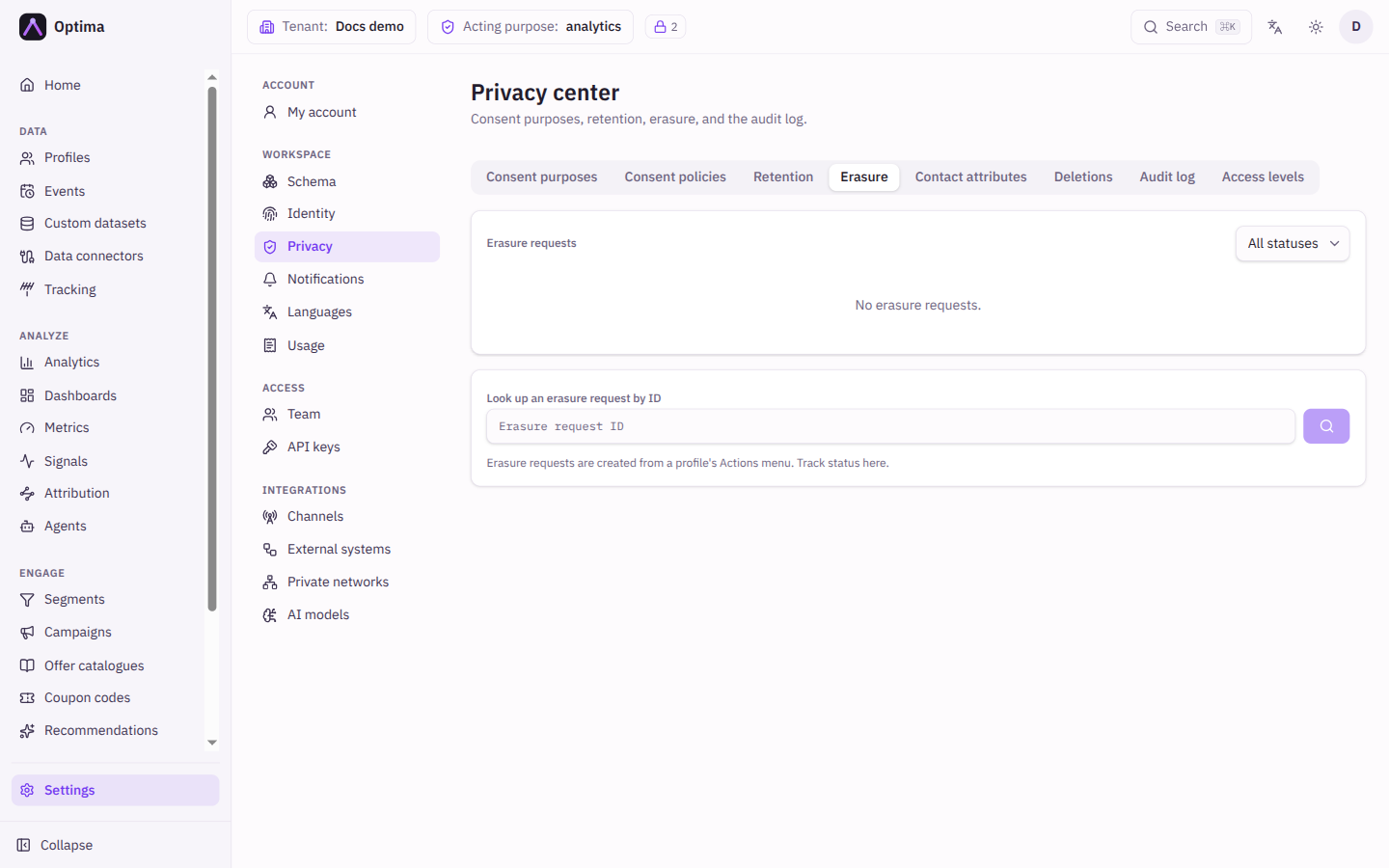
Erasure requests lists requests with Status, Profile, Scope, Requested by, Requested at and Completed, filterable by status (Pending, In progress, Completed, Failed). Pending means no pass has run yet; a request stays In progress from its first pass until its final check, about an hour after filing, even though the data is usually gone within minutes (it runs a second sweep to catch late writes, then confirms nothing is left). A request that is In progress also shows its phase under the status (Erasing, Sweep scheduled or Verifying) and, while the sweep is waiting, "next check ~" with when it is due; an older backend shows neither. Selecting a row shows the detail, including the Phase and the Last error for a failed one. Look up an erasure request by ID finds one directly. "Erasure requests are created from a profile's Actions menu. Track status here." Filing needs privacy_officer and profile write access such as data_editor; ask your administrator to give the person filing both. This tab only lists and looks up requests.
Deletions
Scheduled deletions lists deletion requests with Status, Kind (Profiles, Events, Dataset records), Scope, Matched, Deleted, Requested by and Scheduled at. A scheduled deletion can be cancelled until it runs; one that is retrying after an error cannot, because "part may already be deleted". A delete by filter that matches nothing schedules nothing: it answers that zero rows matched and no request appears in the list.
Audit log
Every read of personal data is recorded. Filter by Actor, Purpose, Profile ID, Entity type and a From and To date, then Apply filters. The table shows When, Actor, Operation, Purpose, Attributes, Consent and Result. An entry made through a connected AI app says "via AI connection" with a short id. See Connected AI apps.
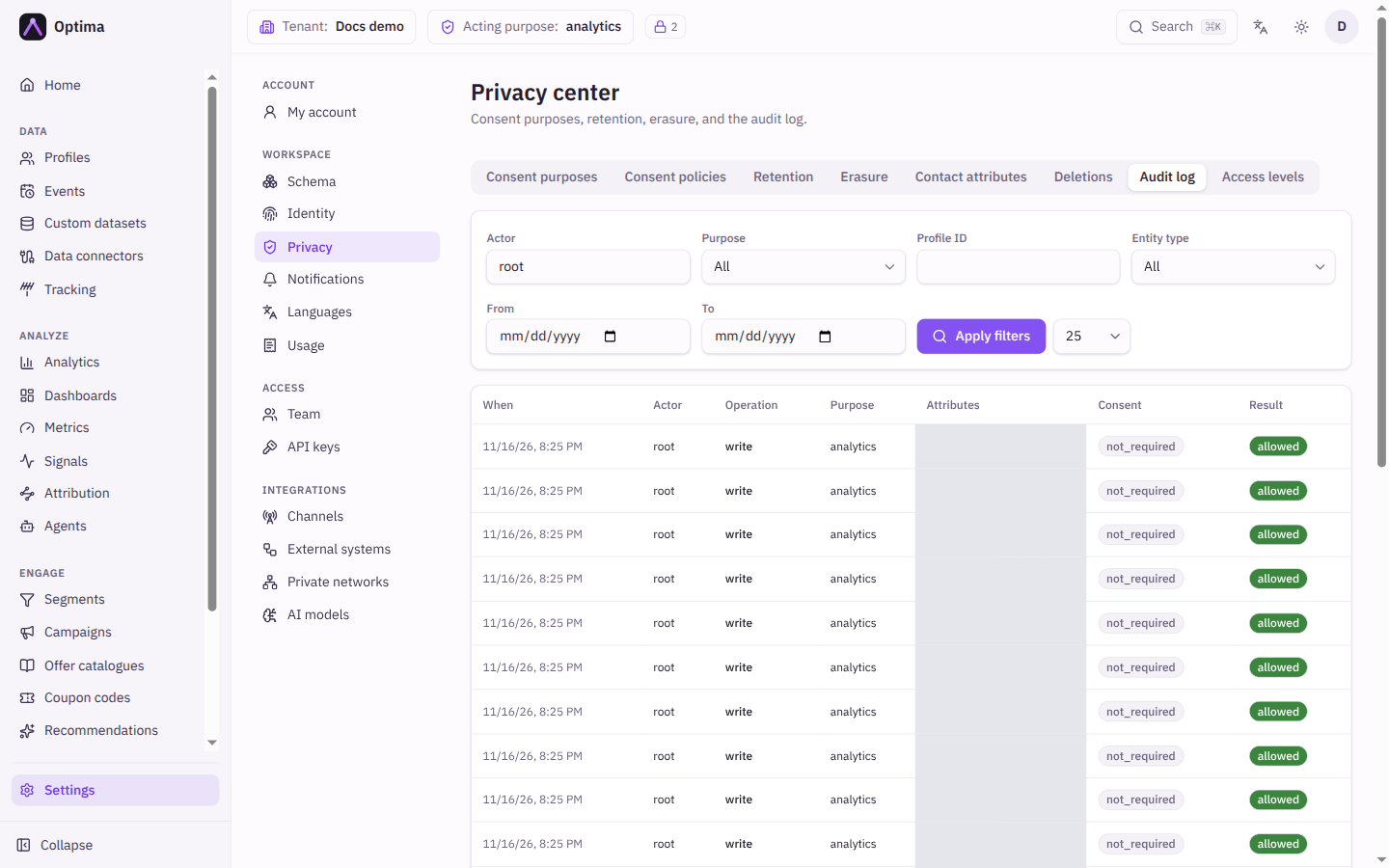
The Result of a read says what the caller got:
- allowed: everything that was read was returned. Attributes lists all of it.
- redacted: some attributes or identifier values were withheld (purpose, consent, provenance or PII access level). Attributes lists only the withheld ones.
- blocked: the request was refused before any data was read or written, for example a request without a purpose when the privacy mode is
strict. The Operation says whether it was a read, a write or a delete. - pii_level_exceeded, attribute_purpose_blocked, consent_blocked or provenance_blocked: only in the
auditandoffmodes, which withhold nothing. The entry names whatenforcewould have withheld, so you can preview enforcement before you switch it on. denied means the same for a refusal that gave no reason.
Exports record one entry per exported profile or event with the same results. A write refused because an attribute was sent under a purpose its tags do not allow says purpose_collection_blocked. An AI profile summary is recorded with the operation llm_summary and a result that names the AI provider, model and PII ceiling used.
Event collection records dropped and quarantined, or would_drop and would_quarantine while the collection gate only audits. When consent arrives and a quarantined event is released, the release is recorded as a write with consent granted and the result released.
Access levels
PII access levels lists each user and API key with its PII access level, which decides how much sensitive data that subject sees. A level only holds back data when the privacy mode is enforce or strict. In audit and off a user below an attribute's level still receives the value, and the audit log entry says pii_level_exceeded. Levels are changed on the Team and API keys screens.
Contact attributes
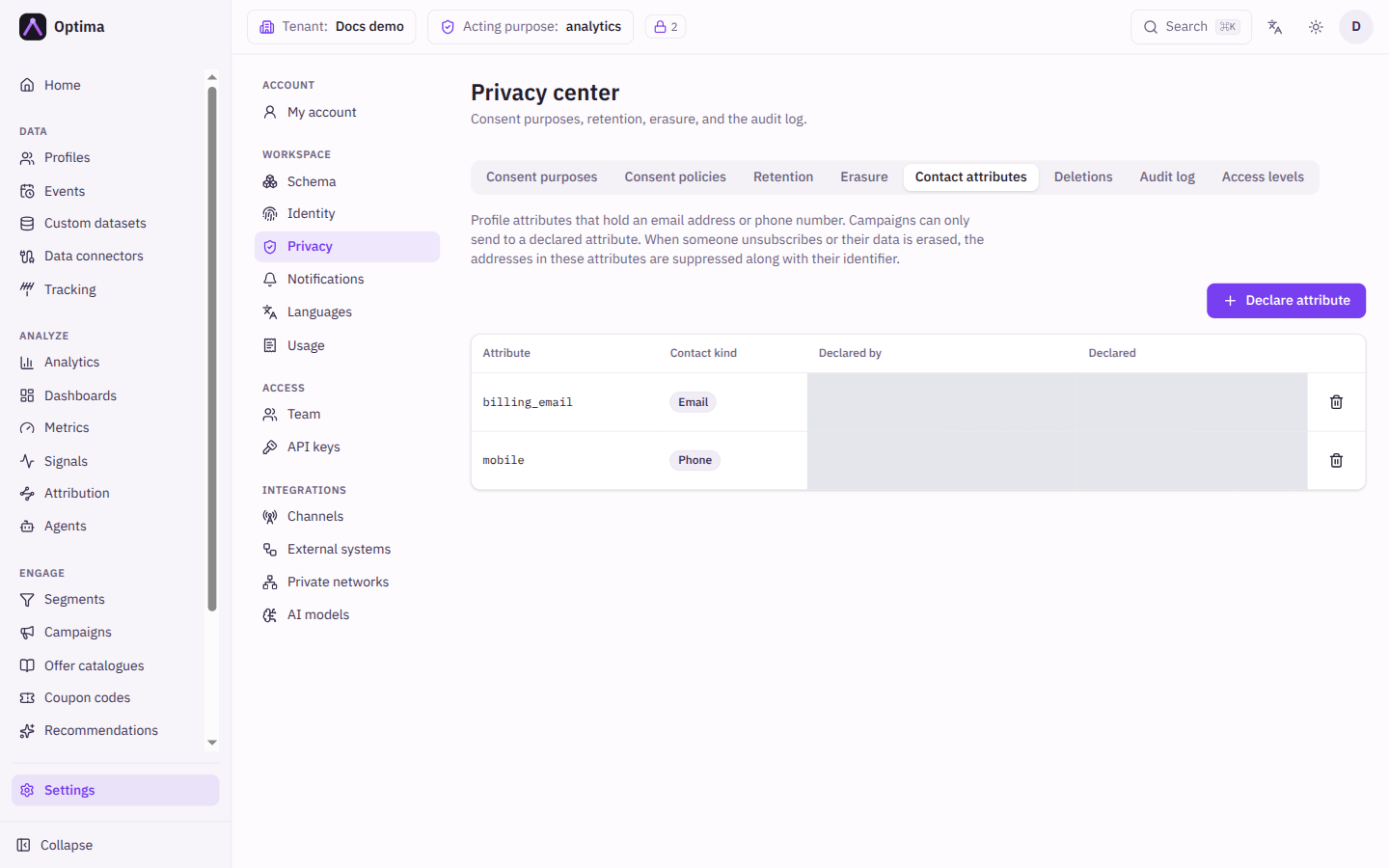
Some campaigns send to an address held in a profile attribute (a Contact attribute) instead of the email or phone identifier. Contact attributes lists the attributes declared as holding a contact, each with its Contact kind. When someone unsubscribes from a channel, or their data is erased, the address in each declared attribute of that channel's kind is suppressed along with their identifier, so the opt-out also covers that address. Campaigns can only send to declared attributes.
| Field | Meaning | Valid values | Default |
|---|---|---|---|
| Attribute | The profile attribute that holds the address. A computed attribute cannot be declared: its value is not stored, so it could not be suppressed. | A stored profile attribute | None |
| Contact kind | What the attribute holds. Email covers the email channel; phone covers SMS, RCS, WhatsApp and Viber. An attribute used by Auto campaigns can be declared with both kinds. | Email, Phone | None |
Attributes already used by campaigns and journeys when this list was introduced were declared automatically (shown as created by migration). Removing a declaration that a running or paused campaign, or a journey that can still send, relies on is refused and lists those campaigns and journeys; you can remove it anyway, but their addresses are then no longer suppressed. Campaigns and journeys that use an undeclared attribute cannot be saved or activated until it is declared again.
Actions
- New purpose, New purpose family, New policy version and New policy (retention) create the items above; the pencil edits and the bin deletes after confirmation.
- Activate policy or Deactivate policy on a consent policy toggles it without changing its wording.
- On Deletions, Cancel deletion asks for confirmation and states how many records will be kept.
- Apply filters and the page arrows move through audit entries.
Examples
Per-channel marketing purposes. Use New purpose family with prefix marketing, lawful basis Consent, and channels Email and SMS. Campaigns can then refer to the whole family and each channel unsubscribes on its own.
Expire old browsing events. Add a retention policy with scope Event, event type page_view, Retain days 365 and On expiry Delete.
Erase on withdrawal. For a purpose that must not outlive consent, set On withdrawal to erase data. When a person who granted it withdraws, an erasure starts and appears under Erasure shortly after.
Common problems
- Cannot save a purpose with erase on withdrawal. The purpose has a channel or is shown in the preference centre; remove either.
- A retention policy removes nothing. Check it is active and that the Purpose matches how the values were collected.
- An erasure shows Failed. Open it for the Last error; if the cause is not clear, contact your Optima support.
- No Deletions tab. Your roles do not include deletion requests.
- A contact attribute cannot be removed because it is in use. Change or stop the campaigns and journeys listed, or remove it anyway if their addresses no longer need suppressing.
- A contact attribute is refused as computed. Store the address in a regular profile attribute and declare that one.
- A consent with a receipt is refused. The receipt names a policy version that is inactive, or a locale the version does not have. Activate the version or send the right locale.