Attribution
See which campaign touches get credit for your conversions, across every campaign and channel, under five side-by-side credit models.
A customer converted: they bought, signed up or did whatever you count as a win. Which of your emails, SMS messages, push notifications and on-site messages led up to it? Attribution picks a conversion event, traces every conversion in the period back to the campaign touches that customer received inside an attribution window, and divides the credit among them. It answers "which channel is actually doing the work across everything we send", a question a single campaign's own results cannot answer.
Who uses it
Business owners and campaign managers. Reading the report needs analytics_viewer, or another role your administrator has given access to this area — see Licences and roles. The screen belongs to the Campaign package: if your licence does not include it, the Attribution entry is not in the navigation. The report is read-only, so there are no write-access limits.
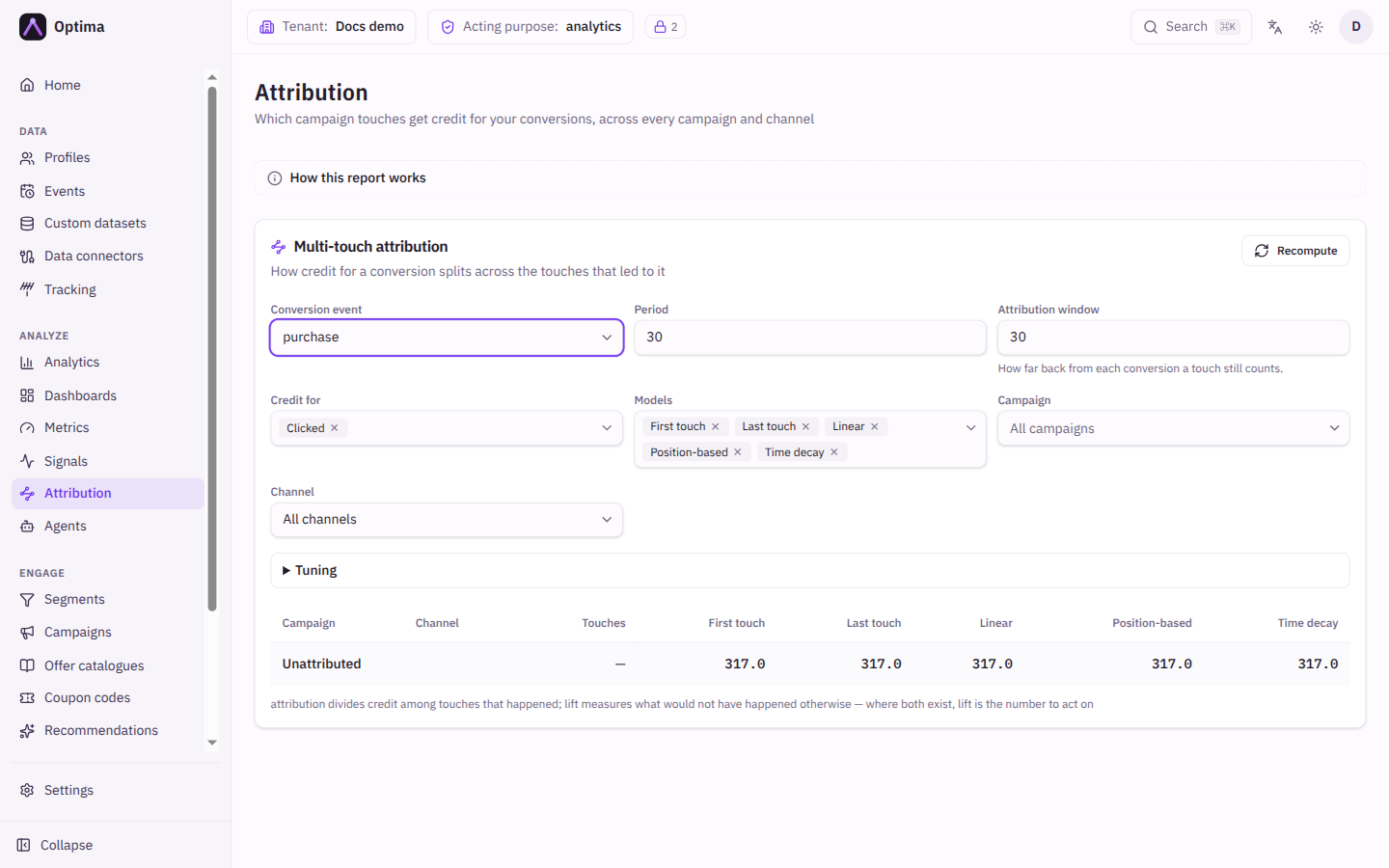
Fields
Nothing is shown until you choose a conversion event. The report refreshes as you change the controls.
| Field | Meaning | Valid values | Default |
|---|---|---|---|
| Conversion event | The event that counts as a conversion, for example purchase. | Any event type in your schema | None (choose one) |
| Period | How many days back to look for conversions. | 1 to 365 days | 30 |
| Attribution window | How far back from each conversion a touch still counts. | 1 to 365 days | 30 |
| Credit for | Which kinds of touch can earn credit. Only touches that actually reached the customer count. | Sent, Delivered, Opened, Clicked; at least one | Clicked |
| Models | Which credit models to compute side by side. | First touch, Last touch, Linear, Position-based, Time decay; at least one | All five |
| Campaign | Limit the report to one campaign. | All campaigns or one campaign | All campaigns |
| Channel | Limit the report to one channel. | All channels or one channel | All channels |
Tuning
Open Tuning for optional controls.
| Field | Meaning | Valid values | Default |
|---|---|---|---|
| Value attribute | A numeric attribute on the conversion event (for example the order value), summed alongside the conversion counts. When set, the report also shows Total value credited. | No value metric or a numeric attribute of the event | None |
| Journey | Limit the report to one journey. Needs a campaign to be chosen first. | All journeys or a journey of that campaign | All journeys |
| Position weights | For the position-based model: the share given to the First, Middle and Last touches. Must add up to 100%. | Non-negative percentages | 40 / 20 / 40 |
| Half-life (days) | For the time-decay model: how many days back a touch's credit halves. | A number above 0 | 7 |
The models
| Model | How it splits the credit |
|---|---|
| First touch | All credit to the earliest touch in the window. |
| Last touch | All credit to the most recent touch before the conversion. |
| Linear | Credit split evenly across every touch. |
| Position-based | The first and last touches get the most (40/20/40 by default), the middle ones share the rest. |
| Time decay | Touches closer to the conversion get more; credit halves every half-life. |
Showing several models at once is the point. Where they agree, the answer is robust. Where they disagree, the split is a modelling choice, not a fact.
The result table
| Column | Meaning |
|---|---|
| Campaign | The campaign that sent the touches. A campaign that has since been deleted is marked Deleted, and its credited touches are still shown. No campaign groups touches that did not come from one. |
| Channel | The channel the touches were sent on. |
| Touches | How many touches were credited. |
| One column per model | The conversions credited to that campaign and channel under the model (with the value, when a value attribute is set). |
| Unattributed (pinned last row) | Conversions no configured model could credit: nobody reached that customer through a tracked channel and action first. It is always shown. |
A line under the table adds a standing note, and a warning appears if a limit truncated the result.
Actions
- Recompute bypasses the cached result and recomputes now. Results are otherwise cached briefly.
- How this report works (above the controls) opens a short explanation of the report and its limits.
- Select a campaign name to open that campaign.
Examples
Which channel earns the sales. Conversion event purchase, period 30 days, window 14 days, credit for Clicked, all models, all campaigns. Compare the email and push rows across First touch and Last touch. Email that appears strongly under first touch but weakly under last touch is starting journeys that other channels finish.
Revenue by campaign. Choose the order value as Value attribute, and read Total value credited and the per-model values.
Is a long window flattering us? Run the same report with a window of 7 days and then 30 days. If the Unattributed row shrinks a lot, many conversions have only distant touches.
Common problems
- "Choose a conversion event to run the report." Pick an event first.
- "Fix the tuning values below to run the report." Position weights must be non-negative and add up to 100%, and the half-life must be above 0.
- "Choose at least one." Credit for and Models each need a selection.
- The Unattributed row is large. Most conversions happen without your campaigns involved, or the window or credited actions are too narrow. Try a longer window or add Opened.
- A campaign I sent is missing. Control-group members are never contacted, so they never appear. Decisions and queued messages never earn credit.
- The Journey list is empty. Choose a campaign first; journeys belong to a campaign.
- I do not see Attribution in the navigation. The Campaign package is not part of your account's licence, or your roles do not include access.
- Attribution is not the same as lift. Attribution divides credit among touches that happened. It cannot tell you whether the conversion would have happened anyway. Where a campaign has a control group, act on its lift on the campaign's Measurement tab, and use attribution for campaigns that ran without a holdout. Only touches sent through Optima are credited, and the models are rule-based.