Delivery channels
Configure the providers that send your email, SMS, RCS, WhatsApp, Viber, push and webhook messages, and choose the default for each channel.
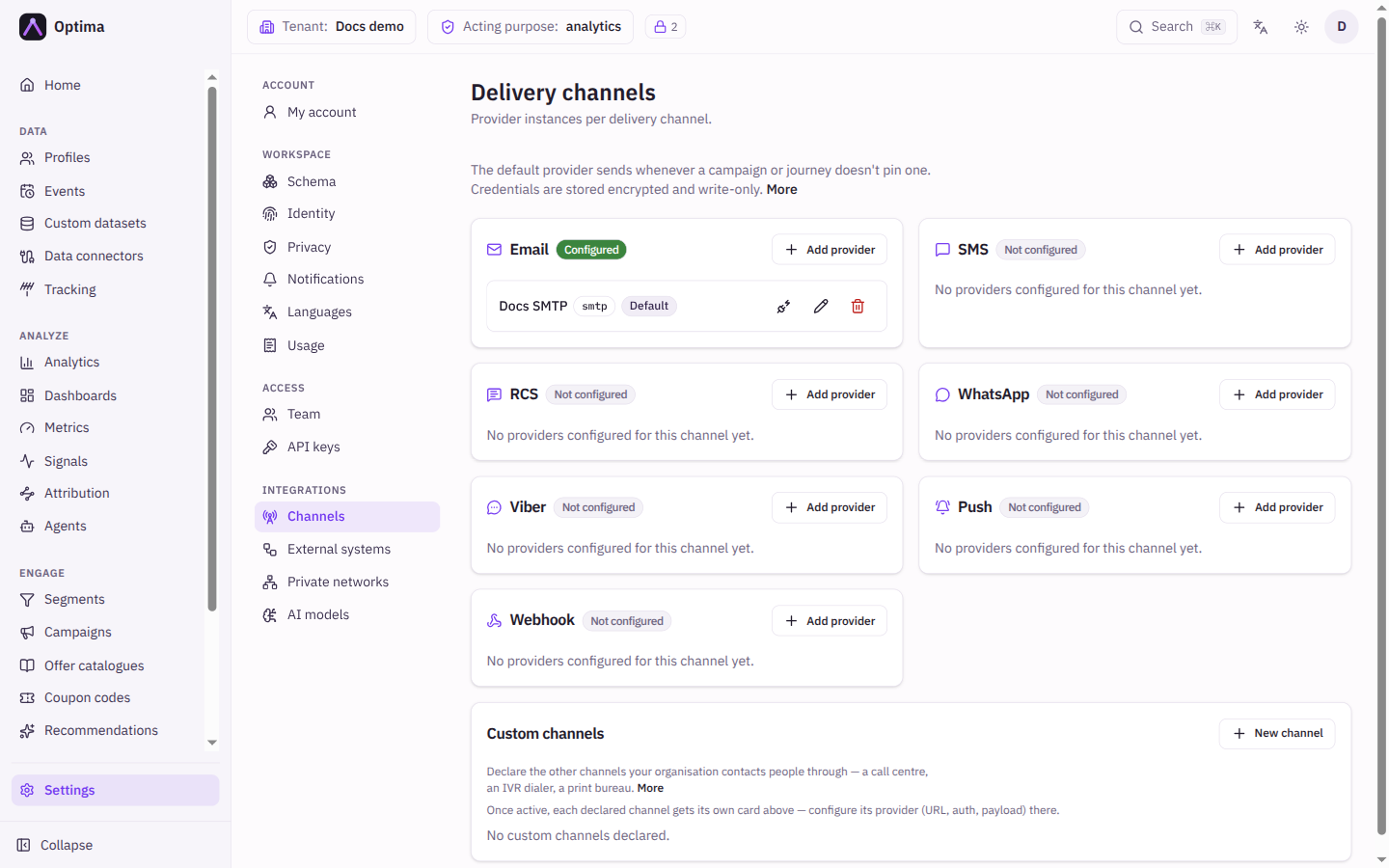
Delivery channels is where you tell Optima which service sends each kind of message. Each channel has a card listing its configured providers; a provider is one account or endpoint, such as an SMTP relay for email or a Twilio account for SMS. The default provider sends whenever a campaign or journey does not choose one. Open it under Settings → Integrations → Channels.
Who uses it
Integration specialists set providers up, and tenant administrators review them. Reading needs the integration_viewer role; adding, testing, editing, changing the default and deleting need integration_editor, or another role your administrator has given access to this area — see Licences and roles. The screen is part of the Campaign package (the delivery channels feature).
Fields
The screen shows one card per channel: Email, SMS, RCS, WhatsApp, Viber, Push and Webhook, then any custom channels you declared. A badge says Configured or Not configured. Each provider row shows its name, its type, and badges: Default, Inactive, Credentials set, and Delivery receipts when the provider reports what happened after sending.
The New provider and Edit provider dialog:
| Field | Meaning | Valid values | Default |
|---|---|---|---|
| Channel | The channel this provider carries. Fixed after creation. | One of the channels above | The card you clicked Add provider on |
| Provider type | The service. Fixed after creation; create a new provider to change it. | Depends on the channel, see the table below | The first type of the channel |
| Name | A unique name, for example prod-mailgun or slack-alerts. Required. | Text | Empty |
| Configuration fields | Settings that belong to the type, such as a sender address or an account id. A star marks required ones. | See below | Documented per field |
| Credentials | The secrets the type needs. Write-only. | See below | Empty |
| Private network | Sends all of this provider's traffic through a tunnel into your network. | A network from Private networks | Default route (public internet) |
| Active | Whether the provider can send. | On or off | On |
| Use as this channel's default provider | Makes this the provider used when nothing else is chosen. | On or off | Off |
Provider types
| Channel | Provider types | Delivery receipts |
|---|---|---|
smtp, mailgun, sendgrid, postmark, mailchimp | mailgun, sendgrid, postmark and mailchimp report delivered, bounced, failed, opened and clicked (failed is not reported by postmark and mailchimp); smtp reports none | |
| SMS | twilio, infobip, sinch | Delivered and failed |
| RCS | twilio, infobip | Delivered, failed and opened |
meta_cloud, twilio | Delivered, failed and opened | |
| Viber | infobip, vonage | Delivered, failed and opened |
| Push | fcm (Android), apns (iOS) | None |
| Webhook | http | None |
The http type is the generic HTTP request builder. It is also offered on every other channel: choosing for example SMS and http says that your own gateway is your SMS channel, and consent, contact lookup, suppression, fatigue policies and reporting then treat it exactly as SMS.
A provider that reports no delivery receipts records a send as "sent" once the provider accepts it. One that does report them fills in the delivered, opened and clicked steps of campaign reports. The dialog says which kind you have chosen.
Configuration and credentials by type
Every standard type shows its own fields; the dialog lists their names and a short description. The most common ones:
| Type | Configuration fields (star = required) | Credentials |
|---|---|---|
smtp | host *, port (587), user, from * | password |
mailgun | domain *, from *, base_url | api_key *, webhook_signing_key |
sendgrid | from *, base_url, event_webhook_public_key | api_key * |
postmark | from *, message_stream, base_url | server_token * |
mailchimp | from *, from_name, base_url | api_key *, webhook_key |
twilio (SMS) | account_sid *, from *, base_url | auth_token * |
infobip (SMS) | base_url *, from * | api_key * |
sinch | service_plan_id *, from *, base_url | api_token * |
meta_cloud | phone_number_id *, api_version, default_language, base_url | access_token *, app_secret |
fcm | None | service_account_json * |
apns | key_id *, team_id *, topic * (the app bundle id), sandbox | key_p8 * |
RCS, Viber and the other WhatsApp and Infobip types follow the same pattern with a sender (from) and an API key or token. Email providers also offer from_name, reply_to and reply_to_name: the default sender name, Reply-To address and Reply-To name. A message template can override all three; see Template editor.
Webhook (http) configuration
The http type builds one HTTP request for every send.
| Field | Meaning | Valid values | Default |
|---|---|---|---|
| URL template | The address to call. Can use {{.Params.name}} and profile values. | An absolute URL, or empty to use the address supplied with each send. Loopback (localhost) addresses are always refused, and private and cloud-metadata addresses are refused unless your platform operator allows them. | Empty |
| HTTP method | The request method. | GET, POST, PUT, PATCH, DELETE | POST |
| Headers | Extra headers as Header and Value (template) rows. | Name and value pairs | None |
| Payload template | The request body. {{.Content.body}} is the rendered message, {{.Params.name}} a parameter, and {{json .Profile.Attributes.x}} inserts a profile value safely. Empty sends no body, which is only allowed for GET and DELETE: a provider using POST, PUT or PATCH must have a payload template. | Text | Empty |
| Declared parameters | Values campaigns and journey steps can supply, each with Name, Default value and Required. A required parameter without a default blocks the send. | Rows | None |
| Authentication | How the request identifies itself. | None, HTTP Basic, Bearer token, API key, OAuth2 (client credentials), Mutual TLS | None |
| Max requests and Per | Limits how fast the endpoint is called. The limit is shared, so adding capacity does not raise it. Over the limit a send waits and retries; nothing is dropped. | A number per second, minute, hour or day | Unlimited |
The authentication choice reveals its own fields: Username for basic; API-key header (default X-API-Key) and Value prefix for API key, for example prefix Token with header Authorization; Token URL, Client ID and Scopes (space-separated) for OAuth2. The matching secret (password, bearer_token, api_key, client_secret, or the three PEM values for mutual TLS) goes under Credentials.
Signing requests
Every http provider also accepts an hmac_secret credential. When you set it, each request carries an X-Optima-Signature header of the form sha256=<hex>, the HMAC-SHA256 of the request body computed with your secret. Your receiving service recomputes it to prove the call came from Optima. Without the secret the header is not sent, and it is also not sent when the address is built per send or from a template (only a fixed address in the provider is signed). Put secrets in the credentials, not in custom headers.
Credentials are write-only
Secrets are stored encrypted and never shown again; a provider with stored secrets carries the Credentials set badge. When you edit a provider, the dialog says "Credentials are stored" and offers Replace credentials. Leave it alone to keep the stored secrets. Select it to type new ones: replacing sets the whole group, so enter every secret the provider needs, not just the one that changed. Saving with all the inputs blank clears them only for a provider that needs no secret: an http provider with Authentication set to None, or SMTP without a user. A provider whose type requires a secret (Mailgun, SendGrid, Postmark, Mailchimp, Twilio, Infobip, Sinch, WhatsApp, Firebase, APNs) refuses a save without it; delete the provider instead. If you save a change that needs a secret you did not re-enter, the dialog highlights what to re-enter instead of saving.
Receipt callback URL
For a provider that reports receipts, the edit dialog shows a Receipt callback URL with a copy button. Register it in the provider's own console (or, for per-message providers, Optima attaches it to every send). Rotate receipt token creates a new URL; the old one stops being accepted within about 30 seconds, so register the new one at the provider straight away or receipts silently stop arriving. For WhatsApp through Meta, the verify token Meta asks for is the last part of the URL. If your deployment has no receipt endpoint, the dialog says the URL cannot be shown yet.
Actions
- Add provider on a card opens the dialog with that channel preselected.
- A provider can also carry a rate limit (requests per second, minute, hour or day). Sends over the limit wait and go out when the window rolls over; they are not dropped. If the service itself answers "too many requests", the send waits for the time it asks (one second if it names none) without counting as a failed try. An SMTP relay on a private address is refused at save unless your platform operator allows it or the provider uses a private network.
- Test connection (plug icon) checks the provider and shows the result under the row. For a webhook provider with a fixed address it only opens a network connection to the address and sends nothing; the result reads "endpoint reachable (TCP connect only, no request sent)". An address on a private network is refused unless your platform operator allows it or the provider uses a private network. A provider whose address changes per message reports that there is no live check.
- Make default (star) makes a provider the channel's default. It does not appear on the current default.
- Edit (pencil), or select the provider's name.
- Delete (bin) removes the provider after confirmation. Campaigns pinned to it fall back to the channel default; if it was the default, the oldest remaining provider becomes the default.
- In an
httpprovider's edit dialog, Preview the request renders the exact request for a profile you choose, with secrets redacted, without sending it. Send it performs the real call, which the receiving endpoint cannot tell from a live one.
Examples
Send email through Mailgun. On the Email card, select Add provider, choose mailgun, name it prod-mailgun, set domain and from, enter the api_key, tick Use as this channel's default provider and select Create. Then select Test connection.
Rich push. Create an fcm provider with the Firebase service-account file and an apns provider with your key id, team id and bundle id as topic. Action buttons on iOS come from a notification category your app registers; images on iOS need a notification extension in your app. Both are set in the message template, see Template editor.
Reach an in-house SMS gateway. On the SMS card choose provider type http, set the URL template and the payload template, and add an API-key authentication. Consent and suppression for SMS keep working.
Common problems
- Not configured badge. The channel has no provider yet; a campaign on that channel cannot send.
- Save asks for credentials again. Changing certain settings requires re-entering the secrets; select Replace credentials and fill them in.
- Delivery receipts never arrive. The callback URL was not registered at the provider, or the token was rotated since.
- Webhook credentials withheld in a preview. The URL's host comes from a template, so the request would go out without credentials, and a real send to it is refused. Write the host literally in the URL template.
- A required parameter blocks the send. Give the parameter a default or supply it from the campaign or journey step.
- Save refused: payload_template is required. A provider that sends a body (POST, PUT, PATCH) needs a Payload template. Use
{{.Content.body}}to send the message copy as the body. - Everything is greyed out. You have read access only.