Field mappings
Map the columns of an imported file or query to Optima fields, or choose the columns an export writes.
The Mappings tab of a batch connector says how each source column becomes an Optima field when importing, and which fields are written, under which column names, when exporting. It appears on the connector detail page of Batch source and Batch sink connectors. Stream connectors use a transform script instead.
Who uses it
Integration specialists, with the integration_editor role to save and integration_viewer to read, or another role your administrator has given access to this area — see Licences and roles. Part of the Connect licence feature.
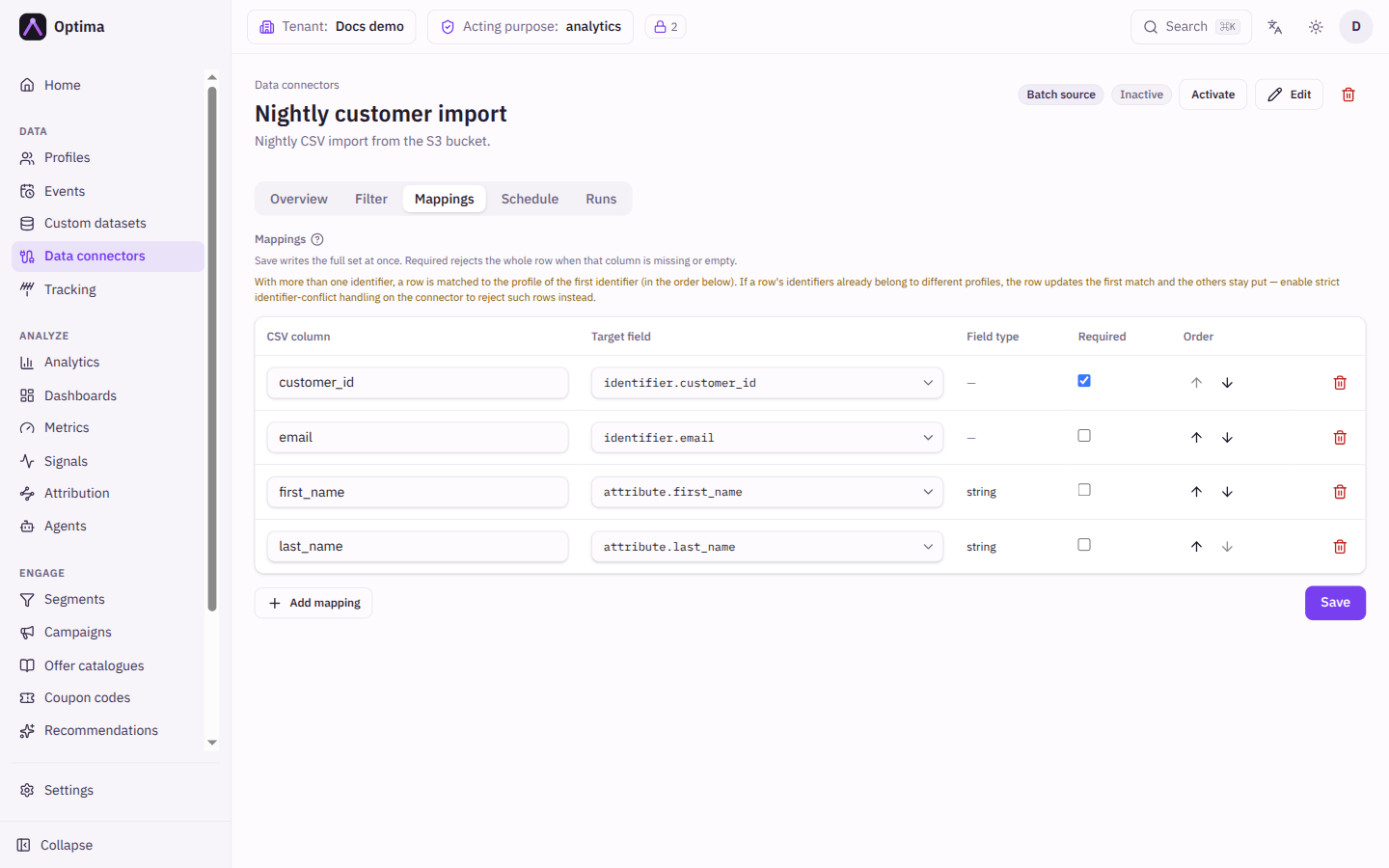
Fields
On an import (Batch source) each row of the table is one mapping:
| Field | Meaning | Valid values | Default |
|---|---|---|---|
| CSV column | The column heading in the file. For a SQL source this is the Result column of the query. | Text | Empty |
| Target field | The Optima field that receives the value. | See the table below | None |
| Field type | How the value is read. For attribute. targets it comes from the attribute's type in your schema and is shown as read-only ("from schema"); other targets show a dash. | As declared in the schema | string when the schema declares nothing |
| Required | A row whose column is missing or empty fails instead of being imported without it. | On or off | Off |
| Order | Position in the list. Use the up and down arrows. | Order added |
On an export (Batch sink) the columns are Column (the heading written), Source field (the Optima field) and Order. Top to bottom is left to right in the file. With no mappings the default column set is written. Fields a row does not have are exported as empty cells. For a SQL sink the column names are those of the target table.
Target field options depend on the data type:
| Data type | Target fields |
|---|---|
| Profiles | identifier.<name> for each identifier of the entity, attribute.<name> for each attribute |
| Events | event_timestamp, source, event_key, the entity's identifier.<name> fields, and the attribute.<name> fields of the chosen event type |
| Consents | consent.purpose, consent.granted, consent.expires_at, identifier.<name> |
| Profile links | profile_link.parent_id, profile_link.child_id, profile_link.relation_type |
| Custom dataset | dataset.record_key and the dataset's attribute.<name> fields |
| External signal values | signal.name, signal.value, signal.computed_at, signal.valid_until, signal.model_version, identifier.<name> |
Actions
- Add mapping adds a row. For a SQL source Use columns reads the column names from the query so you do not retype them.
- Arrows reorder; the bin icon removes a row.
- Save writes the whole set at once.
Rules the tab enforces, with a message beside the table:
- Profile, event, consent and signal imports must map at least one
identifier.column, because imported rows are matched to or create profiles by identifier. - Event imports need an Event type chosen on the connector (Edit → Event type). Only that event type's attributes can be mapped.
- Signal imports need a
signal.valuemapping, plussignal.nameunless the connector pins exactly one signal. - With more than one identifier mapped, a row is matched to the profile of the first identifier, in the order shown. If the identifiers already belong to different profiles, the row updates the first match. Turn on Reject rows matching multiple profiles on the connector to reject such rows instead.
CSV details such as CSV delimiter and CSV quote character are connector settings. Values that contain the delimiter, the quote or line breaks are wrapped in the quote character, with embedded quotes doubled, when exporting and when reading.
Examples
Customer file. A file with email, fname and tier columns, imported as Profiles: email to identifier.email (Required), fname to attribute.first_name, tier to attribute.loyalty_tier.
Narrow export. A Profiles batch sink with identifier.email named Email address and attribute.loyalty_tier named Tier writes a two-column file in that order.
Common problems
- Save is disabled. An identifier or event type is missing; the warning above the table says which.
- A target field is missing from the list. It is not in the schema for that entity or event type, or the wrong Entity type is set on the connector.
- Rows fail with "required". The mapped column is empty in the file. Clear Required if blanks are acceptable.
- Dates are off by hours. Set Timezone on the connector for timestamps without an offset.
- A
computed.mapping is refused. The name must be an existing computed attribute of the entity type set in the schedule's export filter (or on the connector).computed.*maps all of them. Save the Schedule tab with an entity type first.