Metrics
Watch one number on a schedule, keep its history, and get an email when it moves in a way you did not expect.
A metric is one number, recomputed on a schedule with its history kept. For example: total profiles, events in the last 7 days, or purchase revenue this month. Turn on alerting and a broken data feed or a runaway campaign finds you, instead of the other way round.
A report answers "show me this now". A metric answers "watch this one number and tell me when it moves".
Who uses it
Business owners and campaign managers who care about a handful of figures. Reading metrics, their history and alerts, running a metric and previewing a draft need analytics_viewer. Creating, editing and deleting metrics, and Trigger, need analytics_editor. You can also use another role your administrator has given access to this area — see Licences and roles. Metrics are part of the core licence, but an agreement can exclude them for an account.
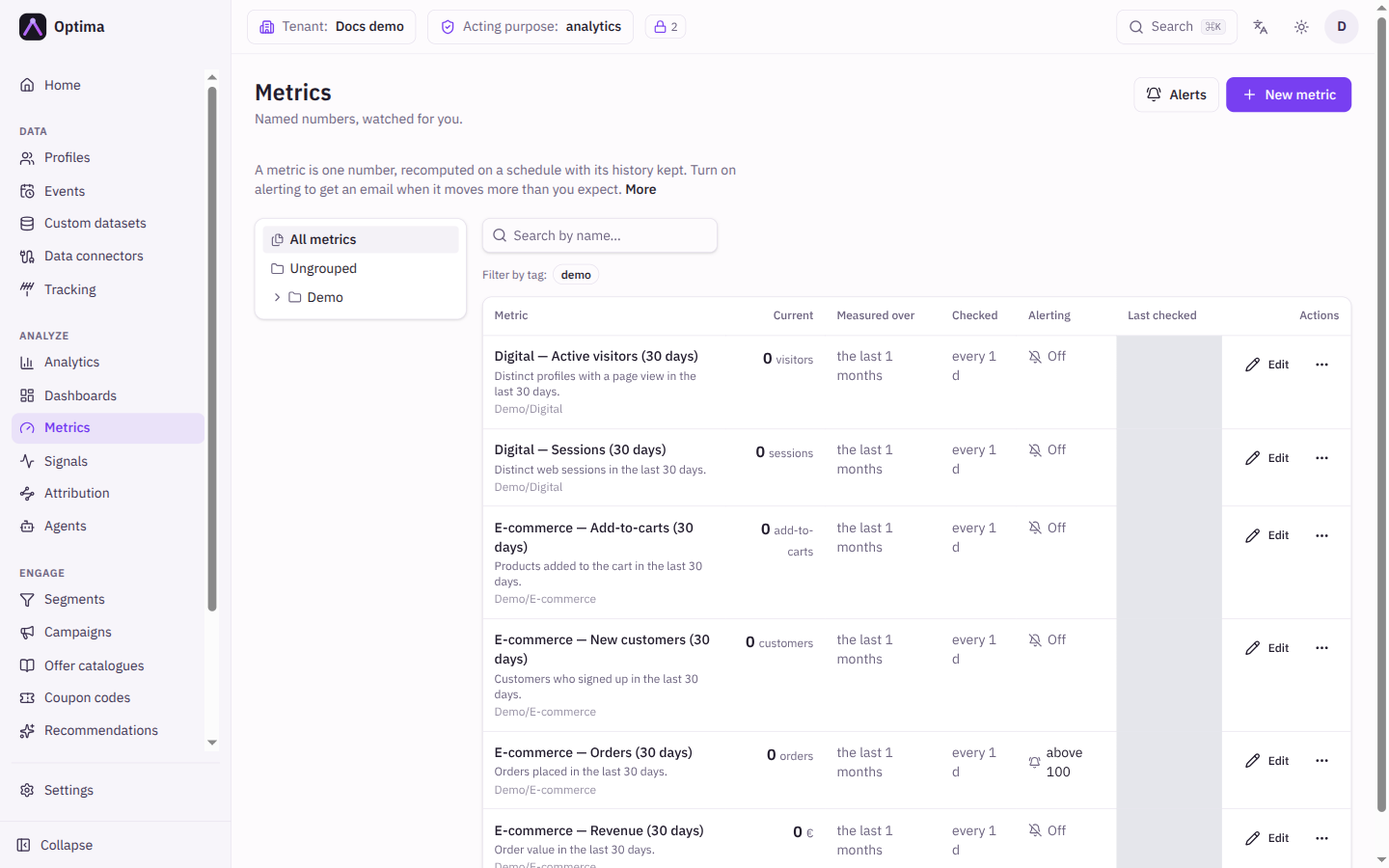
The list can be searched by part of a name (any part of the name matches) and filtered by folder and tag. Choosing a folder or tag adds a step to your browser history, so Back undoes it; typing in the search box does not. Each row shows:
| Column | Meaning |
|---|---|
| Metric | Name, description and folder. A Paused marker means the metric is not checked on schedule. |
| Current | The last recorded value with its unit. Not checked yet appears before the first check. |
| Measured over | The time window each check covers, for example "the last 7 days" or "all time". |
| Checked | How often the value is recomputed. |
| Alerting | The alert rule in short form, or Off. |
| Last checked | When the value was last recorded. |
Fields
New metric (or Edit on a row) opens the editor.
What it is
| Field | Meaning | Valid values | Default |
|---|---|---|---|
| Metric | The name. | Text, required | Empty |
| Unit | A label shown next to the value, such as orders. Nothing is converted. | Text | Empty |
| Description | What the number means. | Text | Empty |
| Folder, Tags | Organise the list. Use / to nest folders, for example Growth/Revenue. | Text | None |
What to measure
The editor contains a one-number query: a Source type and Source, one Aggregate (function and field), and Filters. The functions are the same as in Analytics: count, count_distinct, sum, avg, min, max. A metric has no groupings, sort or absolute date range, because the time window below replaces them.
| Field | Meaning | Valid values | Default |
|---|---|---|---|
| Measured over | The period each check covers, always ending now. Leave the amount empty for all time, the right choice for totals such as the profile count. Months count as 30 days and years as 365, because the window rolls. | An amount and a unit (days, weeks, months, years), up to 10 years; presets all time, 7, 30, 90 and 365 days | 7 days |
| Checked | How often the value is recomputed. Checking faster than the data moves only adds load. | Every 5, 15 or 30 minutes; 1, 3, 6, 12 or 24 hours; 1 week | Every 24 hours (1 day) |
| Preview | Computes the value now so you can sanity-check the setup. Nothing is recorded and no alert can fire. | Button | |
| Check this metric on schedule | Turn off to keep the metric and its history without recomputing it. | On or off | On |
Alerting
Email me when this changes turns alerting on. It is on for a new metric. Choose Alert when:
| Rule | What it does | Extra fields |
|---|---|---|
| It changes by a percentage | Alerts when the value moves by at least a percentage compared with the previous check. | Alert on (Any change, Drops only, Rises only; default Any change); Change of at least (%) (default 15); Ignore below (default 0) |
| It crosses a fixed value | Alerts once each time the value goes past a bound, and not again until it has come back inside. | Rises above and Falls below; leave a side empty to skip it. Falls below must be less than Rises above. At least one bound is required. |
| It stops receiving data | Alerts once when the metric has returned no value, or zero, for a period, and again only after data has come back. | No data for (minutes), at least 5 and at most 525,600 (one year); default 60 |
| It changes against an earlier period | Compares the current value with the value recorded earlier. Skipped until that much history exists. | Compare with: The same time yesterday or The same time last week (default last week); plus the percentage fields above |
Ignore below is a noise floor on the metric itself, not on the size of the change. With 10 here, a drop from 100 to 0 still alerts but a drop from 2 to 1 does not. Leave it at 0 to alert on any movement.
For the no-data rule, the clock starts at the first check that finds no data and the alert goes out at the next check, so it may arrive later than the period you set.
Shared by every rule:
| Field | Meaning | Valid values | Default |
|---|---|---|---|
| Then stay quiet for | After an alert, no further alert for this long, so a number hovering around the threshold does not email you at every check. | No quiet period, or an amount in minutes, hours, days or weeks, up to 1 year | 1 day |
| Send to | Who receives the email. Only members of this workspace can be picked, because an alert carries a business number and so can only reach someone who could already read it by signing in. | People in this workspace. When you are the only user, the picker says so and alerts go to you. | Whoever created the metric |
Actions
On each row, Edit opens the editor and the more actions menu has:
- Preview: computes the value now and shows it, marked Preview — not recorded. Nothing is saved and no alert is sent.
- Trigger: runs a full check now, exactly as the scheduler would: records the value and sends an alert if it qualifies. A message tells you whether an alert was sent.
- Delete: removes the metric together with its recorded history and fired alerts. This cannot be undone.
Preview and Trigger each depend on their own permission. When your role cannot use one, it is disabled and says why, for example "Your role cannot run this metric." or "Recording a check writes the series and can send alerts — editors only."
Alerts at the top opens the alert feed.
The metric page
Selecting a metric name opens its page, with the same Preview and Trigger actions (gated by the same permissions as on the list), Edit, a refresh button that re-reads the recorded value, history and alerts without recomputing, and delete. A Preview that fails is reported as Preview failed; nothing was written.
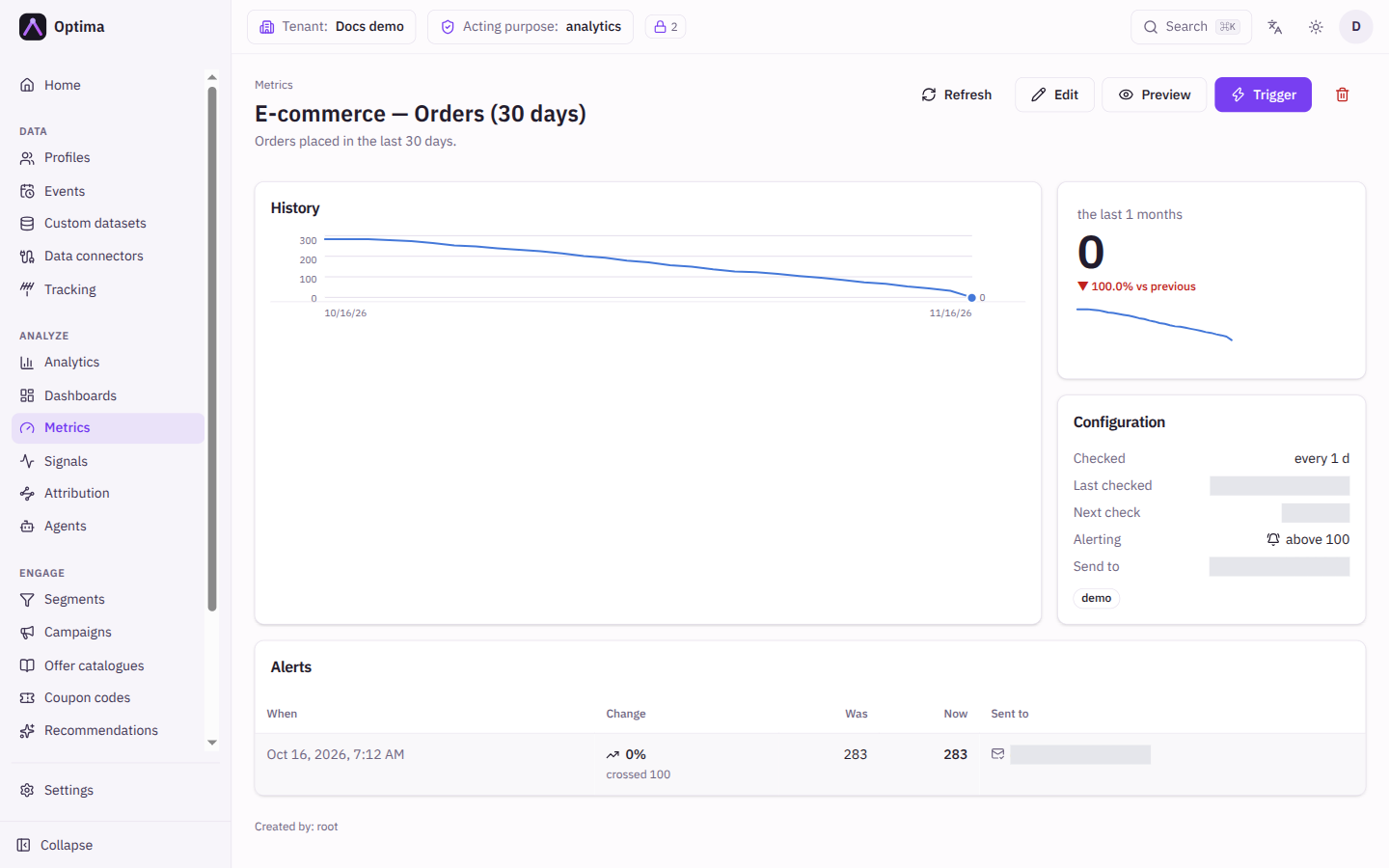
- History charts every recorded value. With only one value so far it says a line needs a second check.
- Configuration summarises the check interval, last and next check, the alert rule and the recipients.
- Alerts lists the alerts this metric has fired.
- If the last check failed, a message says so. The value shown is then the last one that succeeded, so it may be out of date, and nothing was recorded for the failed check.
Examples
Revenue guard. Source type events, source purchase, aggregate sum of the order value, Measured over 1 day, Checked every hour. Alert: It changes against an earlier period, compare with The same time last week, change of at least 30%, Drops only.
Feed went quiet. Source type events, source page_view, aggregate count, Measured over 1 day, Checked every 15 minutes. Alert: It stops receiving data after 60 minutes.
Profile ceiling. Source type profiles, aggregate count, Measured over all time. Alert: It crosses a fixed value, Rises above your plan's profile limit.
Common problems
- Not checked yet. A new metric shows its first value after the next scheduled check. Use Trigger to record one immediately.
- I get no emails. Check that Email me when this changes is on, that the rule can fire (for a percentage rule, Ignore below may be hiding small movements), and that you are listed under Send to. The alert feed shows Not sent with a reason for alerts that could not be delivered.
- The metric keeps alerting. Raise Change of at least (%), or lengthen Then stay quiet for.
- The last check failed. The message explains why. The value on screen is the last good one.
- The metric is paused. Check this metric on schedule is off. Turn it on again.
- I cannot create, edit or trigger a metric. That needs
analytics_editor. Saving is refused (403) if the metric is built from data your privacy clearance or granted purposes do not cover, because a metric runs unattended and its value is shown to every reader. Saving a report is refused in the same case.
Related
- Alert feed
- Analytics, for the query options
- Dashboards, where metrics become tiles