SDK keys
Create and manage the public keys your websites and apps use to talk to Optima, and get the install snippet.
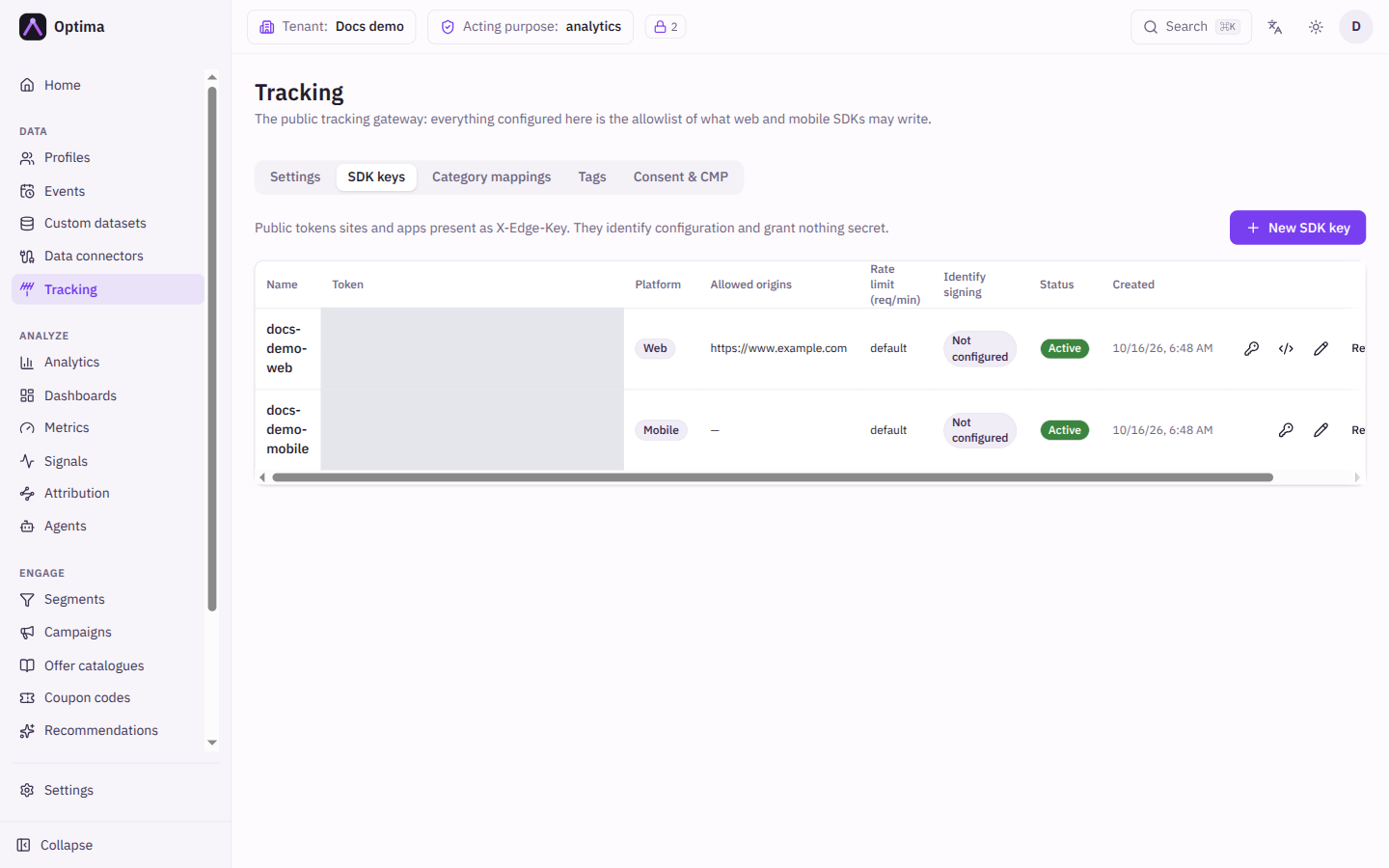
An SDK key is a public token that your website or app presents to Optima. It identifies which configuration applies, which sites may use it and how fast they may call. It grants nothing secret: it can be read in your page source, which is why it is limited by the allowed origins and by everything you permit under Tracking. Keys live on the SDK keys tab of Tracking.
Who uses it
App developers. Reading needs integration_viewer and changing needs integration_editor, or another role your administrator has given access to this area — see Licences and roles. SDK keys are part of the Core package.
Fields
The table shows Name, Token, Platform, Allowed origins, Rate limit (req/min), Identify signing, Status and Created. The token has a copy button.
| Field | Meaning | Valid values | Default |
|---|---|---|---|
| Name | A label for the key, for example the site it belongs to. | Text | None (required) |
| Platform | Web or Mobile. | Web, Mobile | Web |
| Allowed origins | The sites allowed to use a web key. Not shown for mobile keys. | One or more addresses of the form https://www.example.com, with scheme and host (and port if needed), no path and no wildcard | Empty (a web key needs at least one) |
| Rate limit (req/min) | How many requests per minute the key may make. | A whole number of 1 or more | Empty, which uses the default |
| Active | Shown when editing. Turns the key off without revoking it. | On or off | On |
The token is created for you when you save, and shown in the list. It is public by design.
Actions
- New SDK key creates a key. Edit (the pencil, or select the name) changes it.
- Snippet (web keys): shows two equivalent ways to install the web SDK for this key, Auto-init (recommended) and Command queue (buffers calls made before the SDK loads), each with a Copy button. If the Public base URL is not set under Tracking, the snippet uses a placeholder host and says so. The dialog also offers Create recommended mappings, which creates a
page_viewcategory mapping for the URL, referrer, title, session and campaign fields. It is disabled with a reason when there is nopage_viewevent type, apage_viewmapping already exists, or the event type has none of the recommended attributes. - Identify signing secret (the key icon): opens Identify signing.
- Revoke: stops the key within about 30 seconds and keeps it in the list marked Revoked, so the audit trail is kept. Queued traffic for it is dropped. Revoking cannot be undone; create a new key instead.
- Delete (the trash can): removes the key completely. Prefer Revoke so the history stays.
For SDK installation and calls, see the SDK guides: Web, iOS, Android and React Native.
Examples
A key for the shop. Name Kupko shop, Platform Web, Allowed origins https://www.kupko.example and https://shop.kupko.example. Leave Rate limit empty.
A key for the app. Name Kupko iOS and Android, Platform Mobile. Mobile keys have no origins.
Common problems
- The browser console shows a refused request. The site's address is not in Allowed origins. Add the exact scheme, host and port, with no trailing path.
- A mobile key is rejected on the web. The platform is fixed to the key; create a Web key.
- A revoked key still works for a short while. It stops within about 30 seconds.
- The snippet shows a placeholder host. Set the Public base URL on the Tracking Settings tab.