Tracking
Decide what your website and mobile apps may send to Optima, create SDK keys and map SDK events to your event types.
Tracking is the allowlist for everything the Optima SDKs send from the public internet. A visitor's browser or phone can only write what you have listed here: the profile type anonymous visitors become, the identifiers and attributes a sign-in may attach, the event categories that become events, and the purposes consent is recorded under. Anything not listed is dropped. The screen has five tabs: Settings, SDK keys, Category mappings, Tags and Consent & CMP.
Who uses it
App developers and integration specialists. Reading needs the integration_viewer role and changing needs integration_editor, or another role your administrator has given access to this area — see Licences and roles. Tracking is part of the Core package and needs no extra licence feature. A role that can read but not change shows the tabs with disabled buttons.
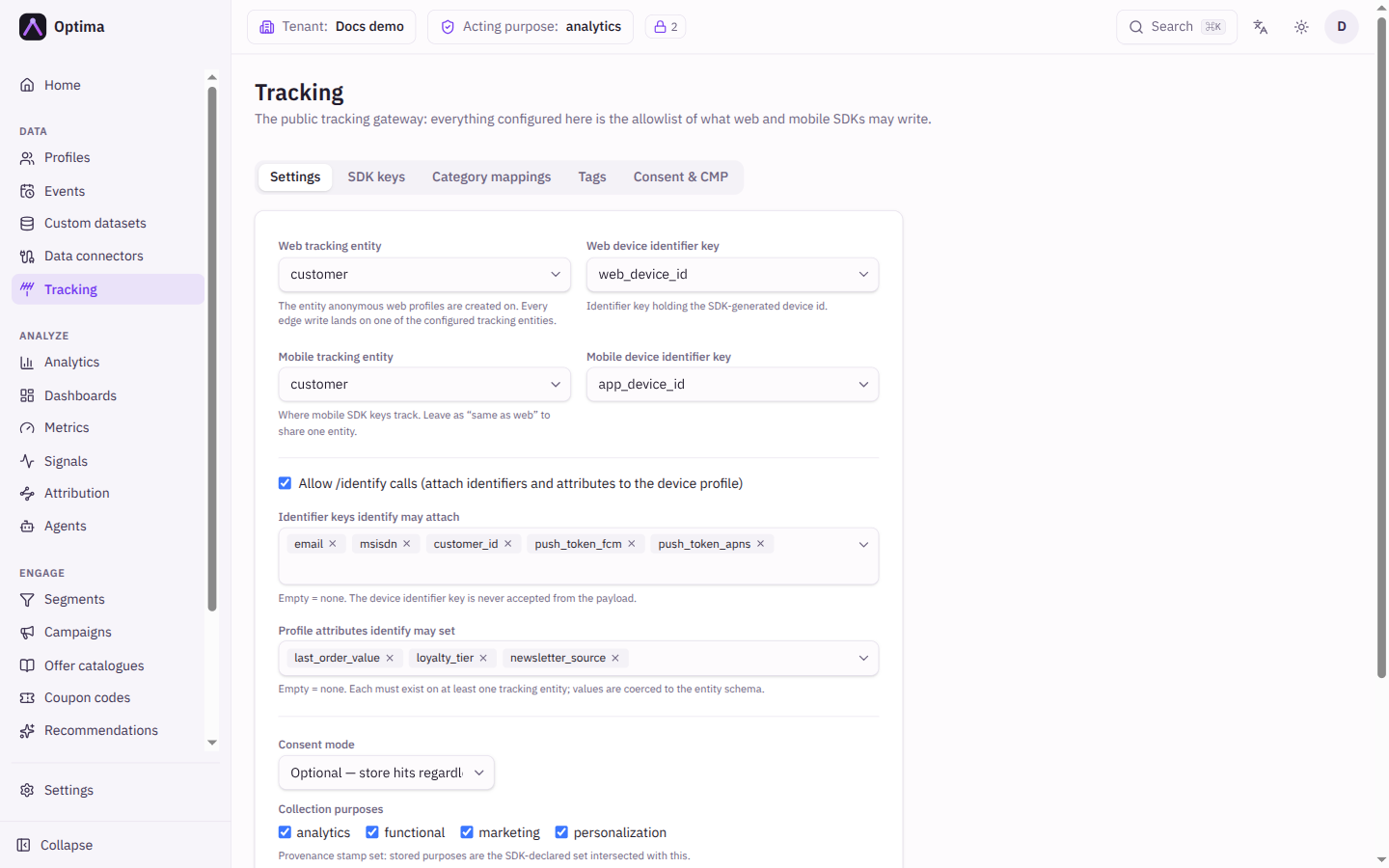
Settings
Until the first save, the tab says Edge tracking is not configured yet. Pick a tracking entity and a device identifier key to enable collection.
| Field | Meaning | Valid values | Default |
|---|---|---|---|
| Web tracking entity | The profile type anonymous web visitors are created as. Every write from a web SDK key lands on this entity. | Any entity type in your schema | None (required) |
| Web device identifier key | The identifier that holds the id the SDK generates for each browser. | An identifier key declared on the chosen entity | None (required) |
| Mobile tracking entity | Where mobile SDK keys track. | Same as web or any entity type | Same as web |
| Mobile device identifier key | The device id identifier for mobile. | Same as web or a key declared on the mobile entity | Same as web |
| Allow /identify calls | Lets the SDK attach identifiers and attributes to the device's profile when a visitor signs in or fills a form. | On or off | On |
| Identifier keys identify may attach | The identifiers a sign-in may attach. The device identifier is never accepted from a request. | Identifier keys of the tracking entities; empty means none | Empty |
| Profile attributes identify may set | The attributes a sign-in may set. Values are converted to the attribute's type. | Attributes of the tracking entities; empty means none | Empty |
| Consent mode | What happens to a hit that does not declare consent. | Optional: store hits regardless of declared consent. Require: drop hits that miss the required purposes. | Optional |
| Required purposes | Shown with Require. A hit must declare every one of these or it is dropped. | Active consent purposes | None |
| Collection purposes | The purposes stamped on what is stored. The stored purposes are the ones the SDK declared, limited to this set. | Active consent purposes | None |
| Public base URL | The public address of your Edge host. Hosted form pages and confirmation links are built on it, and the SDK install snippet uses it. | A full address such as https://edge.example.com | Empty |
Saving replaces the whole settings document, so the form always sends every field. A device identifier key that is not declared on its entity is refused when you change the key or the entity; settings saved earlier can still be re-saved unchanged. A CMP mapping entry with no purposes is refused too.
Choose the entity first: the device key and the identify lists take their options from its schema. If the entity has no identifiers, add one in the schema settings first. If no purposes exist yet, create them under Settings → Privacy → Purposes.
Save stores the whole tab. A save changes what the public side accepts within about half a minute.
SDK keys
The SDK keys tab lists the public tokens your sites and apps present to Edge. It is described on its own page: SDK keys. The signing secret that lets your backend vouch for a logged-in visitor is on Identify signing.
Category mappings
Only mapped categories become events, and only mapped payload fields become attributes. A mapping says: when the SDK reports this category, create an event of this type and copy these fields into these event attributes. Anything else the SDK sends is dropped, because the public internet never gets arbitrary writes to your data.
The tab lists Category, Event type, Attributes (the number mapped) and Status. Select a category or the pencil to edit it, or the trash can to delete it. New mapping opens the dialog.
| Field | Meaning | Valid values | Default |
|---|---|---|---|
| Category | The name the SDK reports for the hit. | Text, for example page_view | None (required) |
| Event type | The event type created from the hit. | An event type from your schema | None (required) |
| Attribute mapping | Pairs of Source token and Target attribute. Fields not listed are dropped. | Sources: $name, $props.yourKey, and $context.url, $context.referrer, $context.title, $context.language, $context.screen_w, $context.screen_h, $context.ua. Targets: attributes of the chosen event type. | Empty |
| Active | Whether the mapping is used. | On or off | On |
Deleting a mapping drops new hits of that category as unknown within about half a minute.
The Snippet button on a web key offers Create recommended mappings, which sets up a page_view mapping for you (see SDK keys). It needs a page_view event type first.
Tags and Consent & CMP
The Tags tab manages third-party scripts and pixels that run only after the visitor grants the purpose you tie them to; see Tags. The Consent & CMP tab reads the consent answer from a consent platform you already use; see Consent banner and CMP.
Examples
Basic website tracking. Web tracking entity visitor, web device identifier key device_id, Consent mode Optional, Public base URL https://edge.kupko.example. Create a web SDK key, then a page_view mapping with $context.url to url and $context.title to title.
Require marketing consent before storing anything. Consent mode Require with Required purposes analytics. A hit that does not declare analytics is dropped.
Let a sign-in link a customer. Allow /identify calls on, Identifier keys identify may attach email, Profile attributes identify may set first_name. The SDK can then attach an email address and a first name to the device's profile, and nothing else.
Common problems
- Nothing shows up in Events. The category has no mapping, the mapping is inactive, or the event type has no attribute you mapped to. Check the Category mappings tab.
- Hits are dropped for missing consent. Consent mode is Require and the SDK did not declare every required purpose. Check the banner or the consent calls on your site, or switch to Optional while you test.
- An identify call attaches nothing. The identifier or attribute is not in the identify lists, or Allow /identify calls is off.
- Hosted form links are empty. Set the Public base URL and create an active web SDK key.
- A change has no effect yet. Settings, keys and mappings take effect within about 30 seconds.