Approvals
Review campaigns that are waiting for sign-off, approve or reject them, and understand when an edit clears an approval.
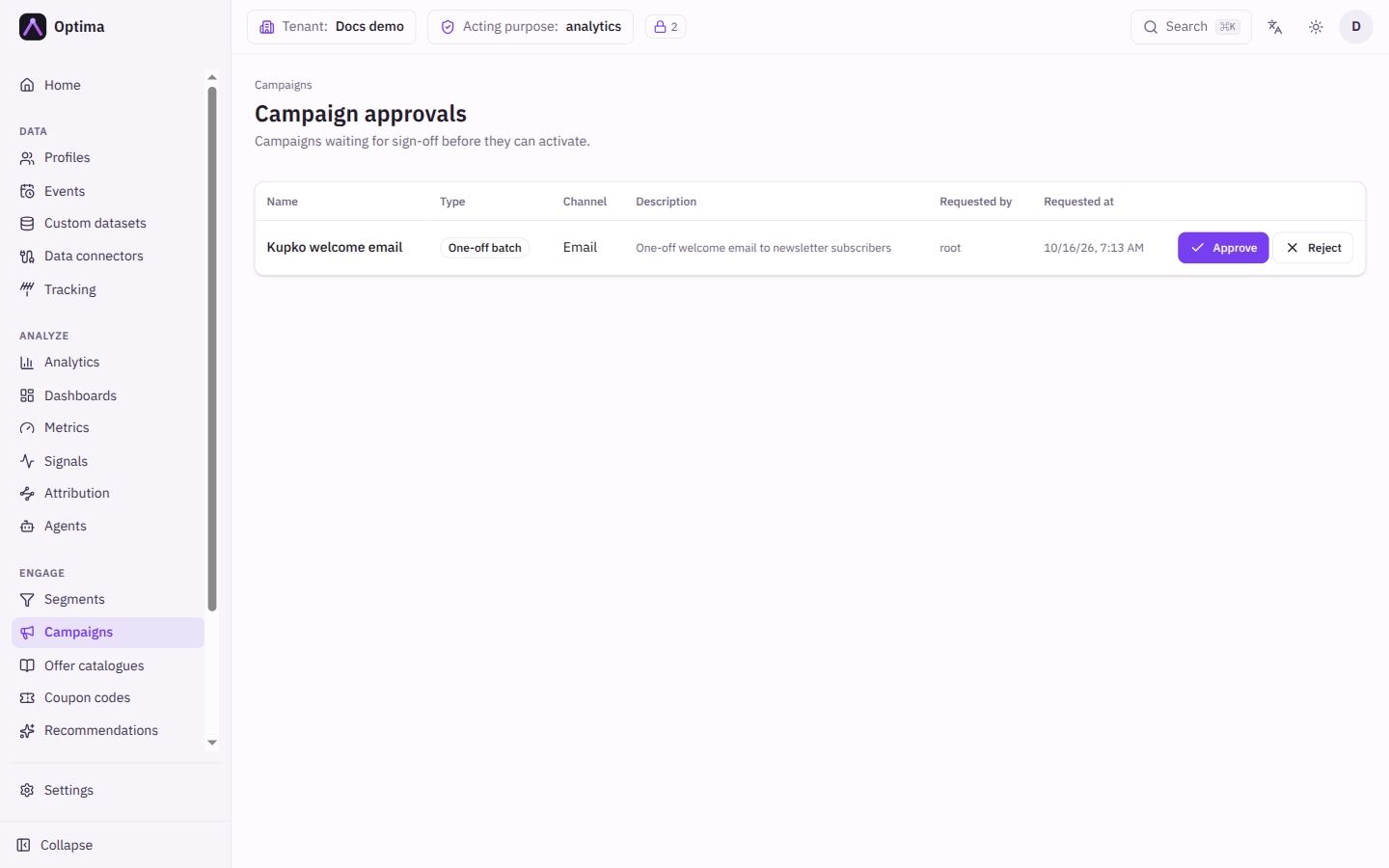
A campaign cannot go live without a standing approval: a named person with approval rights has signed off what it sends. The Campaign approvals screen is the approvers' queue. It lists every campaign with an open approval request and lets an approver approve it or reject it with a reason. This page also explains the rules around approval, because they decide when you need to ask again.
Who uses it
Approvers use the queue; everyone who builds campaigns requests approval from the campaign page. Opening the queue and deciding on requests needs campaign_approver or campaign_admin, or another role your administrator has given access to this area — see Licences and roles. Requesting approval needs campaign_editor. Approvals are part of the Campaign package. A person without approval rights who opens the queue sees You do not have permission to review campaign approvals.
Fields
The queue is a table. Select a campaign name to open the campaign.
| Column | Meaning |
|---|---|
| Name | The campaign waiting for review. |
| Type | One-off batch, Recurring batch, Journey-based or Inbound offer. |
| Channel | The channel the campaign sends on, if it has one. |
| Description | The campaign's description. |
| Requested by | Who asked for the review. |
| Requested at | When the request was made. |
When a request is rejected, the reviewer gives a Reason. It is required, because a rejection nobody can act on is not a review. The requester sees the reason on the campaign.
How approval works
- Build the campaign. Anyone with
campaign_editorcan do this. - Request approval. Select Request approval on the campaign page. You can do this at any time, before you try to activate, and also while the campaign is already running if you want a new review. The campaign appears here and its approval badge reads Pending.
- An approver decides. Approve records who approved and when. Reject needs a reason; the badge reads Rejected and the campaign page shows Previously rejected with the reason. Fix what was asked, then request again.
- Activate. A campaign with a standing approval can be activated by anyone who may change campaigns.
Approvers approve by activating. If you hold approval rights and activate a campaign that has no standing approval, the activation itself is recorded as your approval, under your name, and the campaign goes live. You do not need to queue a request for yourself.
Everyone else is asked to request. If you do not hold approval rights and no approval stands, Activate is refused with a banner, This campaign needs approval before activation, and a Request approval button. Ask an approver to review it, or request approval yourself.
The approval badge
| Badge | Meaning |
|---|---|
| Approved | A standing approval is in place. Pointing at it shows who approved and when. |
| Approved · re-review pending | The campaign is approved and keeps running while a new review is requested. |
| Pending | A request is open. Pointing at it shows who requested. |
| Rejected | The last request was rejected. The campaign page shows the reason. |
Edits clear an approval
An approval signs off what a campaign sends and to whom, so it does not outlive a change to that. When someone edits something that changes what the campaign sends or who it reaches, the standing approval is cleared and the next activation needs a fresh approval. That covers:
- the campaign's own settings: audience, channel, template, provider, schedule, consent purpose, language, frequency cap, silent hours, control group, stop conditions and similar;
- its offers and its journeys, including adding, changing, deleting or re-running a journey (turning a journey on or off does not count);
- the message templates it sends, and the documents and coupon pools those templates use;
- the segments it targets or uses in an eligibility rule, entry trigger, condition, goal or hold;
- the offer catalogues it ranks, and the delivery providers it sends through;
- restoring any of these from the change history, and reopening a stopped campaign.
Labels and filing do not count. Changing the name, description, folder or tags of a campaign keeps the approval, and so does saving without changing anything.
An edit never changes the status of a campaign. A campaign that is already Active keeps running after its approval is cleared. The cleared approval stands in the way of the next activation, for example after a pause. When an edit to a shared object, such as a template or a segment, clears the approval of campaigns, the console warns you and names those campaigns, with links. The change history records Approval cleared by an edit for each.
Actions
- Approve approves the campaign. It can now be activated by anyone who may change campaigns.
- Reject opens a dialog where you enter the Reason (required). The requester sees it and can fix the campaign and request again.
- Request approval (on the campaign page) opens or renews a request. A standing approval is not removed by requesting again.
Examples
Two-person rule. Campaign creators build and request approval. A campaign manager with campaign_approver opens Campaign approvals each morning, reads the campaign, and selects Approve or Reject with a reason such as "Offer ends on the wrong date".
An approver launches their own campaign. Someone with campaign_admin builds a campaign and selects Activate. The confirmation shows how many profiles match, and the activation is recorded as their approval.
Fixing a typo after approval. A creator edits the message template an approved, paused campaign sends. The approval is cleared and the console says which campaigns were affected. They select Request approval before activating again.
Common problems
- Activate says the campaign needs approval, but I already asked. The request is still pending. Ask an approver to open Campaign approvals.
- My campaign was approved yesterday and now needs approval again. Something it sends or reaches was edited, perhaps a template or a segment shared with other campaigns. The change history of the campaign shows Approval cleared by an edit.
- A running campaign lost its approval. It keeps running. The approval gates the next activation.
- The queue says I do not have permission. Your roles do not include approval rights. Ask your administrator for
campaign_approver. - Reject will not submit. The reason is required.