Coupon codes
Keep pools of unique, single-use codes that your messages hand out one by one, and watch how many are left.
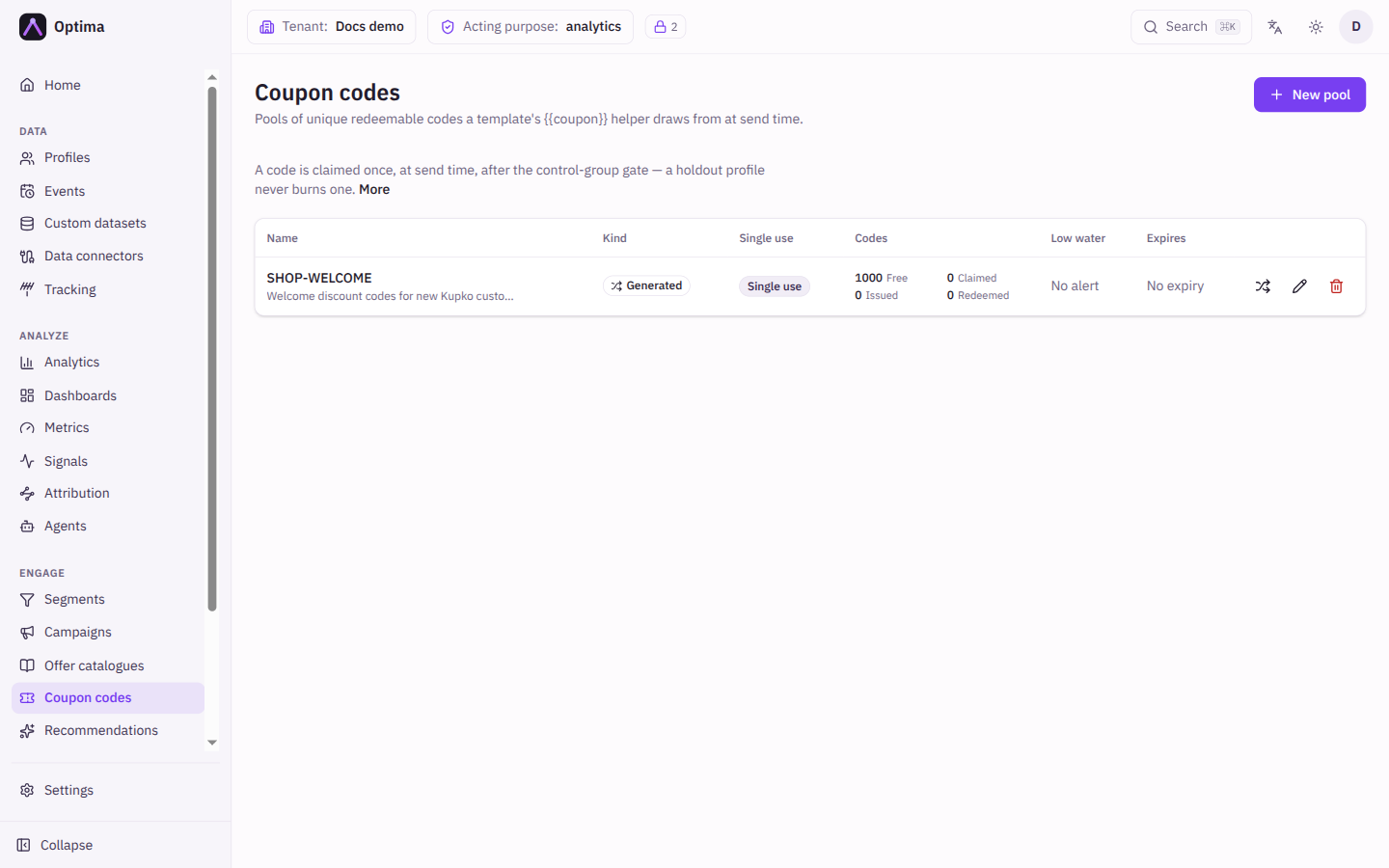
A coupon pool is a supply of unique redeemable codes. When a message template contains the coupon helper, each recipient gets a different code taken from the pool at the moment the message is sent. A pool is stocked in one of two ways: you upload a list of codes that your shop or commerce system created, or you give Optima a pattern and it creates codes on demand. The Coupon codes screen shows every pool with how many codes are free, claimed, issued and redeemed, and warns you before one runs dry.
A code is taken once, at send time, after the control group check. A customer who is held out of a campaign never uses up a code.
Who uses it
Campaign managers, who stock pools and watch them. Reading needs campaign_viewer; creating pools, uploading and generating codes, editing and deleting needs campaign_editor. campaign_admin can do both. You can also use another role your administrator has given access to this area — see Licences and roles. Coupon codes need the Campaign package and the coupon codes feature; if your licence leaves it out, Coupon codes is not in the navigation.
Fields
The pool list
| Column | Meaning |
|---|---|
| Name | The pool name, with its description underneath. Select it to edit. This is the name you give the coupon helper. |
| Kind | Uploaded or Generated. |
| Single use | Shows Single use when a code can be given out only once. |
| Codes | Free (still available), Claimed (reserved for a message being sent), Issued (given to a recipient), Redeemed (used by the customer, as reported back to Optima), and how many have expired. |
| Low water | The alert threshold. Shows No alert when it is 0, and a warning such as 12 left — below the 50 threshold when the pool is running low. |
| Expires | The last day codes in the pool can be handed out, or No expiry. |
New pool and Edit pool
| Field | Meaning | Valid values | Default |
|---|---|---|---|
| Name | The pool's name. | Letters, numbers, spaces, underscores or hyphens, starting with a letter or number, up to 64 characters. For example Summer2026 vouchers. | None (required). Must be unique. |
| Description | A note for your colleagues. | Text | Empty |
| Kind | How the pool is stocked. Fixed once the pool is created, because switching would leave the existing codes in the wrong shape. | Uploaded, Generated | Uploaded |
| Pattern | Shown for Generated. The shape of the codes to create. | One or more {n} groups of random characters (2 to 32 characters each, at least 6 in total) mixed with literal letters, digits, underscores and hyphens. SUMMER-{8} gives codes such as SUMMER-K3F9Q7XA. {4}-{4}-{4} gives three groups separated by dashes. | None (required for a generated pool) |
| Single use | Whether a redeemed code can be given out again. Off lets the same code reach more than one profile; the system that redeems the code, not Optima, then enforces any limit. | On or off | On |
| Low-water threshold | When the number of free codes first falls below this number, a notification is sent according to your notification subscriptions. | Whole number, 0 or more. 0 turns the alert off. | 0 |
| Expires | Free codes after this date stop being handed out. The date is read as the end of that day in UTC. | A date, or empty for no expiry | Empty |
Upload CSV
For an Uploaded pool. One code per line, with an optional code header line. After the upload, the screen reports how many codes were imported and how many duplicates were skipped. A code that already exists in another pool is skipped too (skipped_other_pool in the API response), so one code never points at two pools.
Generate codes
For a Generated pool. How many codes takes a whole number from 1 to 100,000. Codes are created from the pool's pattern and never repeat an existing code.
How redemption is reported
Optima knows a code was redeemed when the system that accepts it, usually your shop, sends a coupon_redeemed event for the customer with an attribute code holding the code. Optima then counts the code as redeemed and records a redeemed contact for the message that carried it. There is nothing to do on this screen.
Actions
- New pool opens the pool dialog.
- The upload icon on an uploaded pool picks a CSV file and imports it. The generate icon on a generated pool opens Generate codes.
- Edit changes the pool's name, description, single-use setting, threshold and expiry. The kind cannot change.
- Renaming or deleting a pool that an active message template or document still uses through the
couponhelper is refused, and the message names the template. Change the template first. If you delete anyway, that template's sends fail until it points at an existing pool. - Delete removes the pool and its free and claimed codes at once. If codes from the pool have already been issued or redeemed, the console explains that deleting would break their audit trail and offers Delete anyway, which removes the pool and every code in it, including redeemed ones. Past messages and receipts are not affected.
Sink mode
When your tenant's outbound mode is sink, nothing is delivered. A code claimed while a message renders is released again, so the pool is unchanged. Check coupon issuance on a live tenant.
Examples
Stock a pool from your shop. Export the vouchers from your commerce system as a CSV with one code per line. Create a pool Summer2026 vouchers of kind Uploaded, Single use on, a Low-water threshold of 500 and an Expires date at the end of the season, then use the upload icon. Use it in a template with {{coupon "Summer2026 vouchers"}} (see Template helpers).
Let Optima create the codes. Create a pool of kind Generated with pattern WELCOME-{8}. Use the generate icon and ask for 10000 codes. Generate more later when the free count drops.
Common problems
- Only an uploaded pool accepts a CSV. The pool you picked is generated. Use Generate codes instead.
- The pattern does not leave room for that many unique codes. Widen the pattern, for example
{10}instead of{6}, or ask for fewer codes. - A pool with this name already exists. Names are unique. Choose another. The same message can appear when a rename is refused because a template still uses the old name; the text after it says which.
- Enter a pattern with at least one
{n}group. A generated pool needs a pattern before it can be saved. - Sends fail after renaming or deleting a pool. A template still names the old pool. Edit the template to use the new name.
- A message is not sent because the pool is empty. Watch the Free count and set a Low-water threshold so you are told in time. Upload or generate more codes.
- Codes from the pool stop working on a date. The pool's Expires date has passed. Edit the pool to move it, or stock a new one.