Pre-flight
Find out who a campaign or journey would reach, and what one person would receive, before anything is sent.
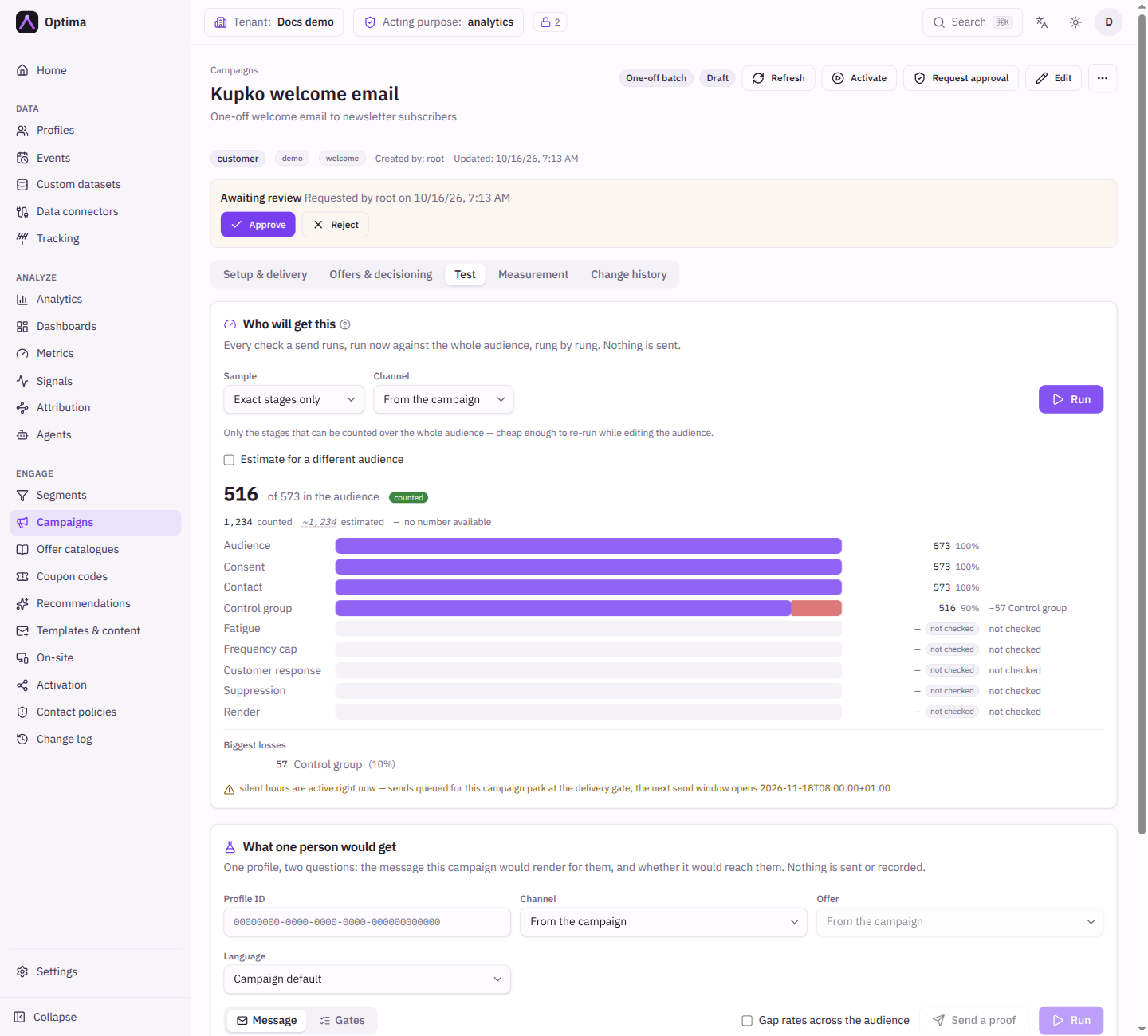
Pre-flight answers two questions before you activate. How many people will actually get this, and why not the rest? And what would one particular person receive? It runs the same checks a real send runs, against your real audience and profiles, and sends nothing. For a campaign it is the Test tab of the campaign page; for a journey it is the Test button on the journey canvas.
The audience count you see on the campaign is only the top of a ladder. Consent, contact address, unsubscribes, caps, fatigue, control group, rendering and the environment's sending mode all apply one person at a time at send time, and are invisible until a campaign has already run. Pre-flight runs the ladder now.
Who uses it
Campaign managers, before activating a campaign and again whenever a live campaign reaches fewer people than expected. Running the estimates and rendering a message needs campaign_viewer, or another role your administrator has given access to this area — see Licences and roles. Sending a proof needs campaign_editor. Pre-flight is part of the Campaign package.
Fields
Who will get this
Runs every check against the whole audience, rung by rung, and shows how many profiles are left after each.
| Field | Meaning | Valid values | Default |
|---|---|---|---|
| Sample | How the stages that cannot be counted over the whole audience are estimated. Exact stages only runs just the stages that can be counted exactly, which is quick enough to re-run while you edit the audience. A number estimates the rest by walking that many profiles down the real checks. | Exact stages only, 100 profiles, 500 profiles, 2000 profiles | Exact stages only |
| Channel | Overrides the campaign's channel for this run. Pin a channel here when the campaign uses Auto, because consent and contact cannot be counted exactly when the channel is chosen per profile. | From the campaign or a channel | From the campaign |
| Estimate for a different audience | A what-if. Pick another segment, or add conditions, to see how that audience would fare. Nothing is saved, and the result says it used the audience above, not the campaign's saved one. | A segment and conditions | Off |
Press Run. The result is a funnel: the audience at the top, then one step per check, with what each step removed (for example -1,204 Consent denied). Every figure carries a label that says how it was found.
| Label | Meaning |
|---|---|
| counted | A real count over the whole audience, or a fact that is the same for every profile. |
| sampled | Extrapolated from the sample. The band on the bar shows how much the true number could differ (95% confidence). |
| assumed | A declared assumption. Nobody measured it. |
| unavailable | The information behind this number could not be read. The steps below it carry on from the population above. |
| not checked | The check did not run, which is not the same as nobody being dropped. |
A Biggest losses list names the steps that removed the most people. cached marks an answer that came from a short-lived store rather than a fresh run.
The checks
| Check | What it asks |
|---|---|
| Audience | Who is in the segment and conditions. |
| Template | Whether the template exists, is active and has a variant for the channel. |
| Offer | Whether the offer exists. |
| Profile | Whether the profile exists and has not been erased. |
| Channel | Whether a channel is available (No eligible channel). |
| Provider | Whether a delivery provider is available. |
| Attachments | Whether the provider can carry the template's attachments. It fails when the chosen provider cannot. |
| Silent hours | Whether the moment falls in a silent window. |
| Fatigue | Whether a fatigue policy blocks the send. |
| Frequency cap | Whether the campaign's cap is reached. |
| Customer response | Whether the customer already answered (Already answered). |
| Consent | Whether the customer has granted the campaign's purpose. |
| Device | For on-site and push channels: whether a tracked device exists. |
| Contact | Whether there is a valid address (No contact address, Invalid contact address). |
| Suppression | Whether the address has unsubscribed. |
| Control group | Whether the customer is held out on purpose. |
| Render | Whether the message builds for this person. |
| Outbound mode | Whether the environment sends at all (Sending is off). |
| Rate limit | Whether the provider's rate limit would make the send wait. |
Each check reports passed, refused, not checked or could not be read. Outcomes are would send, would not send, could not decide, held out (deliberately not contacted so the campaign can be measured, which is not a failure), entitlement (an on-site channel: nothing is delivered now, the website or app shows it when the device next appears), sandboxed (a sandbox or development environment sends nothing) and deferred.
What one person would get
Pick one profile and see exactly what this campaign would do for them.
| Field | Meaning | Valid values | Default |
|---|---|---|---|
| Profile ID | The person to test. | A profile of the campaign's entity type | None |
| Offer | For campaigns that send an offer: which offer to render with. | From the campaign or an offer | From the campaign |
| Language | Overrides the language variant for this proof only. The checks still use the campaign's own language resolution. | Campaign default or a language | Campaign default |
| Gap rates across the audience | Also samples the audience, so each placeholder that came out empty shows the share of people it is empty for. | On or off | Off |
| Keep going past a refusal | Evaluates the rest of the checks after the first one refuses. The verdict is the same either way. | On or off | Off |
The answer has two tabs. Message shows the Rendered message (an HTML preview for email) and the Placeholders that filled in with nothing, each marked not on the profile or no value. Placeholders guarded with a default are not listed, because they are already handled. It also shows how the campaign resolved: the Channel, Variant, Template, Provider, Offer and Consent purpose. Gates (Gate ladder) shows each check with its evidence, and the verdict This person would receive the message or This person would not receive the message. For on-site channels the message tab shows the content handed to the website or app and the data frozen with it.
A check marked reported, not enforced gives a real verdict, but a proof is not a customer contact, so it spends no consent, cap or control-group slot.
Send a proof
Send a proof renders the campaign's message for one profile and delivers it to an address you name. It is never sent to the profile's own address. No customer contact is recorded, so it cannot spend a real profile's frequency cap or move the campaign's numbers. Consent is reported but not enforced, and an address that has unsubscribed is still refused. On-site channels have no destination, so use the rendered proof and Create entitlement (Show it on your own device), which writes one entitlement for the profile that expires after the Expires in (hours) you choose and stays out of the campaign's numbers.
| Field | Meaning | Valid values | Default |
|---|---|---|---|
| Profile ID | Whose data fills the message. | A profile | None |
| Deliver to | The address that receives the proof. Required. | An email address or phone number | Empty |
Proof history
Proof history lists every proof sent for the campaign: When, By, Destination, Outcome (Sent, Rendered, not transmitted, Failed or Entitlement written) and a Body hash. The body of the message itself is not stored.
Journeys
A journey campaign has no single audience and no single message. Its Test tab lists the journeys and sends you to the canvas, where Test opens a panel beside the graph with two tabs. Both walk the saved version of the journey; unsaved edits on the canvas are not tested.
Projection estimates who enters, where they go and what each send step would deliver.
| Field | Meaning | Valid values | Default |
|---|---|---|---|
| Sample | As above. | Exact stages only or a sample size | Exact stages only |
| Assume entrants | For a journey started from the API, the number of entrants cannot be known. Supply one, or this stage reports nothing rather than zero. | A number | Empty |
| Event window (days) | For an event-triggered journey: how far back to count events to estimate the flow. | Whole days | 30 |
The result shows Entering as a flow (for example people per 30 days, arriving over the period rather than standing still), the Path with the accumulated wait to each step, the Send nodes with their delivery funnels and % of entrants, and Send nodes nothing reaches, which are valid in shape but never visited.
Simulation walks one profile through the whole journey without creating a run, sending a message, recording a contact or changing a profile.
| Field | Meaning | Valid values | Default |
|---|---|---|---|
| Profile ID | The person to simulate. | A profile | None |
| Assumptions, one row per goal step | What that goal step is assumed to do. A goal cannot really be simulated, so you declare it. | Not pinned (times out), Goal met, Times out | Not pinned (times out) |
| Assumptions, one row per split step | Which arm that split takes, so it is not a coin flip. | Not pinned (heaviest arm) or one of its arms | Not pinned (heaviest arm) |
| Actually call action nodes | Makes real calls from system steps. Off by default, because the system on the other side cannot tell a rehearsal from a real action. Turning it on needs campaign_editor. | On or off | Off |
The result lists each step with its outcome (for example Goal met, Timed out, No offer, Changes computed, Called, Not called), the waits, the decisions, the request a call step would make, the events and profile changes it Would write, and the Run state at the end. Parallel branches are marked.
On a send step, Message proof renders that step's message for one profile with a Run state you supply (empty shows what a fresh entrant gets), or with the state produced by Simulate from entry. It can Send proof to an address you name.
Actions
- Run runs the reach estimate, the one-person proof or the journey projection.
- Send a proof and Send proof deliver a rendered message to an address you choose.
- Create entitlement writes a proof entitlement for an on-site channel.
- Simulate and Project run the journey surfaces.
Examples
Before the first send. Run Who will get this on Exact stages only. If the funnel falls from 40,000 to 30,000 at Consent, only 30,000 customers have granted the purpose. Decide whether to continue or to widen consent collection.
One customer says they never received it. Enter their profile ID under What one person would get. The Gates tab names the check that stopped them, for example Consent denied or Unsubscribed.
Check a template before launch. Run the proof for a handful of profiles and read Placeholders that filled in with nothing. A placeholder empty for 18% of the audience needs a default value in the template.
Common problems
- The funnel says Pre-flight is not configured. The pre-flight service is not reachable for your environment. Ask your administrator.
- Too many proofs from you just now. Wait a moment and try again.
- This environment does not allow outbound calls. Sending proofs and real calls are switched off in this environment. The rendered message and gates still work.
- A figure says assumed or unavailable. It was not measured. Hover the label for the reason, or run again with a sample.
- On-site channels refuse Send a proof. They have no destination address. Use the render proof and Create entitlement.
- A consent step is not counted exactly. The campaign uses Auto. Pin a channel under Channel to count it.