Fatigue policies
Limit how many messages one customer receives across all your campaigns within a window of days.
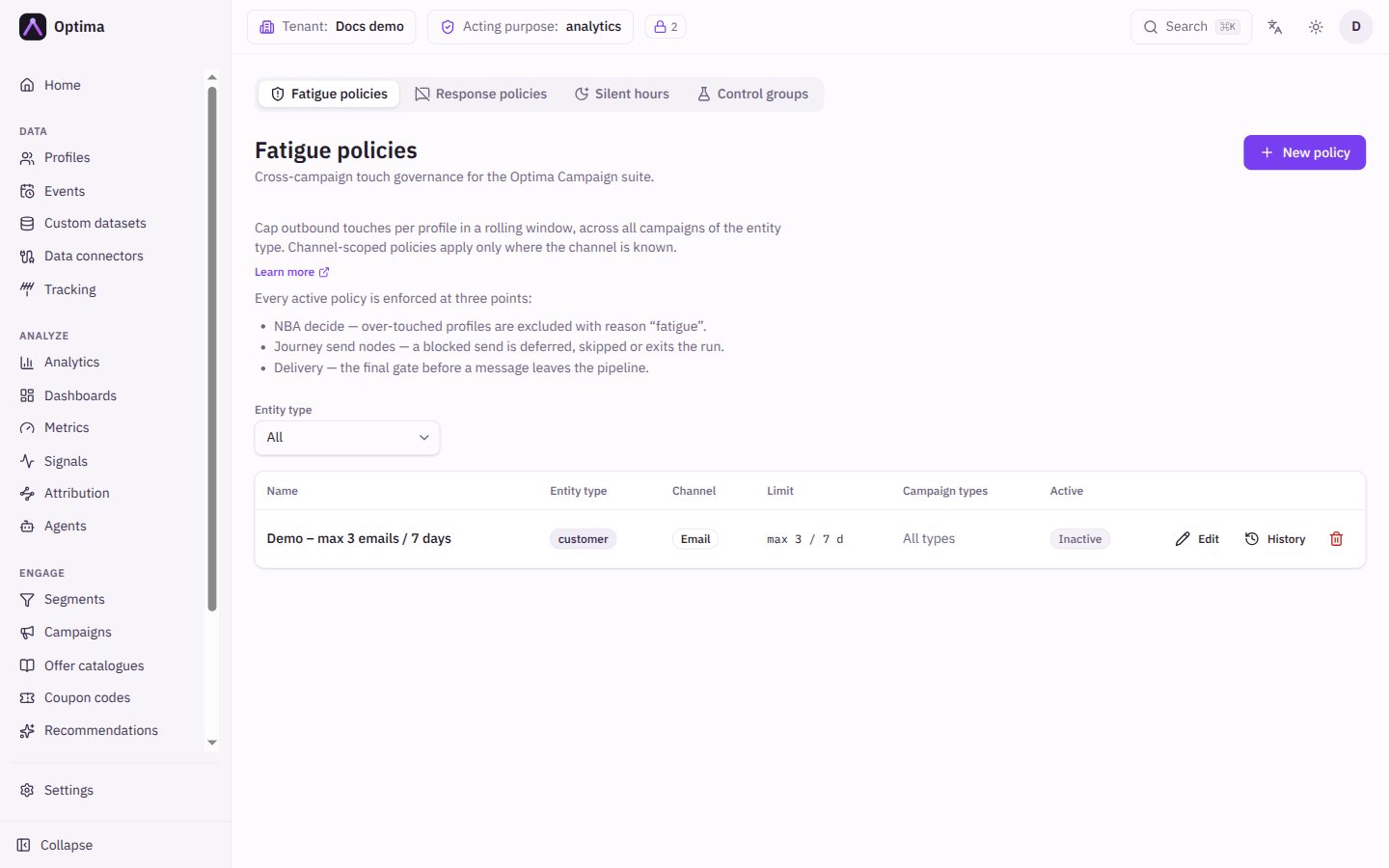
A fatigue policy caps the number of outbound messages one customer can receive in a rolling window of days, counted across every campaign for that kind of profile. Where a frequency cap protects customers inside one campaign, a fatigue policy protects them from all your campaigns added together. Messages are counted per person: profiles linked as the same person share one budget. A policy can cover all channels or just one, and can apply to one customer or to a whole household or account.
Every active policy is enforced at three points:
- Next-best-action decisions. An over-contacted profile is left out of the decision, with the reason Fatigue.
- Journey send steps. A blocked send is delayed, skipped, or ends the profile's run, according to how the step is set up.
- Delivery. The final check before a message leaves Optima.
Messages held back by a control group or withheld by a policy or silent hours are not sent, so they do not count toward Max touches.
Who uses it
Campaign managers who own contact governance. Reading policies needs campaign_viewer or campaign_editor; creating, changing and deleting them needs contact_policy_editor. campaign_admin can do both. You can also use another role your administrator has given access to this area — see Licences and roles. Fatigue policies are part of the Campaign package; if your licence leaves them out, Contact policies is not in the navigation.
Fields
The policy list
Filter by Entity type (default All). Each row shows:
| Column | Meaning |
|---|---|
| Name | The policy name. Select it to edit. |
| Entity type | The kind of profile it governs, or a hierarchy badge with the top entity type for a hierarchy policy. |
| Channel | The one channel it covers, or All channels. |
| Limit | For example max 3 / 7 d: at most 3 messages in 7 days. |
| Campaign types | The campaign types it covers, or All types. |
| Active | Active or Inactive. |
New policy and Edit policy
| Field | Meaning | Valid values | Default |
|---|---|---|---|
| Name | What you call the policy. | Text, for example Global weekly cap | None (required). Must be unique. |
| Scope | Whether the budget belongs to one profile or to a linked group of profiles. A hierarchy policy caps the whole tree of linked profiles, such as a household and everyone below it, and applies to sends to any entity type. | Single profile, Profile hierarchy | Single profile |
| Entity type | For Single profile: the kind of profile the policy governs. | An entity type from your schema | None (required) |
| Anchor entity | For Profile hierarchy: the entity type at the top of the group. Each anchor and all the profiles linked beneath it share one budget. | An entity type from your schema | None (required) |
| Relation types | For Profile hierarchy: which kinds of link make up the group. You can type one that is not in your data yet. | Link types | Empty: every relation type except identity. Add identity to include identity links. |
| Channel | Limits the policy to one channel. A channel-specific policy only counts and blocks messages whose channel is known. | All channels or a channel | All channels |
| Max touches | The most messages one profile (or group) can receive in the window, across all campaigns. | Whole number, 1 or more | 3 |
| Window (days) | How many days back messages are counted. | Whole number, 1 or more | 7 |
| Campaign types | Which kinds of campaign count toward the limit and are blocked by it. With none ticked, all types are covered. Not available for a hierarchy policy, which always covers every type. | One-off batch, Recurring batch, Journey-based, Inbound offer | None ticked (all types) |
| Active | Whether the policy is enforced. | On or off | On |
Actions
- New policy opens the dialog.
- Edit changes a policy. Changes apply immediately.
- History opens the policy's change history, where you see who changed what.
- Delete asks for confirmation and stops the policy from being enforced at once. Campaign and offer frequency caps are not affected.
Examples
One marketing message every three days. Entity type customer, Channel Email, Max touches 2, Window (days) 7. No customer gets more than two emails a week from all campaigns together.
Protect shared household inboxes. Scope Profile hierarchy, Anchor entity household, Relation types left empty, Max touches 4, Window (days) 7. Everyone linked to a household shares one budget of four messages a week.
Leave journeys out of a cap. Tick Recurring batch and One-off batch only, so the cap counts and blocks batch campaigns but never a journey.
Common problems
- A policy with this name already exists. Names are unique. Choose another.
- Max touches and the window must be whole numbers of at least 1. The limit hint under the fields shows what the policy will do once both are valid.
- A channel policy blocks nothing. It only counts and blocks messages whose channel is known.
- A message was blocked but I cannot tell by which policy. For offers, Test decide on an offer catalogue lists the exclusion reason Fatigue.
- A hierarchy policy cannot be narrowed by campaign type. Not available at this scope.