Offer catalogues
Keep shared pools of offers that any campaign can rank, see how each offer performs across campaigns, and test what a profile would be offered.
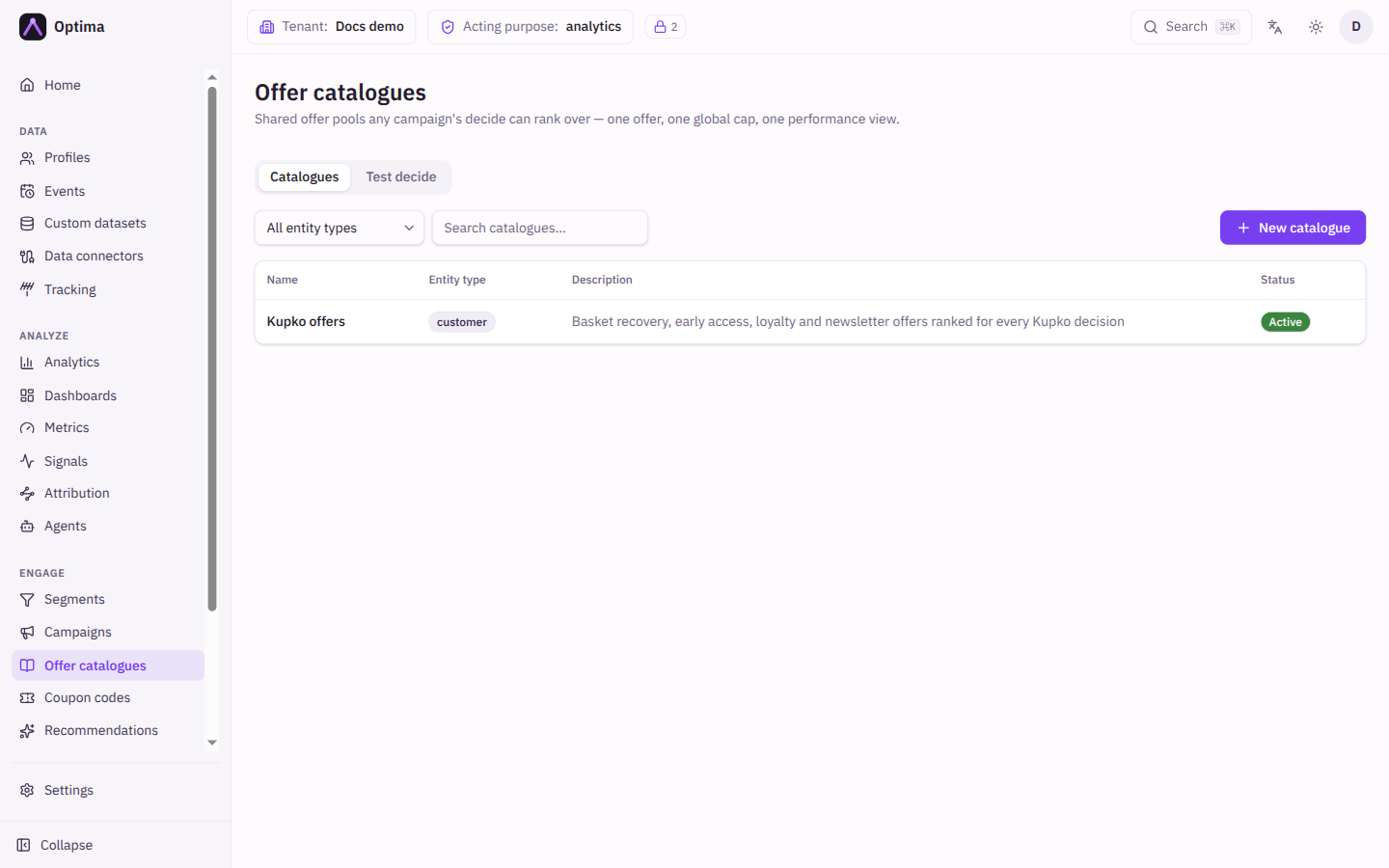
An offer catalogue is a shared pool of offers: a set of discounts, products or messages that more than one campaign can choose from. When a campaign asks for the next best offer for a profile, Optima ranks the offers in the catalogue, drops the ones the profile is not eligible for, and returns the best few. Because the pool is shared, one offer has one cap, one set of rules and one performance view, whichever campaign handed it out. The Offer catalogues screen lists the catalogues, and each catalogue opens on its own page where you manage its offers. A second tab, Test decide, lets you try a catalogue on one profile without involving a campaign.
Who uses it
Campaign managers, who maintain the pools their campaigns rank. Reading needs campaign_viewer; creating and changing catalogues and offers needs campaign_editor. campaign_admin can do both. You can also use another role your administrator has given access to this area — see Licences and roles. Offer catalogues belong to the Decision package, which needs the Campaign package. If your licence does not include them, Offer catalogues is not in the navigation.
Fields
The Catalogues tab
| Field | Meaning | Valid values | Default |
|---|---|---|---|
| Entity type filter | Shows only catalogues for one kind of profile. | All entity types or an entity type from your schema | All entity types |
| Search catalogues… | Finds catalogues by name. | Any text | Empty |
The table shows Name (select it to open the catalogue), Entity type, Description and Status (Active or Inactive). The list is paged, 25 to a page.
New catalogue and Edit catalogue
| Field | Meaning | Valid values | Default |
|---|---|---|---|
| Name | What you call the pool. | Text | None (required) |
| Entity type | The kind of profile the offers are for. Journey decide steps that use the catalogue are checked against it. | An entity type from your schema | None (required). Fixed once the catalogue is created. |
| Description | A note for your colleagues, shown in the list. | Text | Empty |
| Default scoring | How the offers in this pool are ranked when they do not define their own scoring. Offers that do define their own override it; the rest follow it live. | None — each offer scores itself, Signal, Formula | None — each offer scores itself |
| Scoring signal | Shown for Signal. The signal whose current value ranks the offers. | A signal for the entity type | None |
| Scoring formula | Shown for Formula. A formula that returns a number for each profile and offer. | A formula over attributes, signals and context values | None |
| Default offer payload (optional) | The fields offers in this catalogue are expected to carry, as a JSON object. A new offer opens on this shape. Changing it never changes offers that already exist. | A JSON object, for example { "sku": "", "discount_pct": 0 } | Empty |
| Active | Whether the catalogue yields offers. An inactive catalogue returns empty decisions: journeys keep running, but sends that take their offer from it are skipped. | On or off | On |
Choosing one of Signal or Formula clears the other when you save. Signals and formulas are described in Segments, signals and cohorts and Expressions.
The catalogue page
The page header shows the catalogue name, its entity type and status, with Edit and Delete. Below it are three blocks.
Offers lists the offers in the pool, with New offer. A tag filter narrows the list.
| Column | Meaning |
|---|---|
| Name | The offer. Select it to edit. |
| Tags | Labels used to pick a subset of the pool when you ask for offers. |
| Scoring | The signal or formula that ranks the offer. An offer without its own scoring shows the catalogue's, marked inherited. |
| Frequency cap | The offer's global cap, for example 3 per 30d, all campaigns. It counts every time the offer is handed out, in any campaign. |
| Status | Active or Inactive. |
The chart button on an offer row opens Performance of the offer: its touch counts for a window you pick. A warning appears if a limit truncated the result.
Offer responses shows what customers answered about each offer in the pool, across every campaign that used it. You pick a window and an offer, and open any count to see the individual answers. Answers recorded while testing from the console are marked and can be included or left out.
Used by lists the live journeys whose decide step ranks this catalogue and the campaigns that name it as their default offer source. A catalogue that appears here cannot be deleted.
New offer and Edit offer
| Field | Meaning | Valid values | Default |
|---|---|---|---|
| Name | What you call the offer. | Text | None (required) |
| Entity type | Shown, not editable: the catalogue's entity type. | n/a | The catalogue's |
| Eligibility segment | Only members of this segment can be offered this. | A segment of the entity type, or none | None |
| Eligibility conditions | Extra conditions checked live every time offers are chosen, built the same way as a segment. Leave empty for no condition. | A filter on attributes, events, signals, cohorts and linked data | Empty |
| Advanced: expression (Eligibility expression) | A true or false expression for conditions the builder cannot express. An error while checking excludes the offer. | An expression over attributes, signals, context values and the profile id | Empty |
| Ranking by | How the offer is scored. | Inherit from catalogue (offered only when the catalogue has scoring), Signal value, Formula | Inherit from catalogue when the catalogue has scoring, otherwise Signal value |
| Score signal / Score formula | The signal or formula behind the ranking. A missing signal value scores 0. A formula that fails scores 0 and does not exclude the offer. | A signal, or a formula that returns a number | None |
| Priority | A manual tie-break when two offers score the same. Higher wins. | Whole number | 0 |
| Tags | Labels. A request that asks for tags only gets offers carrying all of them. | Free text tags | None |
| Consent purpose | The purpose the customer must have agreed to before this offer is used. It overrides the campaign's purpose. A purpose written with the channel placeholder expands to the channel actually used. | A purpose, or None | None |
| Payload (JSON) | The offer's content, such as a SKU, copy or discount. It is merged into the data your message templates can use. Pre-filled from the catalogue's default payload. | A JSON object | The catalogue's default payload |
| Max touches per profile (under Frequency cap) | The most times this offer is handed out to one profile within the window, across all campaigns. | Whole number, 1 or more, or empty for unlimited | Empty |
| Max per channel | The most any single channel may contribute to the total. It applies when the channel is known, which is why Intended channel matters on Test decide. | Whole number, 1 or more, not above the total, or empty | Empty |
| Window (days) | How far back hand-outs are counted. Required once you set a limit. | Whole number, 1 or more | Empty |
| Response rules | Stop offering this once the customer has answered it often enough, for example rejected it twice in 30 days. A rejection here suppresses the offer in every campaign. | Up to 10 rules. Each rule is a response (Presented, Accepted, Postponed, Rejected, Realized), a count of at least 1, and either a number of days or all time | No rules |
| Active | Whether the offer can be returned. | On or off | On |
The Test decide tab
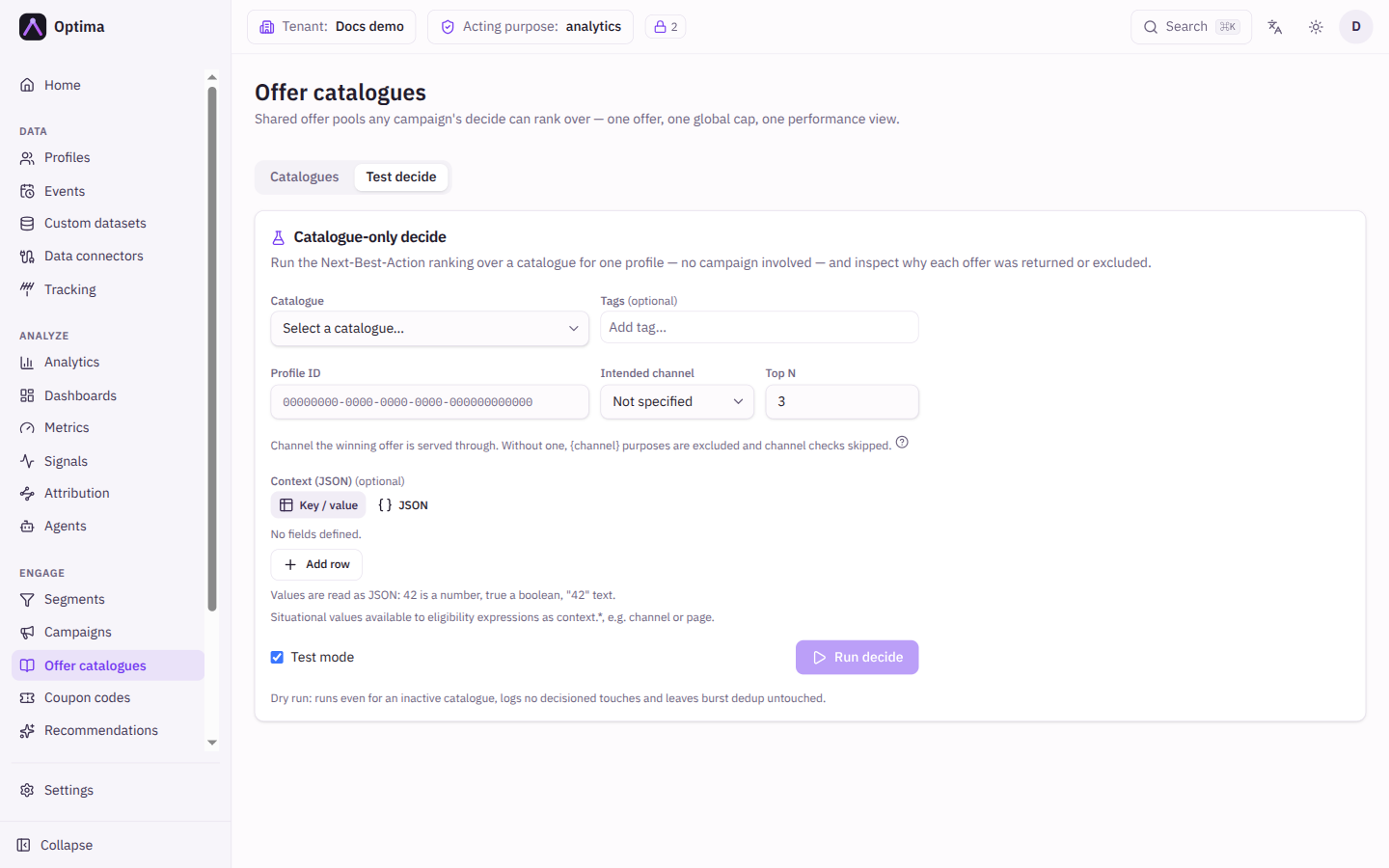
Catalogue-only decide runs the next-best-action ranking over one catalogue for one profile, with no campaign involved, and explains why each offer was returned or left out.
| Field | Meaning | Valid values | Default |
|---|---|---|---|
| Catalogue | The pool to rank. | An active or inactive catalogue | None |
| Offer tags (optional) | Only offers carrying all of these tags are considered. | Tags | None |
| Profile ID | The profile to decide for. | The id of a profile of the catalogue's entity type | None (required) |
| Intended channel | The channel you plan to send the winning offer on. It decides which channel-specific consent purposes, fatigue policies and caps apply. Without one, channel-specific purposes are treated as not allowed and channel-specific checks are skipped. | Not specified or a channel | Not specified |
| Top N | How many offers to return. | 1 to 50 | 3 |
| Context (JSON) (optional) | Situational values, such as {"channel": "web", "page": "/cart"}, that eligibility expressions can read as context.channel. | A JSON object | Empty |
| Test mode | A dry run: the full pipeline executes, even on an inactive catalogue, but no hand-outs are recorded and nothing counts against caps. | On or off | On |
Run decide shows Ranked offers with each offer's Score, NBA ID and Payload, then Excluded offers with a Reason and Detail for each. The usual reasons are Not in eligibility segment, Does not match eligibility conditions, Eligibility expression false, Eligibility expression error, Consent denied, Frequency capped, Already answered, Enough offers answered, Burst dedup, Fatigue, Control group and Ranked below top N. Other reasons can appear for situations the console does not label, for example a score that could not be computed.
With Test mode off, the winning offers are really handed out to that profile. They count against the offers' global caps and can suppress later offers.
Actions
- New catalogue creates an empty pool. Fill it with New offer on the catalogue page.
- Edit on a catalogue changes everything except its entity type.
- Delete on a catalogue is refused while a live journey ranks it, a campaign uses it as its default offer source, or it still contains offers. Remove those first.
- The chart icon on an offer row opens Performance of the offer: a funnel from handed out to realized over the last 7, 30 or 90 days, with a breakdown By deciding campaign.
- Deleting an offer makes journeys that rank the catalogue stop seeing it. Past hand-outs keep their history.
- Run decide on the Test decide tab. For a hand-out that is not a test, the NBA ID is the handle you report the customer's answer against through the API (see the API reference).
Examples
A welcome-offer pool. Create a catalogue Welcome offers for the entity type customer, with Default scoring set to Signal and a signal such as predicted_affinity. Add three offers with different payloads. Offers that define no scoring follow the signal, so changing the signal on the catalogue re-ranks all of them at once.
Cap an offer across campaigns. Open the offer and set its frequency cap to 2 per 30 days. A profile who has been handed the offer twice in 30 days, in any campaign, no longer gets it; Test decide shows the reason Frequency capped.
Check a customer complaint. Use Test decide with the profile id and test mode on. The Excluded offers table shows why an offer the customer expected was not returned.
Common problems
- The catalogue cannot be deleted. Look at Used by and at the offers list. A live journey, a campaign default or any remaining offer blocks the delete.
- A decide returns no offers. The catalogue may be Inactive, or every offer was excluded. Run Test decide and read the reasons.
- Decide says the catalogue is not active. Turn on Test mode to dry-run an inactive catalogue, or make the catalogue active.
- Catalogue or profile not found. The profile id is wrong, or the profile has been erased.
- The default payload change did not reach my offers. It only shapes new offers. Edit existing offers one by one.
- An offer is ranked 0. Its signal has no value for that profile, or its formula failed. A missing score counts as 0, which does not remove the offer.