Silent hours
Define the times when campaign messages must not be delivered, for the whole environment and for individual channels.
Silent hours are the times when no campaign message may reach a customer: overnight, at weekends, on public holidays. The check happens at the last moment before a message is sent. A message queued at 19:55 that reaches the front of the queue at 20:05 is held until the next allowed time. On this screen you set the environment-wide rules, and you can give individual channels their own.
Silent hours can be refined further. A campaign can override these settings, and a journey send step can override its campaign. The most specific setting wins and replaces the less specific one completely; settings are never merged. The order is:
- The journey send step.
- The campaign.
- The channel's own entry on this screen.
- General on this screen.
On-site channels (web banner, web personalization, in-app) are exempt, because they only show while the person is already visiting. Transactional platform emails, such as password resets, are not campaign sends and are not affected.
Who uses it
Campaign managers who own contact governance. Reading needs campaign_viewer or campaign_editor; saving changes needs contact_policy_editor. campaign_admin can do both. You can also use another role your administrator has given access to this area — see Licences and roles. Silent hours need the Campaign package and the silent hours feature.
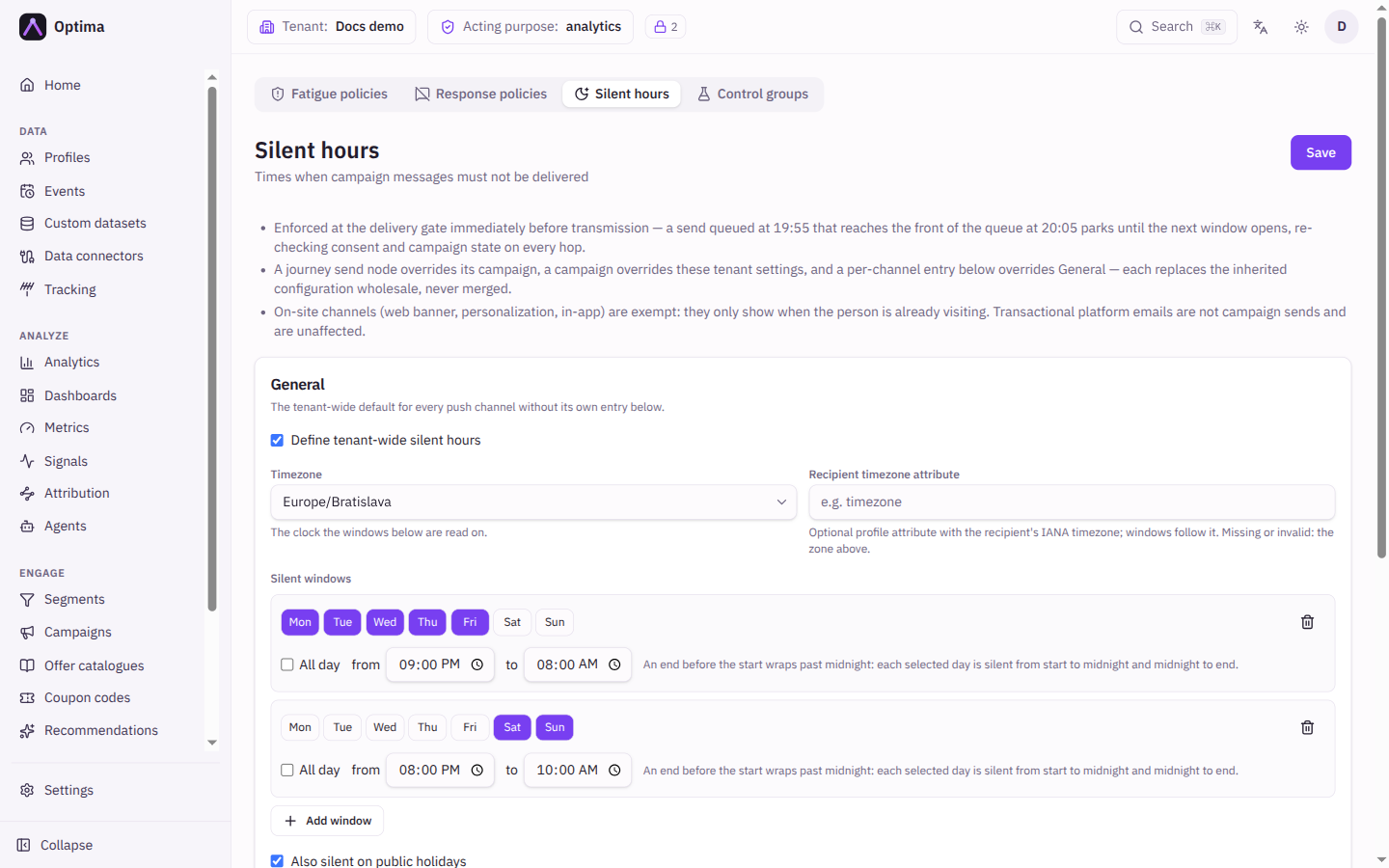
Fields
There is one Save button for the whole screen. Below the cards, Last saved shows when and by whom.
General
Tick Define tenant-wide silent hours to switch the default on. It applies to every message channel that has no entry of its own. Ticking it fills in a starting point: silent from 20:00 to 08:00 every day, and all day on Saturday and Sunday, in your time zone. Unticking it removes the default. Mon–Fri 20:00–08:00 leaves Saturday 00:00–08:00 open; add a Saturday window (or keep the default all-day weekend) to cover it.
| Field | Meaning | Valid values | Default |
|---|---|---|---|
| Timezone | The clock the windows are read on. | A time zone such as Europe/Bratislava | Your own time zone |
| Recipient timezone attribute | Optional. A profile attribute holding each customer's own time zone, so the windows follow their local clock. A missing or invalid value falls back to Timezone. | The name of an attribute, for example timezone, holding a time zone name | Empty |
| Silent windows | The weekly times that are off limits. Each window has a set of days and either All day or a from and to time. An end before the start wraps past midnight: silent from the start to midnight and from midnight to the end. | Days Mon to Sun (at least one), times in 24-hour format | The two windows above |
| Also silent on public holidays | Adds the public holidays of one country. | On or off | Off |
| Country | Shown when holidays are on. | A country from the list | The first country in the list |
| Include observed dates | Also covers holidays moved to a weekday, such as a Saturday holiday observed on Friday, where the country does that. | On or off | On when you switch holidays on |
| Max wait (hours) | How long a queued message may wait for the silent time to end. | Whole number of hours. 0 or empty waits for as long as it takes. | Empty |
| When the wait runs out | What happens to a message that has waited too long. Drop the send fails it and records it as expired. It is never counted as a contact. Send late, despite the window delivers it anyway and marks it as sent after expiry. | Drop the send (default), Send late, despite the window | Drop the send (default) |
Add window adds a window and Remove window removes one. If no weekly windows are set, only the holiday rule (when on) silences anything.
Per-channel overrides
Pick a Channel. The line under the picker lists the channels that have their own entry. Each channel has a three-way choice:
| Choice | Meaning |
|---|---|
| Inherit | The channel follows General. |
| Off — send at any hour | The channel is never silenced. |
| Custom | The channel uses its own windows, with the same fields as General. It replaces General for this channel only. |
Channels your organisation has added to the environment are listed too. If a channel is no longer available but an override for it is still stored, set it back to Inherit and save to remove it; the save is refused while the stale entry remains.
Actions
- Save stores General and every channel entry in one step.
- Nothing is saved until you press Save; leaving the screen discards edits.
Examples
No overnight SMS, email until 22:00. Leave General off. Under Per-channel overrides, give SMS a Custom window from 18:00 to 08:00 every day, and Email a window from 22:00 to 07:00.
Quiet weekends and holidays. In General, keep the Saturday and Sunday All day window, tick Also silent on public holidays and choose your country. Mon–Fri 20:00–08:00 leaves Saturday 00:00–08:00 open; add a Saturday window (or keep the default all-day weekend) to cover it.
Respect customers' local time. Fill Recipient timezone attribute with the attribute that holds each customer's zone, so a customer in Lisbon is not woken by a message sent from a Bratislava evening.
Common problems
- A message did not go out at the expected time. It was held. Check Max wait: after it runs out, the message is dropped or sent late according to When the wait runs out.
- A campaign ignores my settings. The campaign has its own silent hours (Custom or Off). Check the campaign's Delivery block, and any send step in its journeys.
- The save is refused. A window is invalid, for example an unknown holiday country, a window silent around the clock, or a stale channel entry that must go back to Inherit. The message names the problem.
- Web banners still appear at night. On-site channels are exempt by design.