Change history
See who changed which campaign, journey, template, segment or policy and when, read what changed, and restore an earlier version.
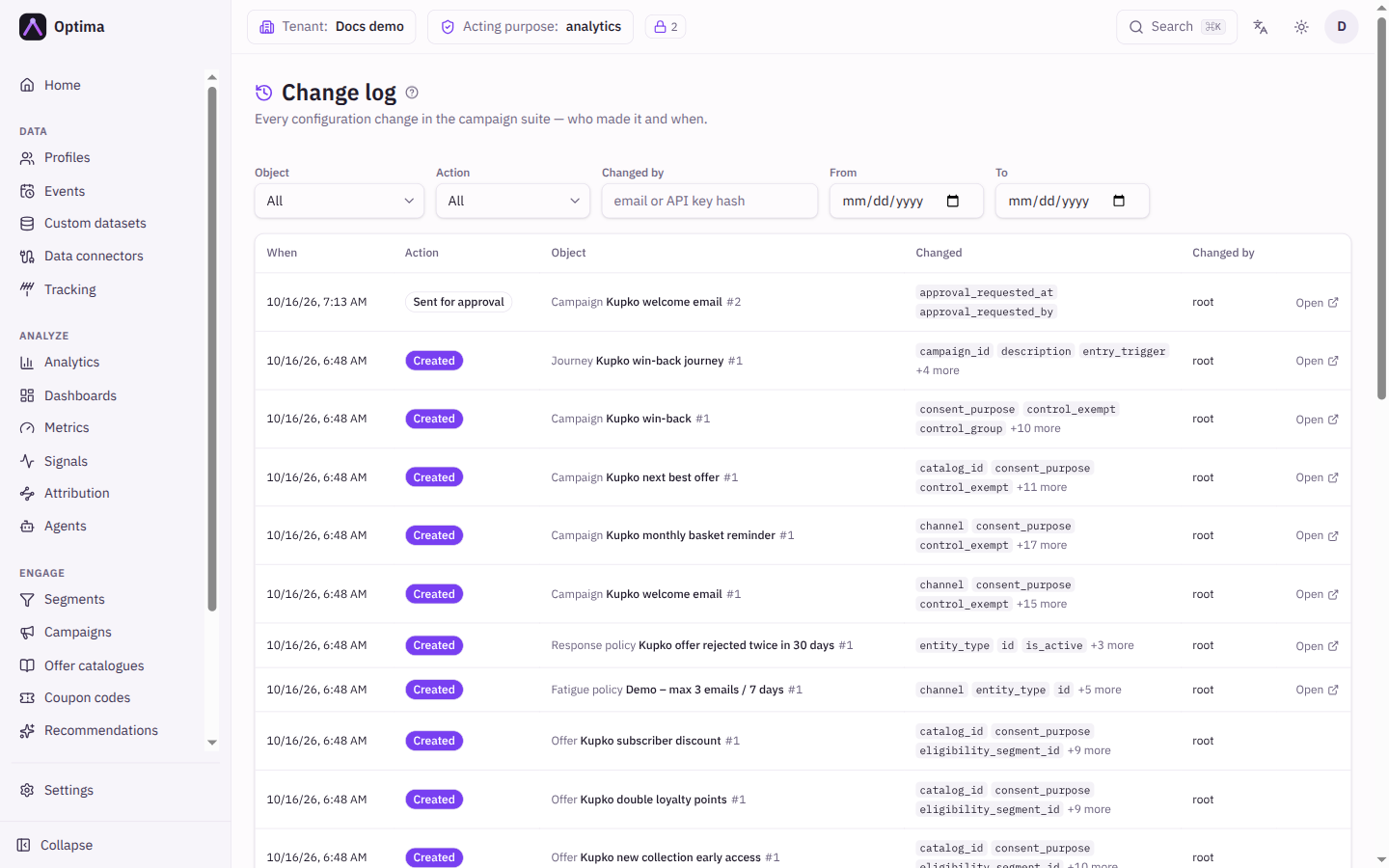
Every change to the campaign suite's configuration is recorded: who made it, when, what it changed, and what the object looked like afterwards. The Change log screen is the audit view across everything. A Change history card on each campaign, segment, journey and other object shows the same record for that one object, and is where you restore an earlier version.
Who uses it
Campaign managers use it to understand why a campaign behaves as it does and to undo a mistake. Auditors use the Change log to review who changed what. Reading needs campaign_viewer or auditor, or another role your administrator has given access to this area — see Licences and roles. Restoring a version needs the role that can edit the object, for example campaign_editor for a campaign. The Change log belongs to the Campaign package.
The record covers campaigns, offers and offer catalogues, journeys, message templates, segments, fatigue policies, response policies, documents and coupon code pools. It does not cover profiles, the data model, connectors, consent purposes, the team or API keys, and content items keep their own history.
Fields
Change log filters
| Field | Meaning | Valid values | Default |
|---|---|---|---|
| Object | Shows one kind of object. | All, Campaign, Offer, Offer catalogue, Journey, Template, Segment, Fatigue policy, Response policy, Document, Code pool | All |
| Action | Shows one kind of change. | All, Created, Edited, Deleted, Activated, Paused, Restored, Archived, Restored from archive, Sent for approval, Approved, Rejected, Stopped automatically, Approval cleared by an edit, Reopened | All |
| Changed by | Shows changes by one person or key. | An email address, or a key's identifier | Empty |
| From, To | Limits the time range. | Dates | Empty |
Change log table
| Column | Meaning |
|---|---|
| When | When the change was made. |
| Action | What kind of change it was. |
| Object | Which object, with its type and name. Select it to open the object, where you can restore it. |
| Changed | The fields that changed, as short summaries such as the old and new value. |
| Changed by | Who made the change: a person, or an API key. |
The log is paged, newest first. If nothing matches, No changes match these filters appears.
Change history card
| Column | Meaning |
|---|---|
| # | The revision number. |
| Action | What kind of change it was. A restored revision shows which revision it came from. |
| Object | On a campaign's combined view: the type of object that changed. |
| Changed | The fields that changed. |
| Changed by, When | Who and when. |
On a campaign, History scope switches between This campaign only and Campaign + offers & journeys, which shows everything that happened in the campaign's tree. Filter by action narrows either view.
Actions
- View opens the revision: What changed, field by field (set to a new value, or cleared, was the old one), and Configuration after this change, the full object as it was then. A deletion has no configuration after it.
- Restore (on a revision that is neither the current one nor a deletion) opens a confirmation. The configuration as it was in that revision is applied as a new change. Nothing is lost: the current version stays in the history.
- The history of a deleted object is kept, but it can no longer be restored. Create it again from the snapshot instead.
What a restore does
- It is validated like any edit, so it is refused if something it refers to no longer exists.
- A campaign's status is not touched. An active campaign stays active and a paused one stays paused.
- A journey's version moves forward, so profiles already inside keep running the version they entered on.
- Because a restore is an edit, it clears the standing approval of any campaign it changes. See Approvals.
Examples
Why did this campaign stop sending? Open the campaign, Change history, set History scope to Campaign + offers & journeys, and read the latest rows. Stopped automatically says a stop condition was met, and its actor shows as the system rather than a person; Paused says who paused it.
Who edited the welcome template? In the Change log, set Object to Template and Changed by to a colleague's email, and read Changed.
Undo a bad edit to a journey. Open the journey, choose History from More actions, select View on the version before the edit, and then Restore. The journey is saved as a new version.
Common problems
- There is no Restore button on a row. It is the current version, a deletion, or you lack write access to that object.
- A restore was refused. The old configuration refers to something that has been removed, such as a deleted template or segment. Fix that, or edit by hand.
- I cannot find a change to a user or a connector. The Change log covers the campaign suite only.
- A change says Approval cleared by an edit. Someone edited something the campaign sends through. See Approvals.