Journey runs
See where every profile is in a journey, find one customer's runs, end a run, enter profiles by hand and conclude a winner test.
A run is one profile's trip through a journey. The runs monitor lists them live: who is at which step, who is waiting, and who finished or failed. Use it to find out why a customer received nothing, to check that a new journey is enrolling people, to end a run that should not continue, and to enrol test profiles by hand.
Who uses it
Campaign managers, during and after a journey launch. Reading runs needs campaign_viewer. Exit on a run and Enter journey need campaign_editor, or another role your administrator has given access to this area — see Licences and roles. The screen belongs to the Campaign package. Open it from the Runs link on the campaign's Journeys card, or from More actions in the journey editor.
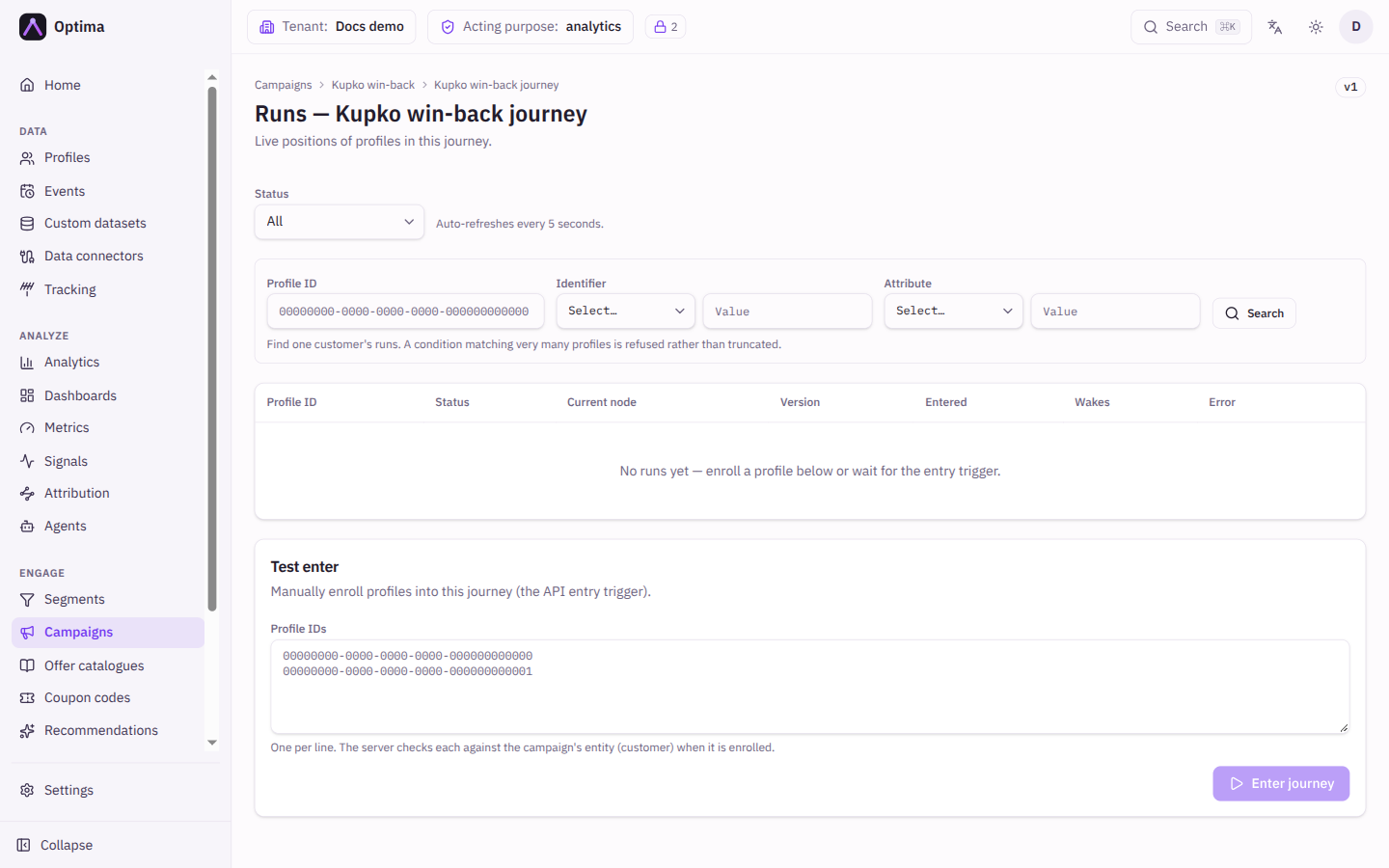
Fields
Filters
The list refreshes every 5 seconds.
| Field | Meaning | Valid values | Default |
|---|---|---|---|
| Status | Shows runs in one state. | All, Running, Waiting, Completed, Exited, Failed | All |
| Profile ID | Finds the runs of one profile. | A profile id | Empty |
| Identifier | Finds the runs of the customer who has a given identifier, such as an email address. | An identifier of the entity type, and its value | Empty |
| Attribute | Finds the runs of customers with a given attribute value. A condition that matches very many profiles is refused rather than cut short. | An attribute of the entity type, and a value | Empty |
Select Search to apply the profile filters and Clear to remove them.
The runs table
| Column | Meaning |
|---|---|
| Profile ID | The profile, shortened. Select it to open Run detail. A parallel branch shows branch with the step it started from; the pointer shows the run it branched from. |
| Status | Running (executing now), Waiting (parked until a time or an event), Completed (reached an exit), Exited (ended early, by you, by a stop condition, by fatigue, or because the customer was erased from the CDP, in which case the run shows the error "profile no longer exists in CDP"), Failed. |
| Current node | The step the run is at. |
| Version | The journey version the run entered on. Runs keep their version when the journey is edited. |
| Entered | When the run started. |
| Wakes | When a waiting run will move on. |
| Error | Why a run failed. |
Above the table, Split distribution counts the arms the runs on this page took at each split.
Run detail
Opens from a row. It shows the Run ID, entity type, Status, Current node, Version, Entered, Wakes, Finished, Updated, any Error, and the run's State: the values earlier steps stored, such as the winning offer or the answer of a call to another system.
Actions
- Exit (on a live row) ends the run at its current node after you confirm. It will not resume. The customer receives nothing more from this journey.
- Test enter enrols profiles by hand, the same as the API entry trigger. Paste one profile ID per line under Profile IDs; the server decides each one when you enrol it, so every outcome below comes from the server. A counter shows how many will enter, how many duplicates were ignored and how many lines are not profile IDs. Enter journey shows the outcome for every profile.
| Outcome | Meaning |
|---|---|
| Entered | A run was created. |
| Already in, or in cooldown | The customer already has a live run, or the re-entry cooldown blocks them. |
| Refused | The server declined the profile and gives the reason, for example an unknown ID or a profile of another entity type than the campaign. The row reads No such profile or Entity … (the entity type that does not match); hover it to see the server's full message. |
| Failed | Something went wrong for that profile. If the customer data service could not be reached for the profile check, no run was created: try again. If the message says the check is not permitted for the campaign service, retrying will not help: ask your administrator to check the Campaign service's access. |
- Winner tests appears when the journey has a split running a winner test. It shows each test's status (collecting, decided, inconclusive), the winner, when it will decide or did, and No conversions recorded yet until there is evidence. Decide now concludes it early after you confirm. See Split node.
Examples
Check a new journey is enrolling. Filter Status to Waiting. A growing list with sensible Wakes times is healthy.
Find out why Anna got nothing. Under Identifier choose email and enter her address, then select Search. Her run's Current node and Error say where it stopped. No run means she never entered: check the trigger, the segment and the re-entry cooldown.
Try a journey before it goes live. Use the API trigger on a copy of the journey, paste the IDs of two internal test profiles into Test enter, and follow them through the list.
Common problems
- No runs yet. Enrol a profile below or wait for the entry trigger. Check that the campaign and the journey are both Active.
- Enter journey says Blocked. The campaign or journey is not accepting entries. The message names the reason.
- A search is refused. The attribute condition matches too many profiles. Narrow it, or search by identifier or profile ID.
- A run is Failed. The Error column and Run detail name the failing step. A call to another system that was refused, or a template that could not be built for that profile, are common causes.
- A run keeps its old version after I edited the journey. That is intended: runs finish the version they entered on.